Backups and Disaster Recovery
Velociraptor does not provide a true High Availability (HA) configuration option. There is no built-in way to run multiple active servers that can take over automatically if one fails. Running several servers is possible through the multi-frontend deployment model, but that is for horizontal scaling rather than high availability. Instead, disaster recovery relies on backups and restores, which involve some downtime while a replacement server is brought up.
For most deployments this is not a problem. Velociraptor is typically used for digital forensics and incident response, where a short outage is acceptable. When the server is unavailable, clients simply buffer their collected data locally and upload it once the server comes back, so no data is lost.
This page discusses the different mechanisms and approaches used for backup and disaster recovery. By thinking carefully about what you want to get out of a backup solution, what data you want to protect, and how quickly you want it restored, you can make a more informed decision about which strategy works best for your deployment.
The right approach depends on exactly what data you choose to back up and what the restoration end goal is. The Velociraptor datastore can grow very large, with most of the disk usage consisting of data that can be recollected from clients if necessary. In some deployments backing up this data might be considered unnecessary, and so a restore would amount to restoring the server’s operational state and then recollecting the data from endpoints. If backing up the entire datastore is justified in your deployment scenario - or even going as far as periodically backing up the entire server - then restores can be more comprehensive (while also potentially taking considerably longer).
Simplest option: Re-deploy server
What if the Velociraptor server is suddenly completely gone? How can it be recovered?
The most difficult part of a Velociraptor deployment is the client deployment. This usually involves pushing packages to endpoints, such as an MSI or Debian/RPM packages. The process usually involves change management, approvals etc. These processes take time and so it is undesirable to have to re-deploy clients.
The client ID is actually a property of the clients themselves. The
Velociraptor Client ID is derived from the client’s cryptographic key
and so it is not managed by the server at all - instead it is stored
on the clients in their writeback file. Additionally, client
registration (or enrollment in Velociraptor terminology), is done
automatically the first time the client is seen by the server.
So if the Velociraptor server is suddenly gone, the server package can be redeployed onto a new server and everything should work again:
-
Provision a new server VM or physical machine
-
Install the same server Debian package (which contains the same key material and configuration files).
-
Update DNS records to point to the new server IP. The clients will use these DNS records to find the new server.
-
After a short time, all clients will re-enroll and the system will become functional again.
Requirements
For a successful recovery the following are required:
-
A backup of the server Debian/RPM package last used to upgrade the server (this will contain the server configuration file).
-
A backup of the server configuration file if it was updated since the last package upgrade.
-
A DNS record for the public interface of the server - this allows the server to be redeployed to a new IP address easily.
Backing up the server configuration
The single most important thing to back up in any Velociraptor
deployment is the server configuration file (server.config.yaml).
Without it you cannot bring a replacement server online that your
already-deployed clients will talk to.
Because client IDs and their keys are stored on each client rather than
on the server, clients can re-enroll with any server they find at their
configured DNS name (see Re-deploy server).
So as long as you have a copy of server.config.yaml, you can stand up
a new server with it and existing clients will connect back without
being redeployed.
The installer package itself is therefore a form of minimal backup.
When you build a server package with velociraptor deb or
velociraptor rpm, that package embeds the server.config.yaml used
to build it and installs it to /etc/velociraptor/server.config.yaml.
Keeping a copy of the package you last used to install or upgrade the
server gives you a recoverable configuration even if you lose
everything else.
Daily backups do not include server.config.yaml, so keep your own
copy of it somewhere safe - ideally under version control and offline,
since it contains your CA keys and other secrets.
Daily server backups
While deploying a new server gets the system operational again, it is not enough:
- Custom artifacts are not restored
- Existing hunts are not recovered
- All collected data from clients are lost
- Labels on existing clients are lost
- User accounts and ACLs are lost
- Multi-tenanted orgs are lost
To address some of these issues, Velociraptor creates a backup package
automatically on a schedule. By default this runs daily, but you can
change the interval in your server config using the
defaults.backup_period_seconds
setting, which is measured in seconds. For example, setting it to
43200 creates a backup every 12 hours. Setting it to a negative value
disables automatic backups entirely.
You can also create a backup on demand using the VQL
backup() function, which requires
SERVER_ADMIN permission:
SELECT * FROM backup(name="MyBackup")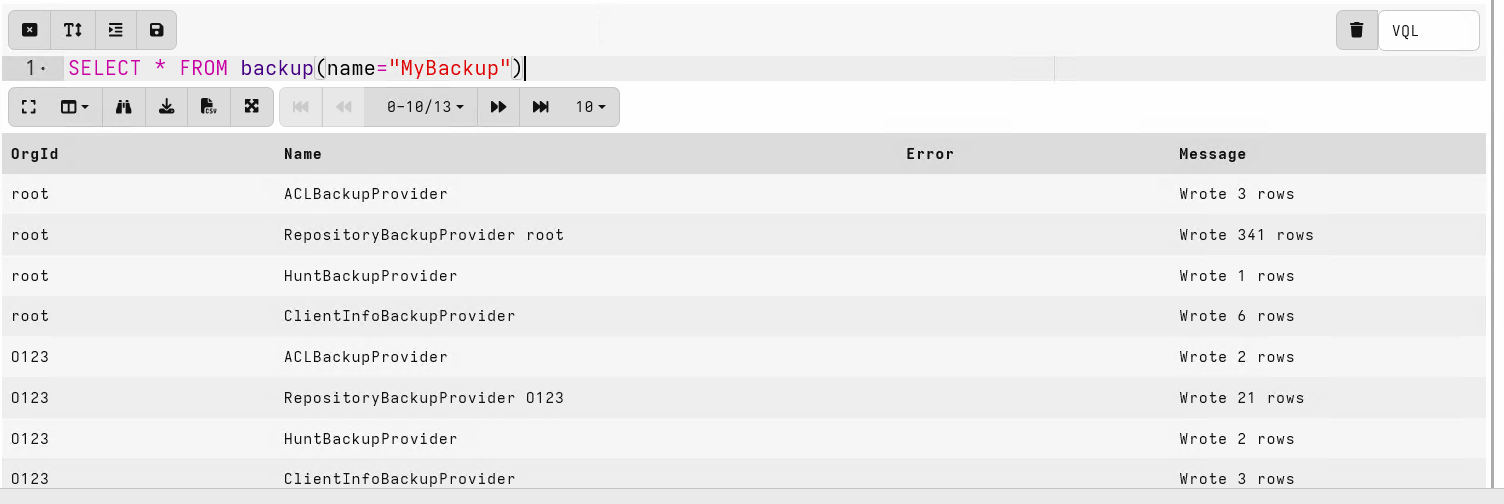
The backup() function is not limited to manual use - you can call it
from any server-side VQL, which makes it possible to back up
conditionally. For example, you could write a
server monitoring artifact
that creates a backup only when some condition is met, such as a
particular time of day, a certain number of new clients enrolling, or
any other trigger you decide is a good reason to take a backup. The
following query shows the pattern: it checks every minute and creates a
backup when the clock matches a configured time.
LET schedule = SELECT
     UTC.String AS Now,
     Weekday.String AS Today
FROM clock(period=60)
WHERE Now =~ ScheduleTimeRegex + ":[0-9][0-9]"
  AND Today =~ ScheduleDayRegex

SELECT backup(name="MyBackup") FROM schedule
If you do not create backups manually, you can still find the scheduled
packages in the backup directory <filestore>/backups/. Note that the
backup package in the root org will contain all other orgs’ backups as
well.
The backup package contains data from various
Providers. Each provider is responsible for saving some aspect of
the server’s configuration. To keep the size down, providers do not
save bulky items like collected data, rather only metadata is stored
about the server.
For example, the hunts are saved, but not the list of clients that have already provided results to the hunt (since the associated collection data is not backed up). This means that when restoring the backup on a new server, clients will participate in existing hunts again.
The current backup providers are:
ACLBackupProviderClientInfoBackupProviderHuntBackupProviderNotebookBackupProviderRepositoryBackupProvider
The RepositoryBackupProvider saves custom artifacts, so any
artifacts you have created or uploaded are restored along with the
rest of the server state. Built-in artifacts do not need to be backed
up as they ship with Velociraptor itself.
Client labels are also saved as part of the client information, so they are restored along with the rest of the server state.
Restoring a daily backup
The server configuration is not part of the backup
Daily backups contain server state, but not the server configuration file itself. Keep a copy of your server config separately so you can fully recover a deployment.
To restore the backup, you must copy the backup file into the backups
directory on the new server (create the directory if it does not
exist). Then run backup_restore(), referring to the backup by name
without the .zip extension:
SELECT * FROM backup_restore(name="MyBackup")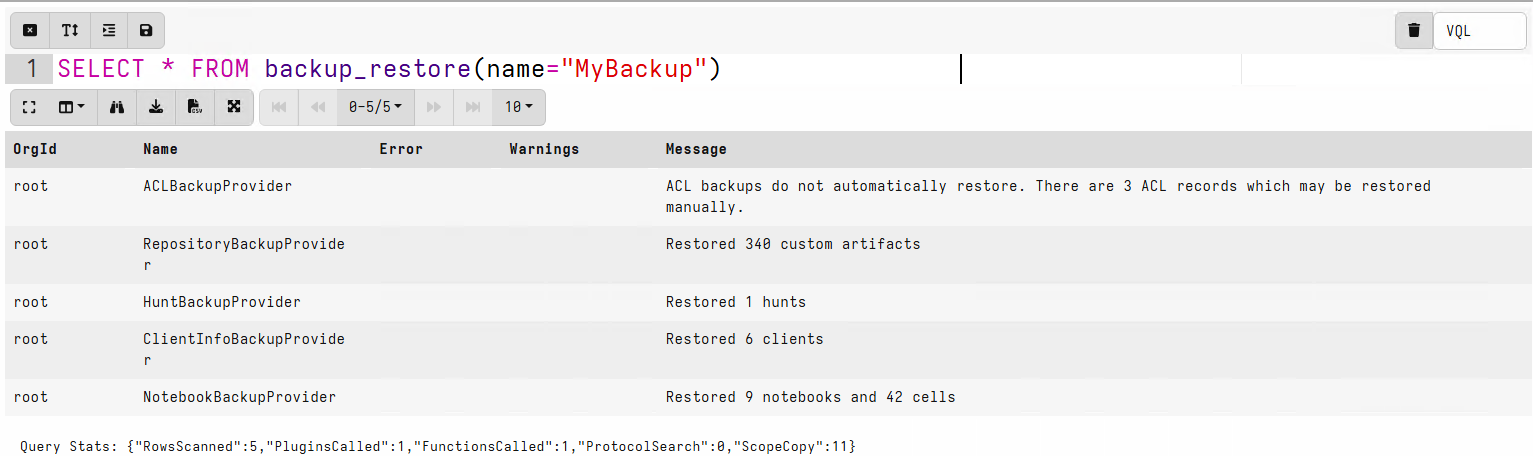
To find the most recent backup, list the backups directory and take the latest entry:
SELECT Name FROM glob(globs="/backups/*", accessor="fs")
ORDER BY Name DESC LIMIT 1
No service restart is required after restoring a backup.
Restoring rolls back server state
Restoring a backup restores the server state to what it was when the backup was taken. What this means depends on whether you restore onto an existing server or onto a newly built one.
When restoring onto a new (rebuilt) server, the backup only contains data that existed when it was created. Anything created since then - such as new clients, hunts, or notebooks - will not be present on the restored server.
When restoring onto an existing server using backup_restore(),
the restore generally only adds objects from the backup rather than
deleting current ones. Hunts, notebooks, and custom artifacts that
exist on the server but not in the backup are left in place. The main
exception is client information: restoring replaces the entire client
store with only what is in the backup, so clients registered since the
backup was taken are removed.
Backups always include the data from all Providers, but when restoring
you can choose a subset that you want to restore using the
backup_restore()
providers parameter. Because the root org’s backup contains every
other org’s backup, you can also use the prefix parameter to restore
only a specific org’s data from the combined file.
Note that ACL records are not automatically restored for security reasons. However you can restore them from the backup data in a Velociraptor notebook, after carefully reviewing the data. For example, this VQL would restore the users and ACLs for a specific org:
SELECT
    user_create(
      user=Principal.name,
      orgs=Principal.orgs[0].id,
      roles=Policy.roles),
    user_grant(
      user=Principal.name,
      orgs=Principal.orgs[0].id,
      policy=Policy)
FROM parse_jsonl(
      filename="/tmp/extracted_backups/orgs/O123/acls.json")
Backing up collected data
The data collected from endpoints is typically much larger and can take a while to back up. Deciding if you need that data backed up depends on how you use Velociraptor.
Since Velociraptor is typically used to respond to incidents, the data collected is typically only useful for a short time. Velociraptor can capture a snapshot of the state of endpoints, but this data may not be relevant months or weeks later since the state of the endpoints evolve over time.
In some situations it is desirable to preserve the data collected from the endpoint:
-
To preserve evidence of compromise. This is needed to support further actions, such as disclosure or legal procedures.
-
As provenance or audit of the actions taken, what was found and justifications of further actions.
In these use cases it is important to ensure that the data is readable outside of Velociraptor itself. For example sharing collections as generic Zip files containing CSV or JSON files is preferable to files that can only be viewed in Velociraptor.
Therefore, Data Export capability is needed from Velociraptor. This is generated using the create_flow_download() and create_hunt_download() plugins. Those plugins are the equivalent of the Download Results option in the Velociraptor GUI.
-
An export ZIP of a hunt contains all the data collected for that hunt by each client that participated.
-
An export ZIP of a collection contains all the files collected by the specific client.
For example, to archive all hunts you could use a query like:
SELECT create_hunt_download(hunt_id=hunt_id, wait=TRUE)
FROM hunts()
The VQL function create_hunt_download() will return the filestore
path you can use to read the file (with the fs accessor).
You can also upload those files to, for example, an S3 bucket:
SELECT upload_s3(secret="S3Token",
                 accessor="fs",
                 file=create_hunt_download(
                     hunt_id=hunt_id, wait=TRUE))
FROM hunts()
This approach is fairly selective as you can add and remove interesting collections from certain hunts using the GUI - so in a real investigation the hunts can serve as a staging container for interesting collections.
To export specific collections, use the
create_flow_download() function. For example to export all
collections on the server completed in the past week:
LET OneWeek <= 7 * 24 * 60 * 60
LET DestDir <= "/tmp/exports/"

SELECT client_id,
       session_id,
       LastActiveTime,
       copy(filename=Export,
            accessor="fs",
            dest=DestDir + Export.Base) AS Export
FROM foreach(row={
  SELECT * FROM clients()
}, query={
  SELECT *, timestamp(epoch=active_time) AS LastActiveTime,
         create_flow_download(client_id=client_id,
                            flow_id=session_id,
                            wait=TRUE) AS Export
  FROM flows(client_id=client_id)
  WHERE LastActiveTime > now() - OneWeek
})
This query:
- Iterates over all clients
- For each client, iterate over all flows
- If the flow is more recent than 1 week, generate a flow download.
- Copy the flow download into a destination directory, preserving the base name generated by the system (which contains the client id and flow id). Note that the “fs” accessor is needed to read the download file generated.
Importing the collections into the new server
To import the collections into the new server, they need to be read from the shared directory.
LET DestDir <= "/tmp/imports/"

SELECT OSPath, import_collection(filename=OSPath)
FROM glob(globs="*.zip", root=DestDir)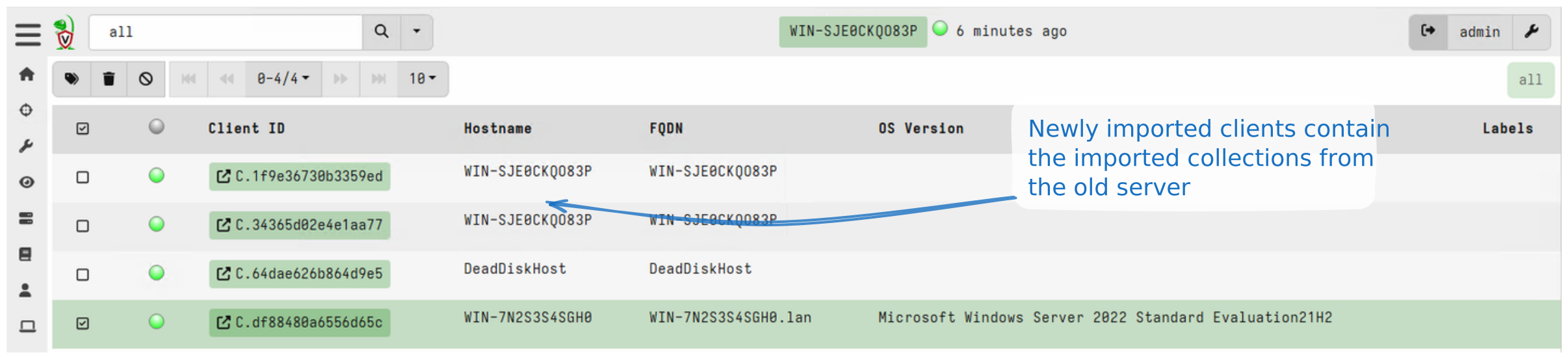
Complete backup of the datastore
One of the reasons Velociraptor is easy to deploy and manage is because everything in Velociraptor is simply a file. There is no need for complicated backend dependencies like databases - all you need to provide is a directory to store files on.
This makes it easy to back the files up using regular backup solutions. It is perfectly safe to run incremental backups on the datastore and restore it at any time. Velociraptor does not use file locking so there is no problem with a backup software reading all files inside the data store directory.
It is possible to back up the datastore directory using rsync, a
network filesystem, or other solutions to keep a hot spare server on
standby. Then fail over is simply a matter of switching the DNS or
load balancer to the other server.
Note that this is a disaster recovery approach rather than true high availability: the standby server is not active, so switching over requires manual intervention and there is some downtime while clients reconnect. It is a more complete backup solution, but it has some caveats:
- The internal Velociraptor files are now compressed so you would typically need Velociraptor to be able to read the data.
- This type of backup solution is indiscriminate - all data is backed up regardless of how relevant it is. Storage costs can accumulate rapidly.
For ephemeral installations, where collected data is immediately exported to other systems (for example using the Elastic or Splunk connectors), backups may not be necessary at all. A new deployment can be set up in minutes and the system can be quickly recovered.
For most elaborate deployments, more thought can be given to backups, collection exports for preservation, and maybe even a complete backup/hot standby architecture.