Server Logging
Velociraptor can log server operational events to local files, forward them to a remote syslog server, or both. On a production system you should enable at least one of these so you have a historical record of what the server was doing.
Logging is distinct from Prometheus/Grafana performance monitoring. Monitoring tracks performance metrics like CPU and memory usage. Logging captures discrete operational events, for example which clients connected, what hunts ran, which users authenticated, and any errors the server encountered.
Centralized logging
If your deployment sends logs to a central syslog server (for example rsyslog, Graylog, or a SIEM), you can search and alert on Velociraptor operational events alongside logs from other infrastructure. This is the recommended approach for production systems.
File-based logging
File-based logging writes log files to a directory on the server. Each log level (debug, info, error) gets its own rotating log file.
Configuration
Add a Logging block to your server.config.yaml:
Logging:
  output_directory: /mnt/data/logs
  separate_logs_per_component: true
The key settings are:
| Setting | Description | Default |
|---|---|---|
output_directory |
Directory for log files. If empty or this key is missing, no files are written. | (empty) |
separate_logs_per_component |
Give each Velociraptor logging component its own log file. | false |
When output_directory is empty, Velociraptor does not write any log
files. This is the default. It applies either when the
output_directory key is omitted from the config entirely, and when
it is present but set to an empty value (for example
output_directory: "").
File naming
Log files are written into the output directory. The file name includes the component and log level.
With separate_logs_per_component: true (recommended), each component
gets its own set of files:
/mnt/data/logs/
    VelociraptorFrontend_debug.log
    VelociraptorFrontend_info.log
    VelociraptorFrontend_error.log
    VelociraptorAudit_info.log
    VelociraptorAPI_info.log
    ...
With separate_logs_per_component: false, all components write to
the same files:
/mnt/data/logs/
    Velociraptor_debug.log
    Velociraptor_info.log
    Velociraptor_error.log
Distributed deployments
In a distributed deployment with minion frontends, each minion writes its logs to a subdirectory named after the node. This ensures that minions do not overwrite each other’s or the master’s logs.
When a log file rotates, the old file gets a timestamp suffix added
(for example VelociraptorAudit_info.log.202608311200) and a symlink
points to the current active file.
Log rotation and retention
Each log level rotates independently. The defaults are:
- Rotation: every 7 days (
604800seconds) - Max age: 1 year (
31536000seconds)
You can override these per level. For example, to rotate debug logs daily but keep error logs for two years:
Logging:
  output_directory: /mnt/data/logs
  debug:
    rotation_time: 86400      # 1 day
    max_age: 2592000          # 30 days
  error:
    rotation_time: 604800     # 7 days
    max_age: 63072000         # 2 years
To disable a log level entirely (for example, to stop writing debug logs to disk while still forwarding info and error to syslog):
Logging:
  output_directory: /mnt/data/logs
  debug:
    disabled: true
When a level is disabled, no log file is written for that level.
Syslog forwarding
Velociraptor can forward log messages to a remote syslog server. This is useful for centralizing logs from multiple servers or feeding them into a SIEM.
Configuration
Logging:
  separate_logs_per_component: true
  remote_syslog_server: syslog.example.com:514
  remote_syslog_protocol: udp
  remote_syslog_components:
- VelociraptorAudit| Setting | Description | Default |
|---|---|---|
remote_syslog_server |
Address of the syslog server (host:port). Port defaults to 514 if omitted. |
(empty — disabled) |
remote_syslog_protocol |
Transport protocol: udp, tcp, or tls. |
udp |
remote_syslog_components |
Which components to forward. | ["VelociraptorAudit"] |
If remote_syslog_server is empty, syslog forwarding is disabled
regardless of other settings. As with output_directory, this applies
both when the remote_syslog_server key is omitted entirely and when
it is present but set to an empty value (remote_syslog_server: "").
Syslog forwarding and separate logs
How syslog forwarding works depends on separate_logs_per_component:
- With
separate_logs_per_component: true, each component logs separately, so every component you list inremote_syslog_componentsis forwarded on its own. - With
separate_logs_per_component: false(the default), all components are logged together as a singleVelociraptorstream. In this mode, listing a specific component such asVelociraptorAudithas no effect; onlyVelociraptoris forwarded. If your list does not includeVelociraptor, then nothing is forwarded at all.
The simplest way to make syslog forwarding work is to set
separate_logs_per_component: true and list the components you want
to forward. If you prefer to keep all components in a single log
stream, leave it at the default and list Velociraptor instead; this
forwards everything.
See Forwarding specific components for details on the available logging components.
What gets forwarded
Syslog forwarding sends messages at the following log levels:
- Panic
- Fatal
- Error
- Warn
- Info
Debug-level messages are not forwarded to syslog. This is by design; debug messages tend to be high-volume and are not useful for operational monitoring.
Velociraptor sends each message using traditional syslog text format (RFC 3164-style): the receiving syslog server prepends its own standard header — for example rsyslog adds a priority, timestamp, and hostname — followed by the raw message body.
The message body itself is a JSON object containing the log level, timestamp, and the original log message:
{"level":"info","msg":"Frontend is ready to handle client TLS requests at https://127.0.0.1:8000/","time":"2026-08-31T13:23:23Z"}These fields are not parsed into individual syslog fields or RFC
5424 structured data — they are embedded together in the JSON body of
the msg portion of each syslog line. If you ingest these logs into a
SIEM, we recommend configuring JSON parsing on the receiving side so
that level, time, and msg become queryable fields.
Protocol choice
UDP is the simplest option but offers no delivery guarantee. If the syslog server is unreachable or the network drops packets, messages are lost silently and Velociraptor continues to run normally.
With tcp or tls, Velociraptor establishes a connection to the
syslog server at startup. If it cannot connect, the server fails to
start. Ensure your syslog server is reachable before enabling TCP or
TLS forwarding.
If you specify tls, the syslog connection is encrypted. You may need
to configure your syslog server with appropriate certificates.
Forwarding specific components
The default value of remote_syslog_components is
["VelociraptorAudit"], so audit events are forwarded by default when
syslog forwarding is enabled with separate_logs_per_component: true.
This captures user and service actions like logins, artifact
modifications, and hunt operations, the most important events for
security monitoring.
To forward additional components, list them explicitly:
Logging:
  separate_logs_per_component: true
  remote_syslog_server: syslog.example.com:514
  remote_syslog_components:
    - VelociraptorAudit
    - VelociraptorFrontend
    - VelociraptorAPI
See Log components for the full list.
Log components
Velociraptor separates log messages by component. Each component represents a different part of the server.
| Component | What it logs |
|---|---|
Velociraptor |
Generic messages, startup/shutdown, and tool operations. This is the fallback component. |
VelociraptorFrontend |
Client connections, communications, and data reception. |
VelociraptorClient |
Client-side operational messages (when running as a client). |
VelociraptorGUI |
Web interface and GUI-related events. |
VelociraptorAPI |
API server operations. |
VelociraptorAudit |
User and service actions: logins, artifact changes, hunt creation, access control changes. |
When separate_logs_per_component is true, each component writes
to its own file. This makes it easier to find messages from a specific
part of the system. When false, all components write to the same file. This is useful
for seeing the full picture in one place but harder to filter.
Audit logging
The VelociraptorAudit component captures security-relevant actions:
who did what and when. This includes:
- User logins and logouts
- Artifact creation, modification, and deletion
- Hunt creation, modification, and deletion
- Access control changes
- Server configuration changes
Audit events are written at the Info level, so they appear in the
_info.log file (or in syslog forwarding).
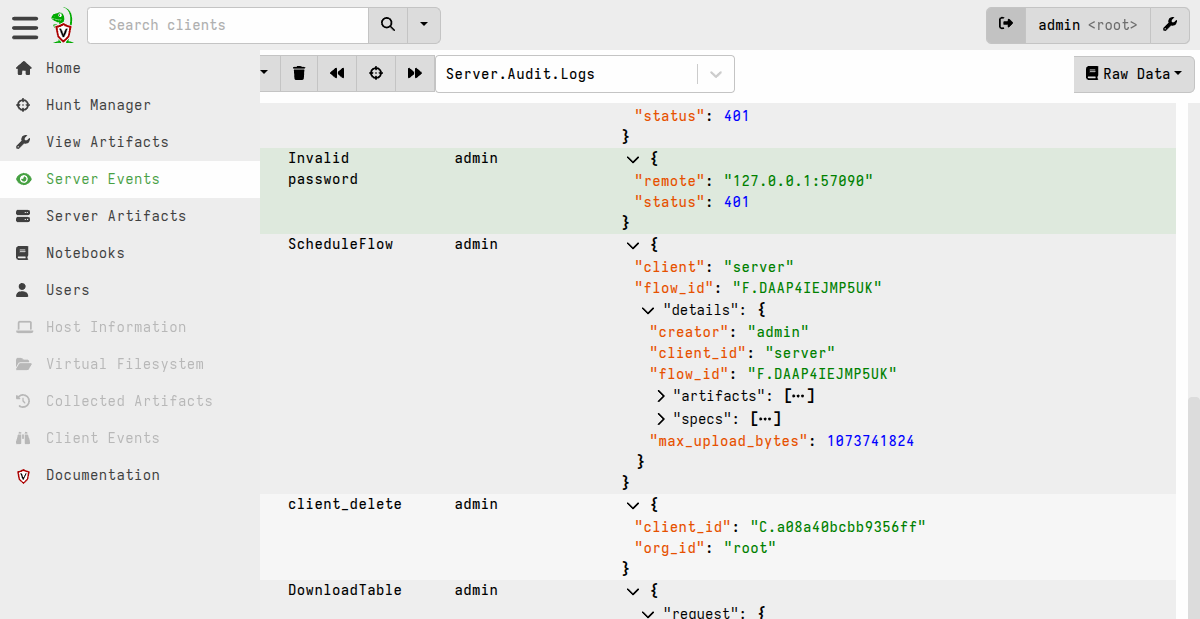
Audit events are also stored in the Server.Audit.Logs event-monitoring
artifact, which you can view and query from the GUI. This is a separate
mechanism from the Logging-configured file logs and syslog forwarding.
On Windows servers, audit events are also written to the Windows Event Log.
While this page covers configuration-defined logging (that is, logging defined in the server config file). Some categories of server events are also available via server monitoring and artifacts can be created to send such events to any destination supported by VQL functions and plugins (including but not limited to syslog). Since configuration-based logging requires server filesystem access, which Velociraptor GUI users typically don’t have, it is considered more resistant to tampering and therefore preferable especially for audit logging.
Configuration examples
Example: File logging only
A minimal setup that writes all log levels to disk:
Logging:
  output_directory: /var/log/velociraptor
  separate_logs_per_component: true
Example: Syslog only
Forward audit events to a remote syslog server without writing log files:
Logging:
  separate_logs_per_component: true
  remote_syslog_server: syslog.example.com:514
  remote_syslog_protocol: tcp
  remote_syslog_components:
    - VelociraptorAudit
Example: Both file and syslog
Write all logs to disk and forward audit events to syslog:
Logging:
  output_directory: /var/log/velociraptor
  separate_logs_per_component: true
  remote_syslog_server: syslog.example.com:514
  remote_syslog_protocol: tcp
  remote_syslog_components:
    - VelociraptorAudit
Example: Custom retention
Write logs with aggressive rotation for debug logs and long retention for errors:
Logging:
  output_directory: /var/log/velociraptor
  separate_logs_per_component: true
  debug:
    rotation_time: 86400       # Rotate daily
    max_age: 604800            # Keep for 7 days
  info:
    rotation_time: 604800      # Rotate weekly
    max_age: 2592000           # Keep for 30 days
  error:
    rotation_time: 604800      # Rotate weekly
    max_age: 63072000          # Keep for 2 years