Other use cases for artifacts
While you can learn a lot about what artifacts are usually used for by looking through the hundreds of artifacts that ship with the Velociraptor binary, there are certainly many more use cases – including ones that nobody has even thought of yet!
Artifacts are a powerful mechanism for encapsulating information, including but not limited to VQL.
Wrapper Artifacts
Using the Artifact plugin, you can
call other artifacts.
A common use for this is to create “wrapper artifacts” which can:
- combine multiple artifacts into a single artifact
name: Windows.Packs.Persistence description: This artifact pack collects various persistence mechanisms in Windows. sources: - name: WMI Event Filters query: SELECT * FROM Artifact.Windows.Persistence.PermanentWMIEvents() - name: Startup Items query: SELECT * FROM Artifact.Windows.Sys.StartupItems() - name: Debug Bootstraping query: SELECT * FROM Artifact.Windows.Persistence.Debug() - add additional sources to an existing artifact
name: Generic.Client.DiskSpace.Extra sources: - name: DiskSpace query: SELECT * FROM Artifact.Generic.Client.DiskSpace() - name: ExtraInfo query: SELECT * FROM ... - filter or manipulate results from other artifacts
name: Custom.Autoruns.ServicesCompsec sources: - query: | SELECT * FROM Artifact.Windows.Sysinternals.Autoruns() WHERE Category =~ "Services" AND `Launch String` =~ "COMSPEC" - provide custom parameter defaults (i.e. your own “presets”) to other
artifacts
name: Find.DotnetStartupHooks description: Finds DOTNET_STARTUP_HOOKS using Windows.Search.FileFinder parameters: - name: SearchFilesGlobTable type: csv default: | Glob HKEY_USERS\*\Environment\DOTNET_STARTUP_HOOKS\* HKEY_LOCAL_MACHINE\SYSTEM\CurrentControlSet\Control\Session Manager\Environment\DOTNET_STARTUP_HOOKS\* - name: Accessor default: registry - name: Upload_File default: Y sources: - precondition: SELECT OS From info() where OS = 'windows' query: | SELECT * FROM Artifact.Windows.Search.FileFinder(SearchFilesGlobTable=SearchFilesGlobTable, Accessor=Accessor, Upload_File=Upload_File) - simplify UI parameter choices for users by only presenting them with
parameters that you want them to change, while hiding and defining preset
values for parameters that you don’t want them to change
name: Find.DotnetStartupHooks
description: Finds DOTNET_STARTUP_HOOKS using Windows.Search.FileFinder
parameters:
    # This parameter can be customized by the user
  - name: SearchFilesGlobTable
    type: csv
    default: |
      Glob
      HKEY_USERS\*\Environment\DOTNET_STARTUP_HOOKS\*
      HKEY_LOCAL_MACHINE\SYSTEM\CurrentControlSet\Control\Session Manager\Environment\DOTNET_STARTUP_HOOKS\*

    # This parameter is hidden from the user
  - name: Accessor
    default: registry
    type: hidden

    # This parameter is hidden from the user
  - name: Upload_File
    default: Y
    type: hidden
sources:
  - precondition: SELECT OS From info() where OS = 'windows'
    query: |
      SELECT * FROM Artifact.Windows.Search.FileFinder(SearchFilesGlobTable=SearchFilesGlobTable,
                                                      Accessor=Accessor,
                                                      Upload_File=Upload_File)
Wrapper artifacts can be used as a way to limit users’ access to built-in artifact capabilities by using the above methods and then also hiding the called artifact from the GUI. In addition you could consider applying the security mechanisms described here which allow low-privilege users to only run certain “Basic” artifacts.
Utility Artifacts
The last example showed how to make an artifact that performs a very specific
task by wrapping the functionality contained in the more general-purpose
Windows.Search.FileFinder artifact. In that context, the called artifact
serves as a utility for the calling artifact.
The calling artifact in the previous example contained much simpler logic than
the called artifact, however that’s not always the case: the
Windows.KapeFiles.Targets artifact is an example of a relatively complex
artifact that wraps the much simpler Generic.Collectors.File utility artifact.
Another utility artifact that you may often encounter is
Generic.Utils.FetchBinary. This artifact contains VQL which ensures the
delivery of third-party tools to the
endpoint, so you will see it called in just about every artifact that uses
tools. These artifacts could easily have implemented the same logic to ensure
tool delivery, but it is cleaner, more efficient, and more consistent to offload
the logic to a purpose-built artifact that can be reliably reused.
Artifacts designed to be used as utilities (sometimes also referred to as
“helper” artifacts) might not be intended to be collected directly, and this may
influence the design of the artifact. For example, the
Generic.Utils.FetchBinary artifact is not intended to be collected directly
and therefore doesn’t need to be particularly user-friendly. To avoid confusing
users with such artifacts you could choose to
hide these artifacts,
as mentioned previously. Hidden artifacts can still be called from other
artifacts.
Server “Bootstrap” Artifacts
Server initialization config options
Instead of using the GUI to configure the collection of CLIENT_EVENT and
SERVER_EVENT artifacts, we can preconfigure these items via the config.
The config settings which provide this are:
-
Frontend.default_client_monitoring_artifacts: specifies the initial client monitoring table that will be created.By default, Velociraptor collects endpoint CPU and Memory telemetry from all clients using the
Generic.Client.Statsartifact. You can remove this, or specify a different set ofCLIENT_EVENTartifacts to collect. -
Frontend.default_server_monitoring_artifacts: specifies an initial set ofSERVER_EVENTartifacts that will be set in the server monitoring table and thus collected.By default, we collect only the
Server.Monitor.Healthartifact.
The config also allows us to define users and orgs that will be created when the server is first run, using the following settings:
-
GUI.initial_users -
GUI.initial_orgs
Going beyond the config options
While the options described above may be sufficient for some server setup situations, we may want to automate many other things during setup so that we don’t have to rely on time-consuming and potentially error-prone manual configuration via the GUI.
One of the limitations of the config settings in the previous section is that you can’t specify custom parameter values for your default monitoring artifacts.
To overcome these limitations and allow for almost unlimited flexibility, Velociraptor allows us to specify startup artifacts via the config setting:
Frontend.initial_server_artifacts
This setting allows us to specify one or more SERVER artifacts that will be
run when the Velociraptor server is started for the very first time. The server
detects that it is being run for the first time by checking for the presence of
the file config/install_time.json.db in the datastore: if the file is not
found then the server assumes it’s the first time it is being run.
Since this setting allows us to run artifacts on the server, this gives us access to the full capabilities of VQL in setting up the server. There are many VQL functions that can be useful when initializing a new server which don’t have equivalent config settings.
We could, for example:
- create users and customize user profiles using the
user_createanduser_optionsfunctions. - create orgs using
org_create. - create and start hunts using the
hunt_addfunction. - create notebooks using the
notebook_createfunction (based on custom notebook templates). - configure client monitoring using the
set_client_monitoringfunction or server monitoring using theset_server_monitoringfunction. - run server artifacts which import other artifacts
- run artifacts which define and download tools
to the server’s tool inventory
(or we could add/update tools using VQL’sinventory_addandinventory_getfunctions). - run server artifacts which create client installer packages or offline collectors:
Because we can specify multiple server artifacts in the
initial_server_artifacts setting, we might choose to have several artifacts
where each one addresses a particular aspect of server initialization, or we
could have one larger “bootstrap” artifact that does everything we want.
These artifacts are just normal server artifacts which can be developed and tested by running them in the “Server Artifacts” screen in the GUI (obviously on a non-production/development server!).
These initial server artifacts can also call other artifacts (either built-in or custom) to aid in the setup process.
Custom artifacts, as well as the “bootstrap” artifacts themselves, can be embedded in the config or loaded from a folder.
Client startup artifacts
Sometimes we may want the client to do something very early on, as soon as it starts and potentially even before client enrollment.
Such startup tasks could be, for example:
- copying a file from the network
- cleaning up some old files
- setting up or starting a VPN client (perhaps to enable the client to connect to the server)
- adding an anti-malware exclusion (see for example Windows.Utils.DefenderExclusion)
The Client.additional_event_artifacts configuration item allows us to do this
by specifying artifacts that should run when the client starts. Although these
artifacts are run as event artifacts (never expected to terminate), they can
contain any valid client-side VQL.
These artifacts will run every time the client starts, even before enrollment.
Because client artifacts are normally delivered from the server – and in this
case the client might not have enrolled with the server yet – this setting
generally requires the artifacts to be included in the client config’s
autoexec.artifact_definitions section.
If these artifacts are run before enrollment then the data produced will be queued and delivered to the server after enrollment, as event queries. To ensure that the server has a corresponding event queue to receive these events, you’ll also need to also add the artifact to the server’s artifact repository.
Sourceless Artifacts
Artifacts can have ZERO or more sources. It may seem strange at first to think about having artifacts with no sources, however this allows for some interesting use cases.
We have already seen that notebook templates are a special use case for artifact definitions. While notebook templates do have sources, these sources contain templates for notebook cells rather than just queries. The notebook cell templates themselves may or may not contain queries.
Furthermore, if you’ve spent any time looking through the list of built-in artifacts, you may have noticed several that have little to nothing but an artifact name. The purpose of such artifacts is to establish event queues on the server, which intercept and queue messages from clients and from the server itself. These artifacts can have sources, which would typically do something with the event messages, but they aren’t required to have sources; for example, other artifacts may be created to act on the event queue’s messages.
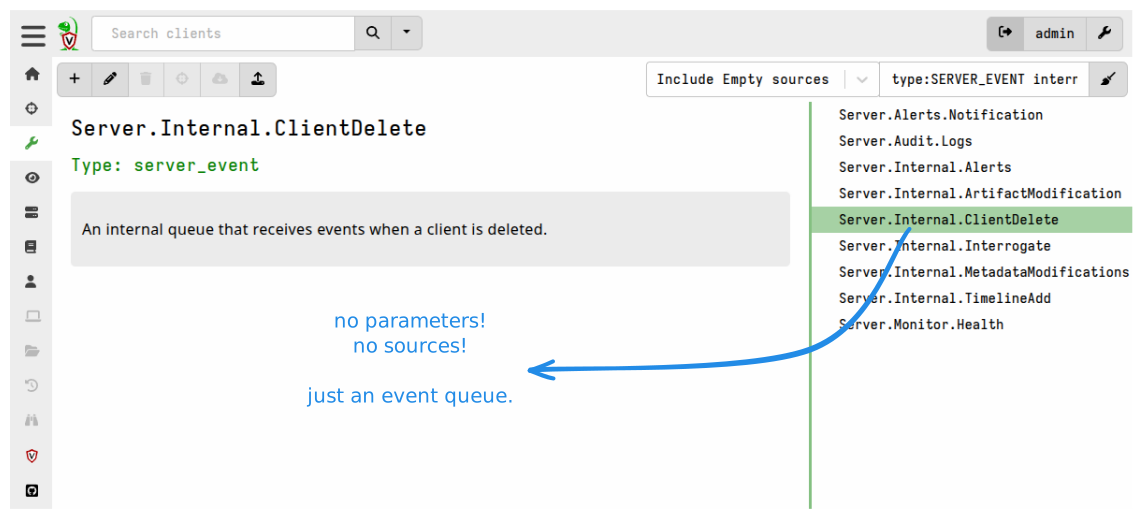
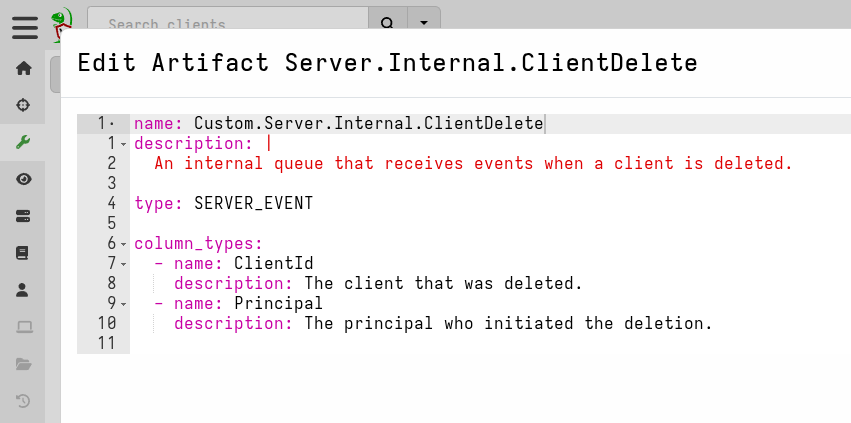
Artifacts without sources cannot be directly launched via the GUI and are also filtered out from all the preset filter views on the Artifacts screen, except for the filter category “Include Empty Sources”. This filter will show all artifacts including those that don’t have sources. This aspect is useful because it means you can define sourceless artifacts without them being collectible, and therefore such artifacts don’t clutter artifact selection lists or confuse users.
Export-only artifacts (sharing VQL via export-imports)
An artifact with no sources and an export section can be used:
- for defining shared variables or “constants”
- for defining shared custom functions and plugins
This can help ensure consistency across artifacts and simplify artifacts that have large sections of generically reusable code. In particular, artifacts that include binary parser profiles can be difficult to read because you first have to scroll past the potentially very long profile definition to get to the VQL. Putting such lengthy blocks into a sourceless artifact’s export section and then importing it when needed makes the latter artifact much more user-friendly.
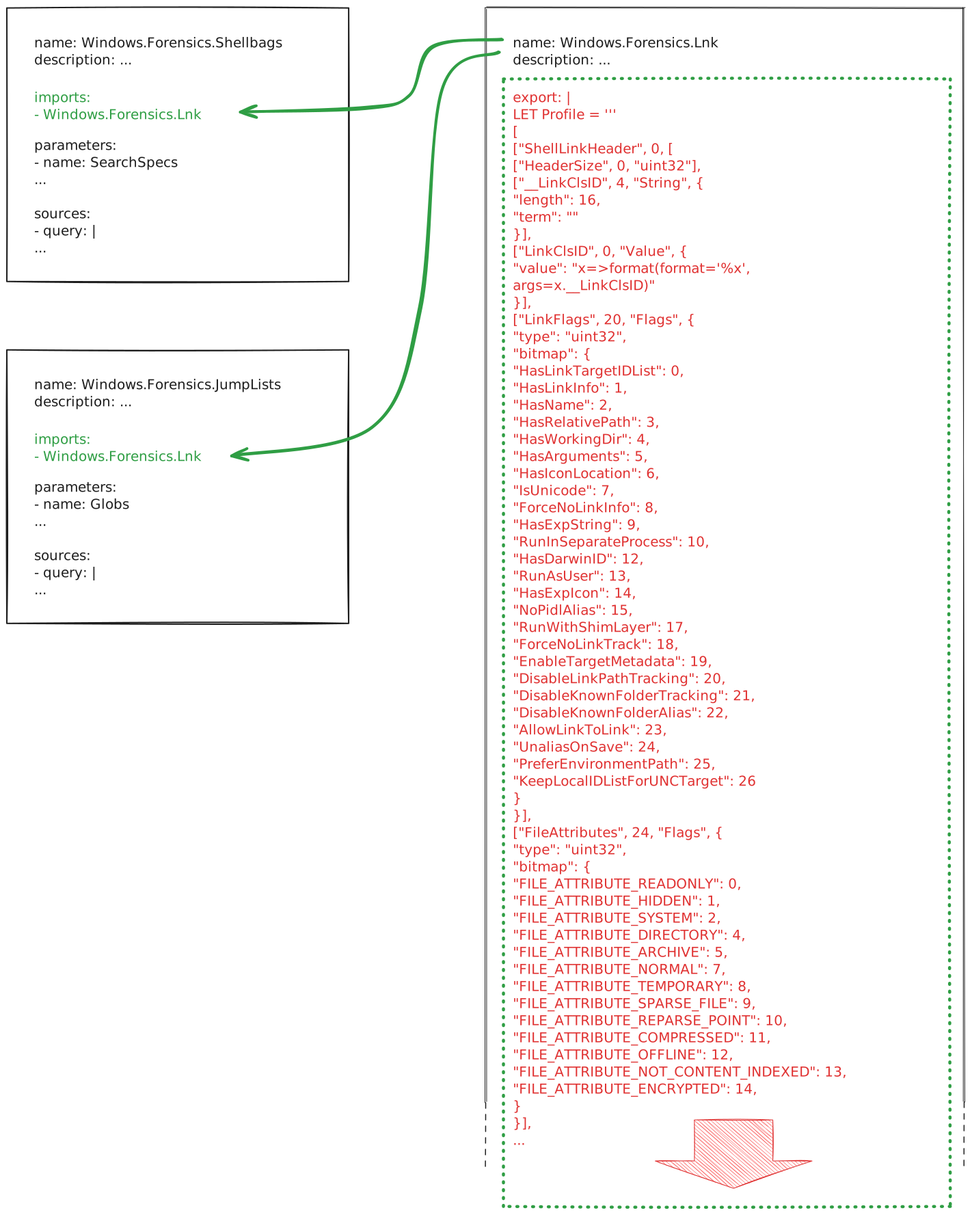
Ultimately when the importing artifact is collected the imports are resolved and the compiled artifact is sent to the client which includes the imported VQL, so there is no saving in terms of network bandwidth. It just improves legibility and code consistency.
Event queues
An artifact with no sources can be used to define server and client event queues.
These may have sources, but can still be useful without them, as demonstrated by
the Server.Internal.ClientDelete artifact shown above.
Documentation
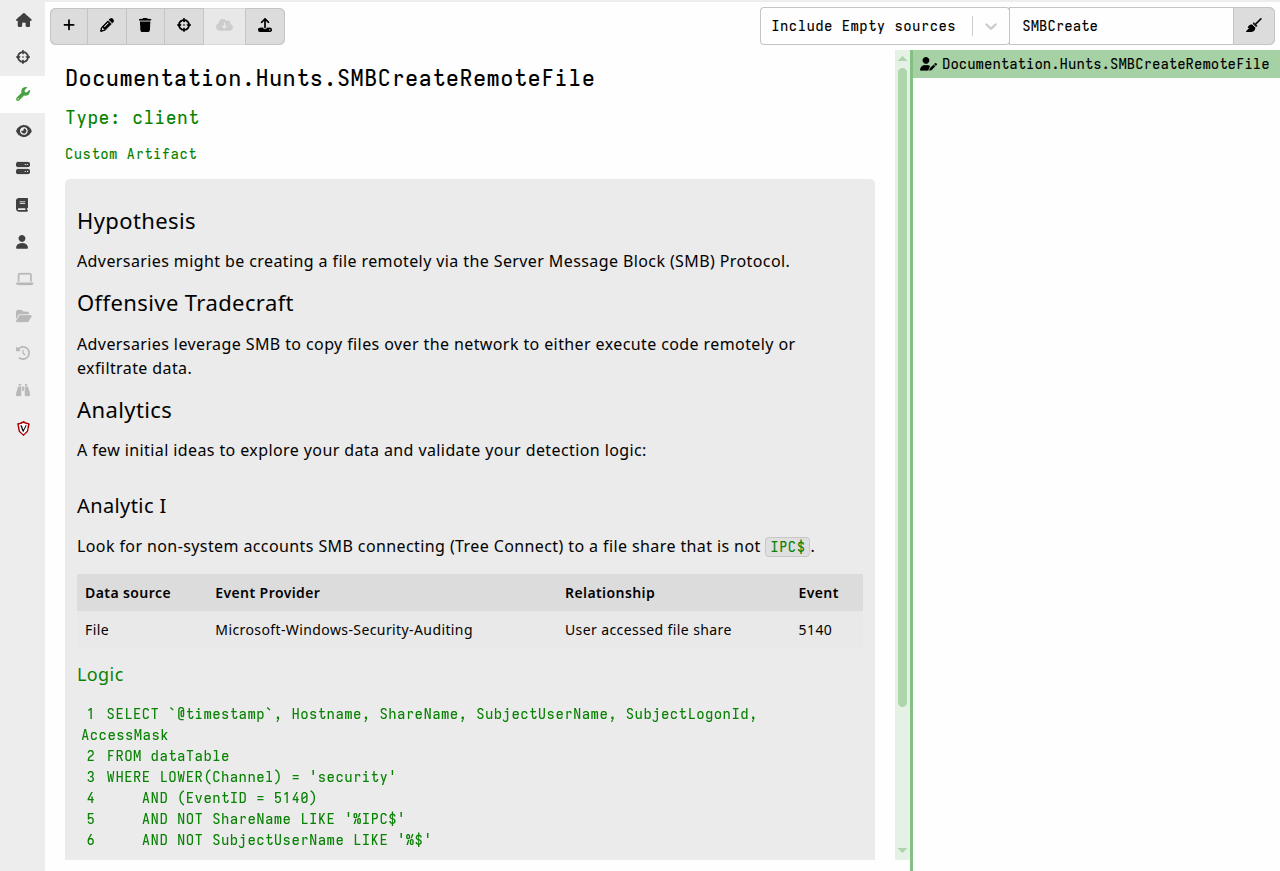
Artifacts with no sources and only
informational fields
can be used to store internal documentation; particularly since the
description field supports Markdown
and is indexed and searchable in the GUI.
You could perhaps use it to store Velociraptor SOP documentation or other DFIR-related information that could be useful to the team working on your server.
As mentioned above, artifacts without sources cannot be directly launched via the GUI and are also filtered out from all the preset filter views on the Artifacts screen, which means that you can create such artifacts without them being collectible, and without them appearing on artifact selection lists where they might confuse users.
Standalone Tool definitions
It is possible to use a single sourceless artifact to store all your tool definitions, which can then be referred to (using only the name and optionally a version number) in other artifacts that use those tools.
In fact Velociraptor itself takes this approach with the built-in
Server.Internal.ToolDependencies artifact, which is used to provide tool
definitions for the other Velociraptor binaries so that they are available for
tasks such as creating offline collectors.
If you define such an artifact as a SERVER artifact then running it will
download the tools from the URLs specified in the tool definitions. This
provides a quick way to ensure that your server’s tools inventory is populated
with all the tools that your CLIENT artifacts will need before you collect
those artifacts.
Manually collecting such an artifact also serves as a way to update all the
tools defined in the artifact, as it will re-download them when serve_locally
is set to true.
You can additionally use such an artifact as one of your “server bootstrap artifacts”, as described above.