Managing external Tools
Velociraptor is a powerful endpoint visibility tool. It has plugins and parsers for many file formats, such as raw NTFS access, raw registry hive, prefetch files etc. One of the strengths of Velociraptor is its flexibility afforded by the use of the Velociraptor Query Language (VQL).
However, as most DFIR professionals know, there are so many tools out there that we would love to use in our IR work. Many of these tools are not specifically designed to work in a fast evolving network environment.
Velociraptor can orchestrate the use of these tools at scale, across
the network using the built in Tools support.
How can Velociraptor manage and distribute tools?
Velociraptor push third party tools to the endpoint. In this
context, tools are third party binaries or other files (e.g. Yara Rule
files) that we want to make available on the endpoint.
Tools are managed via the inventory service. A part of Velociraptor
dedicated to keep track of Tools.
At a high level:
-
A
Toolis file managed by the inventory service, known by itsTool NameandVersion. -
The Tool is defined as a dependency to a specific artifact in the artifact definition YAML.
-
When the artifact is scheduled for collection, Velociraptor ensures the tool is available for delivering to the endpoint by its
Tool Name. -
A Velociraptor administrator may override the tool with a different version and decide where the tool should be served from.
-
Once a tool is delivered to the endpoint, it is cached there for the next use of the artifact. If the tool changes since the time of last use, the new version is delivered to the endpoint automatically.
The built in tool support ensures that artifact writers do not need to think about managing the tools, all the they need to do is simply define the tool as a dependency of their artifact and then simply use it in the VQL. The logistics of managing the tool, delivering it to the endpoint, ensuring the correct version is present are all managed by Velociraptor in a consistent way.
Let’s examine how Velociraptor tools are implemented and used in detail.
Defining a tool
Before an artifact can use a managed tool, the artifact writer should declare that tool as a dependency.
Let’s look at a simple example of an artifact that uses a tool:
name: Linux.OSQuery.Generic

tools:
  - name: OSQueryLinux
    url: https://github.com/Velocidex/OSQuery-Releases/releases/download/4.4.0/osquery-4.4.0-linux-amd64
    serve_locally: true
    expected_hash: e3b0c44298fc1c149afbf4c8996fb92427ae41e4649b934ca495991b7852b855

parameters:
  - name: Query
    default: "SELECT * FROM osquery_info"

sources:
  - query: |
      LET result = SELECT * FROM foreach(row={
        SELECT OSPath
        FROM Artifact.Generic.Utils.FetchBinary(ToolName="OSQueryLinux")
      }, query={
        SELECT * FROM execve(
         argv=OSPath, "--json", Query],
         length=1000000)
      })

      SELECT * FROM foreach(row=result,
      query={
         SELECT * FROM parse_json_array(data=Stdout)
      })
The artifact defines a list of tools under the tools: section. Each
tool has a set of options:
- The
nameis the name of the tool that will be used in the artifact body itself. - The
urlis where the tool can be downloaded from. Note that tools are not downloaded until the artifact is scheduled for the first time so it can be delivered to the endpoint. - The
serve_locallyflag controls if the endpoint should fetch the tool from the Velociraptor server itself, or directly from theurldeclared above. Note that this is just the initial preference as this setting can be configured by the administrator later. - The
expected_hashdeclares the sha256 hash of the tool as fetched from the URL above. This extra control ensures that tool can not be replaced by the upstream publisher without the artifact writer being aware of it - this is a protection from supply chain attacks.
Of all the above options, only the name is mandatory. If the url
is not specified, then the server is unable to automatically fetch the
file on first use, therefore the artifact can not be scheduled until
the admin uploads a tool manually (see below). This is a valid
configuration for artifacts that use commercial tools that are not
widely distributed.
Using a tool in the artifact
Once the tool is defined as a dependency, the artifact may use it via
the Generic.Utils.FetchBinary artifact:
  SELECT OSPath
  FROM Artifact.Generic.Utils.FetchBinary(ToolName="OSQueryLinux")
This artifact handles the logistics of managing the tool on the endpoint:
- Check the local cache on the endpoint for the presence of the tool.
- If there is a cached version of the tool, then check the hash of the local file to ensure it matches the required hash.
- If the local copy of the file is not present, or its hash does not
match the required hash, the
FetchBinaryartifact fetches a new copy of the file.
If all goes well the FetchBinary artifact emits a single row with a
column OSPath of the local path on the endpoint to the file (this
will be in the Tools cache directory).
Consuming the output of the FetchBinary artifact
In the above example, we iterate over the output of the FetchBinary
artifact using a foreach() plugin. This method is more defensive, as
if the tool fails to be fetched, the query will just do nothing:
LET result = SELECT * FROM foreach(row={
  SELECT OSPath
  FROM Artifact.Generic.Utils.FetchBinary(ToolName="OSQueryLinux")
}, query={
  ... Do stuff with OSPath
})
In many other artifacts we see a pattern like:
 LET binary <= SELECT OSPath
 FROM Artifact.Generic.Utils.FetchBinary(ToolName="OSQueryLinux")

 SELECT * FROM execve(
    argv=[ binary[0].OSPath, "--json", Query],
    length=1000000)
This works because binary is a list of rows so we index the first
row with [0] and take the OSPath column. However, this pattern is
not robust: If the tool fails to download binary will be an empty
list, and binary[0].OSPath will be NULL. This is dangerous because
the artifact will then attempt to execute a program called NULL
which is not the intention.
Usually the output of the tool is processed by the artifact somehow,
for example, the tool may write output in JSON or CSV or simply create
some output files that the artifact uses upload() to deliver to the
server.
Generic.Utils.FetchBinary options
By default the Generic.Utils.FetchBinary will ensure the filename
ends with a .exe extension, which is required on Windows to be able
to run the tool, while on Unix like systems, the tool will be written
with the execute permission enabled.
If you are using the Tools mechanism to distribute non binary tools
(for example a zip file), the .exe extension can be unexpected
(and also trigger some security tools on the endpoint). Therefore you
can indicate to FetchBinary that the file is not an executable by
setting IsExecutable to FALSE or “N”.
When FetchBinary decided to fetch the file from the server, a small
random sleep interval is added. This is to avoid overloading the
server during large hunts (which all will try to download the tool at
the same time). You can change the sleep interval with the
SleepDuration parameter if the tool is exceptionally large and might
overload the network.
Finally, if you prefer to not cache the tool locally, use
TemporaryOnly to prevent the tool from being locally cached. Note
that this will increase network load and delay re-collecting the same
artifact but might be appropriate for tool files which change
frequently (so caching them does not make sense).
Managing tools
The previous sections showed how tools can be used in artifacts, but typically Velociraptor administrators need to have more control over the files that are distributed.
Tools are managed using the Tool Setup screen. You can get to the
Tool Setup screen whenever the artifact is shown (for example in the
View Artifact screen, or when selecting the artifact in new
collections).
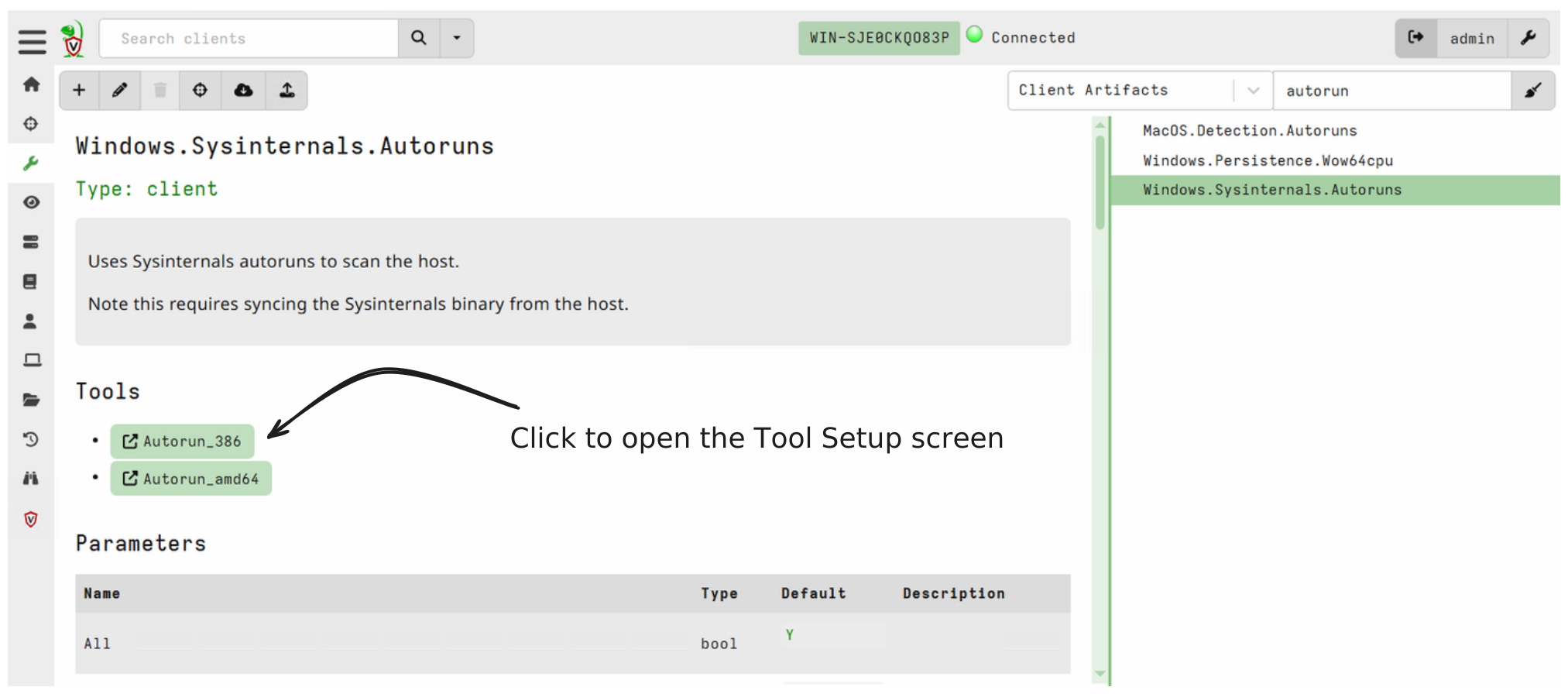
Once the setup screen is open we can manage how tools are distributed
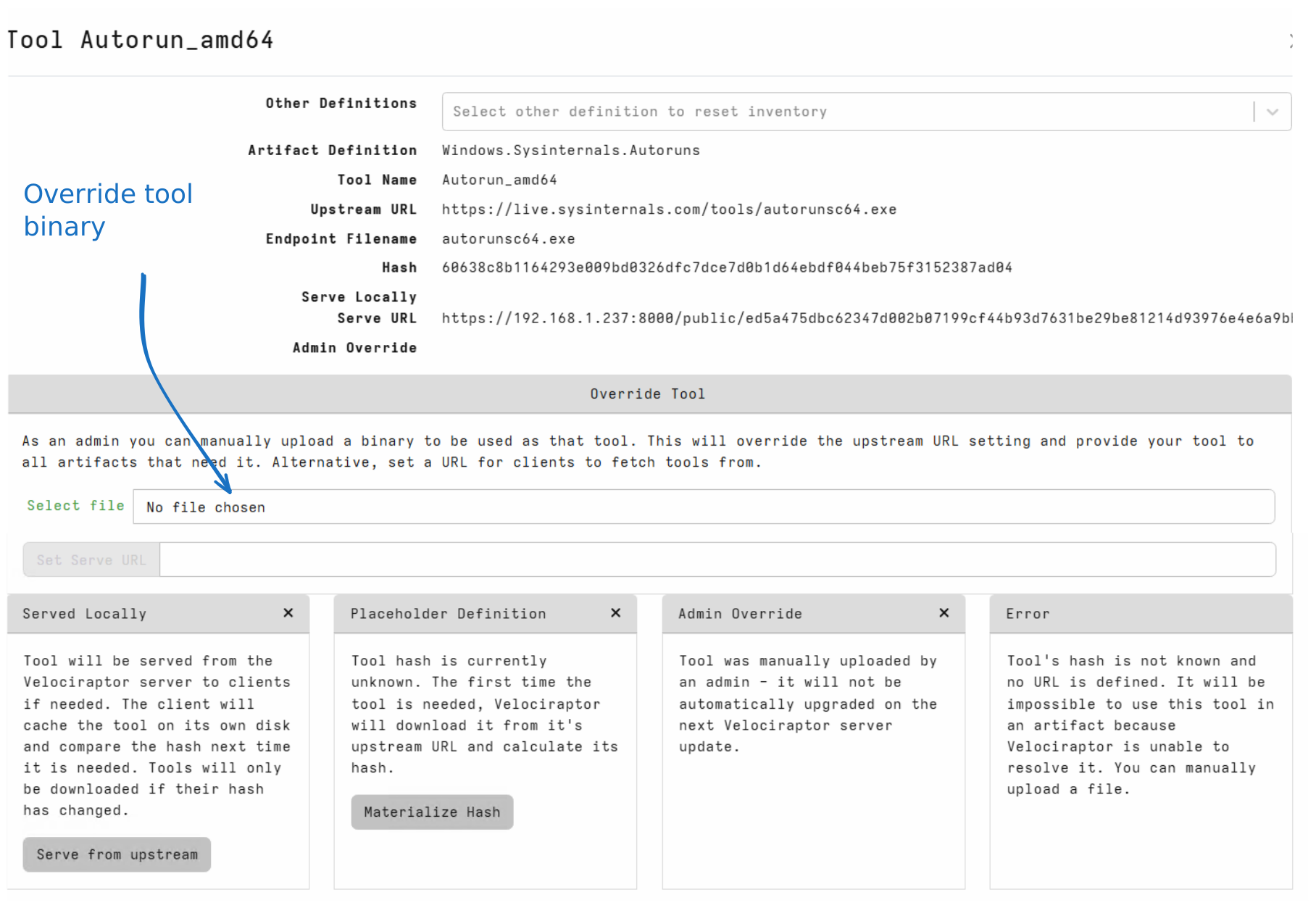
The following parts of the GUI are:
-
The
Tool NameandArtifact Definitionrefer to the specific tool we are editing, and where it was defined. -
It is possible to use the same tool in multiple artifacts which means it will be defined in multiple artifacts. However, only one definition is actually used at a time. The
Other Definitionsdrop down shows where else the tool is defined, and allows us to switch to the relevant definition (and reset the tool definition back to the defaults). -
The
Upstream URLindicates where the tool originally resides. The server will attempt to fetch the tool from that URL prior to scheduling the artifact. -
Once the tool is fetched (In Velociraptor terminology the tool is
Materialized), the server is able to calculate the hash. This is the hash that endpoints will require prior to use of the tool. -
In the case shown above, the tool is served locally (i.e. fetched from the Velociraptor server itself).
-
The
Serve URLindicates which URL the endpoint will fetch the tool from. When served from Velociraptor itself, the URL will consist of an obfuscated URL based on the filename, served from the server’s public directory. -
The
Override Toolsection allows the administrator to override the way the tool is served. The user may upload their own binary which will be used as that tool through the GUI.Alternatively, the administrator can override the
Serve URLto an external URL. This is useful when the tool is very large and we need to distribute it to a large number of hosts. Setting aServe URLto be a cloud provider storage bucket for example will handle any issues of scale and bandwidth easily. -
The
Served Locallybutton can be used to toggle the tool from being fetched from the Velociraptor server, or from the upstream URL. Most upstream publishers (e.g. GitHub) have DDoS protection so using the tool in a hunt may trigger rate limiting when thousands of endpoints fetch the same file. You should consider delegating serving to a cloud provider as described earlier.
The Velociraptor Public directory
There is no authentication required to fetch URLs from the Velociraptor public directory, only the knowledge of the obfuscated URL itself. This means that the URL is in itself a form of shared secret.
Managing tools in restricted environments.
During security incidents many environments are locked down and it is not possible to the Velociraptor server to reach out to fetch tools from the internet when needed (i.e. internet access is shut down or blocked). You might sometimes also have to work in environments that are permanently air-gapped.
In these environments, we need to manually pre-populate the tools inventory with the binaries of all the tools we would like to use in advance. This also gives us the opportunity to curate the tools that will actually be allowed.
To facilitate this we provide a built-in server artifact that partially
automates the process:
Server.Utils.UploadTools
This artifact is designed to be used as follows:
-
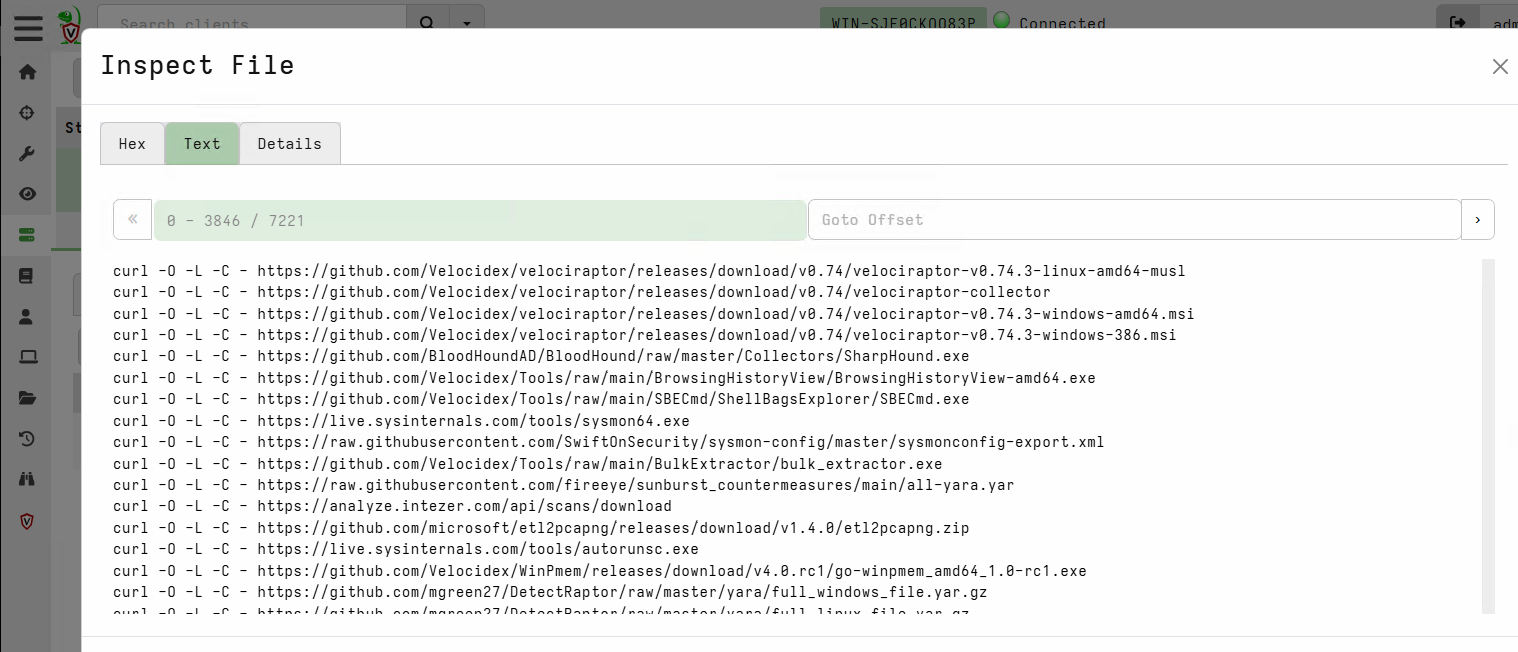
The first time you collect it, it will create a downloader bash script which you can find in the collection’s Uploaded Files tab. The script uses
curlto download the binaries into the current folder. Copy that script to a system that has internet access and that hascurl.The uploader script generated by Server.Utils.UploadTools -
On an internet-connected system you create a folder and then run the script produced in the first step from that folder. This downloads all the binaries.
-
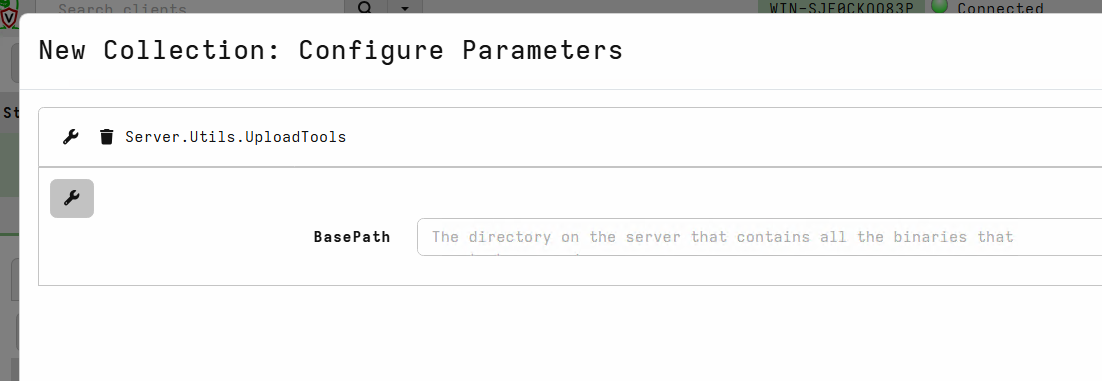
You move the folder containing the binaries to your Velociraptor server (the one that doesn’t have internet access), and there you run the same artifact a second time, but this time pointing it to the folder using the artifact’s
BasePathparameter. This step loads all the binaries into the tools inventory.Re-importing all the binaries manually