VQL Fundamentals
Velociraptor Query Language (VQL) is the query language used across all of Velociraptor’s features - from artifact collections and client monitoring to notebook investigations and API automation. This page covers the core concepts you need to write and understand VQL queries.
Running VQL queries in Notebooks
When learning VQL, we recommend practicing in an environment where you can easily debug, iterate, and interactively test each query. Velociraptor notebooks provide a perfect playpen for learning and experimenting with VQL. You can read more about notebooks here.
For the purposes of this documentation, we will assume you’ve created a notebook and are typing VQL into a notebook cell.
Basic Syntax
VQL’s syntax is heavily inspired by SQL. It uses the same basic
SELECT .. FROM .. WHERE semantic structure, but does not include the
more complex SQL syntax, such as JOIN or HAVING. In VQL, similar
functionality is provided through plugins, which keeps the syntax
simple and concise.
Variables
In VQL, variables are assigned using LET statements, for example:
LET my_variable <= SELECT * FROM info()In the above example the assignment is using <= which is a
materialized LET expression, meaning
that the value is immediately assigned to the variable. However
assignment can be “lazy” which means that the assignment only happens
when the variable is subsequently referenced and therefore evaluated
only if an when it’s needed.
See LET expressions for more information about
lazy evaluation.
Variable names can only consist of alphanumeric characters,
underscores (_), and dashes (-), and cannot begin with a numeric
or a dash character. They are also case-sensitive.
Throwaway variables
In artifacts you might sometimes see just a _ used as a variable
name. This is a naming convention (not a language-enforced rule) for
an anonymous or “throwaway” variable, where we don’t care about the
name because we don’t intend to use the actual value in subsequent
VQL, and therefore also don’t care is the variable name is later
reassigned another value.
For example:
LET _ <= log(message="Start time %v", args=start_time)would be used just to generate a log message and we don’t intend to do anything with the result. It uses a materialized LET expression so that the evaluation happens immediately.
A convention of using CamelCase for variable names has evolved in our artifacts. But you are free to use any naming convention that you prefer in your VQL.
Any supported data type can be assigned to a variable, including VQL queries.
In VQL, variables can also perform double-duty as local function names. For example:
LET CheckTime(Time, Default) = if(condition={
                                  SELECT *
                                  FROM info()
                                  WHERE OS =~ "windows"
                                },
                                then=Time,
                                else=Default)
defines a local VQL function that can be called from subsequent VQL queries and passed arguments.
See Local Functions for more information.
The assignment of variables can be immediate or “lazy” (when required). See LET expressions to learn about lazy evaluation/assignment.
Artifact parameters are externally-defined variables
Artifact parameters are converted to variables using the parameter name as the variable name and the parameter type as the data type. So artifact parameters are really just a convenient way to define variables outside of the VQL itself.
Built-in Variables
The behavior of certain VQL plugins are determined by a set of built-in variables.
In general, you should not need to modify these, but if for some reason you need to override the default behavior of these plugins you can do so by setting the relevant variables within the same VQL scope as the plugin call. In a sense, these can be considered “hidden arguments” for certain plugins.
Some default variables are also used to define certain aspects of GUI
behavior, for example column_types is a variable that the GUI uses
to configure user-defined display formatting for specific columns. If
you’re working in a notebook and use the Format Columns GUI
option, you will see that it adds a variable ColumnTypes to the VQL.
You could define this special variable in artifacts too, but for that
we have the equivalent column_types YAML key.
Whitespace
VQL does not place any restrictions on the use of whitespace in the
query body. We generally prefer queries that are well indented because
they are more readable and look better but this is not a
requirement. Unlike SQL, VQL does not require or allow a semicolon ;
at the end of statements.
The following two queries are equivalent
-- This query is all on the same line - not very readable but valid.
LET X = SELECT * FROM info() SELECT * FROM X

-- We prefer well indented queries but VQL does not mind.
LET X= SELECT * FROM info()
SELECT * FROM X
Let’s consider the basic syntax of a VQL query.
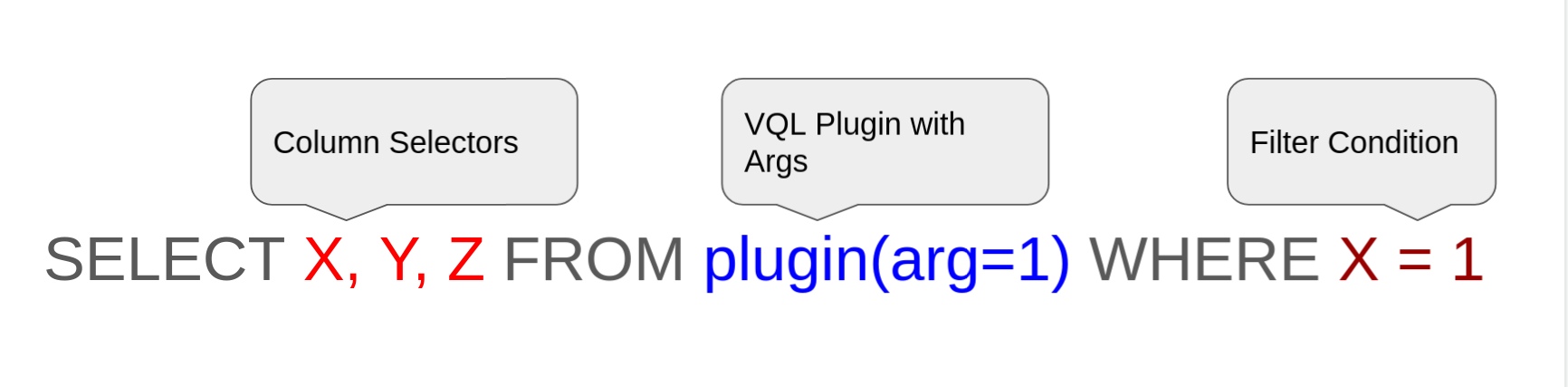
The query starts with a SELECT keyword, followed by a list of Column Selectors then the FROM keyword and a VQL Plugin potentially
taking arguments. Finally we have a WHERE keyword followed by a
filter expression.
Plugins
While VQL syntax is similar to SQL, SQL was designed to work on static
tables in a database. In VQL, the data sources are not actually static
tables on disk - they are provided by code that runs to generate
rows. VQL Plugins produce rows and are positioned after the
FROM clause.
Like all code, VQL plugins use parameters to customize and control their operations. VQL Syntax requires all arguments to be provided by name (these are called keyword arguments). Depending on the specific plugins, some arguments are required while some are optional.
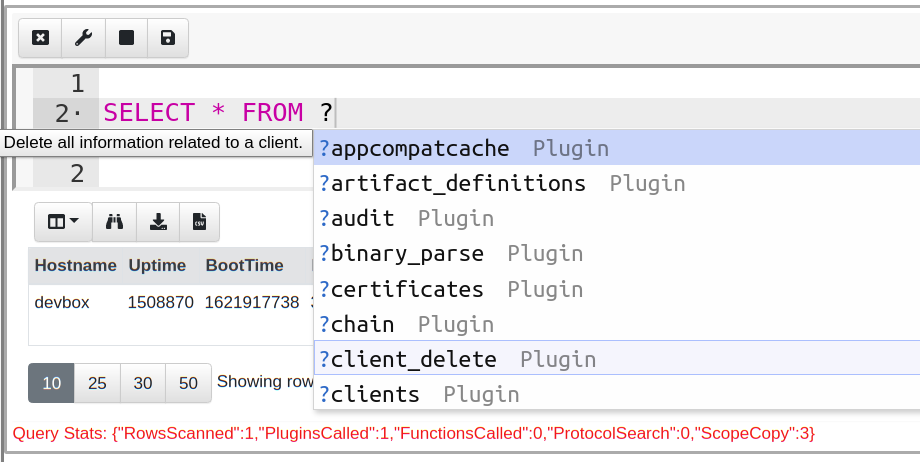
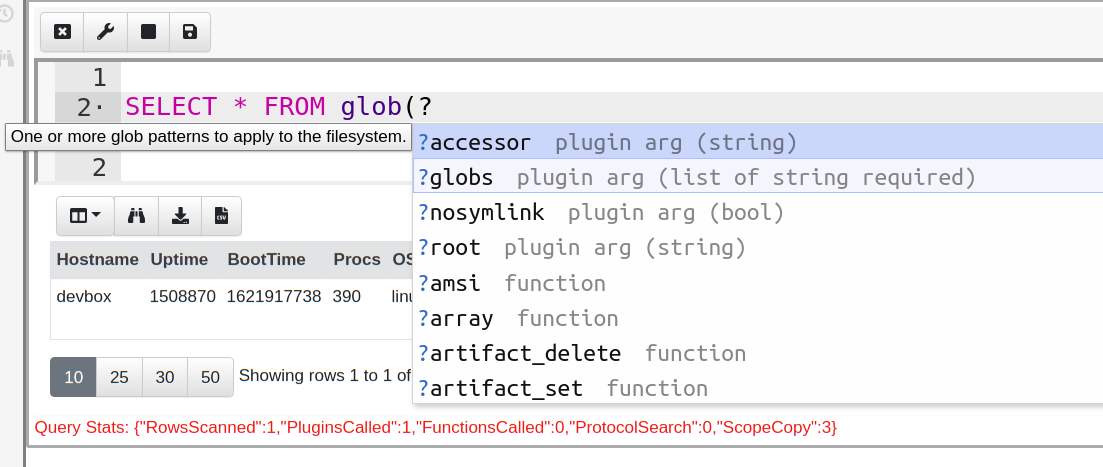
Using the GUI suggestions
You can type ? in the Notebook interface to view a
list of possible completions for a keyword. Completions are context sensitive. For example, since plugins must follow the FROM keyword, any suggestions
after the FROM keyword will be for VQL plugins. Typing ? inside
a plugin arguments list shows the possible arguments, their
type, and if they are required or optional.
Argument unpacking
Args can be passed to plugins or functions as a dict.
In the following simple example, the plugin’s args are first packed
into a dict. The plugin is then passed the dict using the special **
arg, which unpacks the dict into the separate arguments that the
plugin expects.
Example
LET args <= dict(root="c:/windows", globs="*")

SELECT *
FROM glob(`**`=args)
Note that the ** has to be enclosed in backticks because
it is an identifier that uses non-alphanumeric characters.
Also, when this method is used any other arguments specified are ignored.
Free-form Args
Certain plugins and functions, namely:
alertarraychaindictsigma_log_sourcesswitchtypeof
accept arbitrary arguments, which we call “free-form args”.
However all args still have to be named, so you’ll usually see the
args specified as a=, b=, c= just for simplicity.
Example
SELECT *
    FROM chain(
      a={ SELECT * FROM ...) },
      b={ SELECT * FROM ...) })
Life of a query
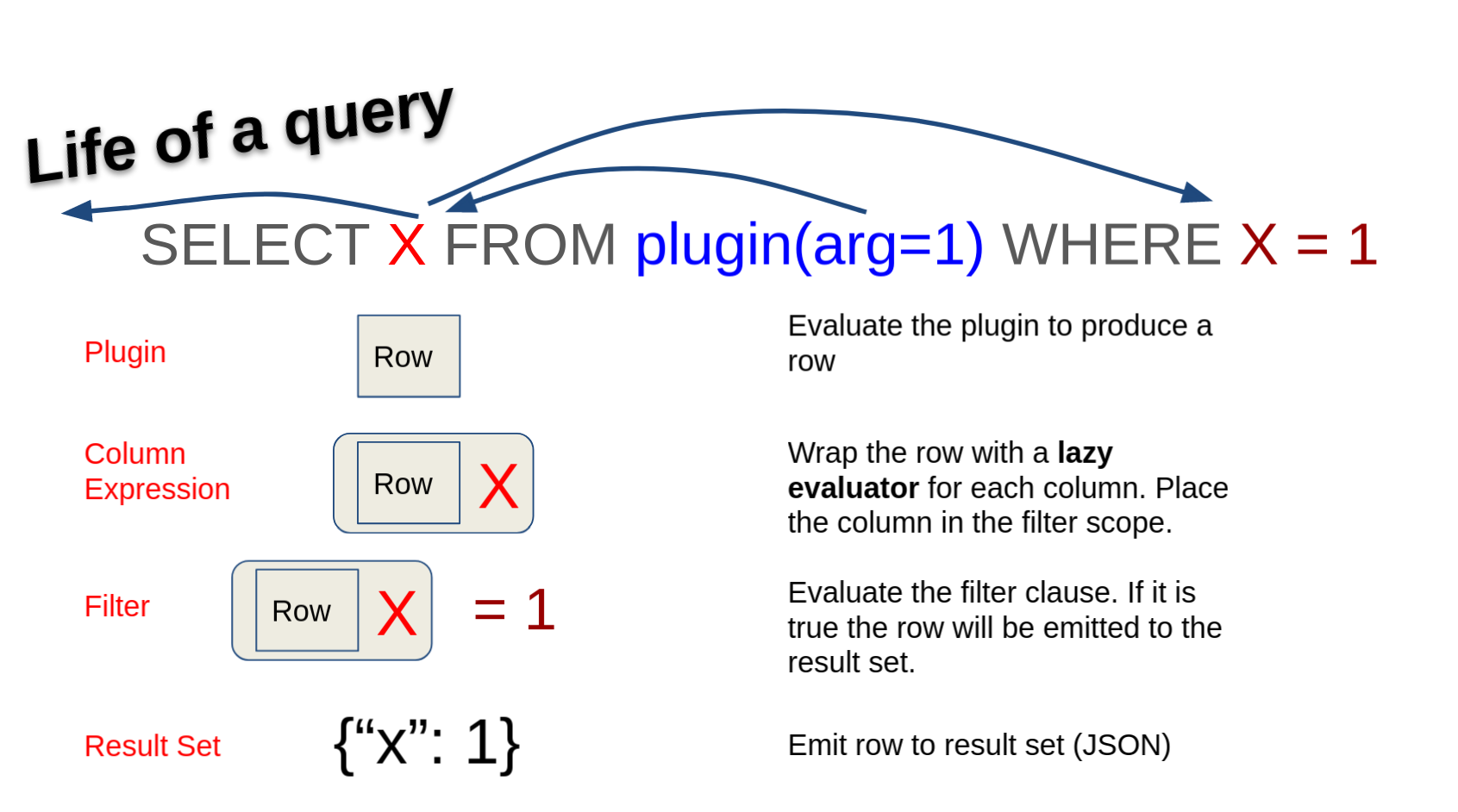
In order to understand how VQL works, let’s follow a single row through the query.
-
Velociraptor’s VQL engine will call the plugin and pass any relevant arguments to it. The plugin will then generate one or more rows and send a row at a time into the query for further processing.
-
The column expression in the query receives the row. However, instead of evaluating the column expression immediately, VQL wraps the column expression in a
Lazy Evaluator. Lazy evaluators allow the actual evaluation of the column expression to be delayed until a later time. -
Next, VQL takes the lazy evaluator and uses them to evaluate the filter condition, which will determine if the row is to be eliminated or passed on.
-
In this example, the filter condition (
X=1) must evaluate the value of X and therefore will trigger the Lazy Evaluator. -
Assuming X is indeed 1, the filter will return TRUE and the row will be emitted from the query.
Lazy Evaluation
In the previous example, the VQL engine goes through significant effort to postpone the evaluation as much as possible. Delaying an evaluation is a recurring theme in VQL and it saves Velociraptor from performing unnecessary work, like evaluating a column value if the entire row will be filtered out.
Understanding lazy evaluation is critical to writing efficient VQL
queries. Let’s examine how this work using a series of
experiments. For these experiments we will use the log() VQL
function, which simply produces a log message when evaluated.
-- Case 1: One row and one log message
SELECT OS, log(message="I Ran!") AS Log
FROM info()

-- Case 2: No rows and no log messages
SELECT OS, log(message="I Ran!") AS Log
FROM info()
WHERE OS = "Unknown"

-- Case 3: Log message but no rows
SELECT OS, log(message="I Ran!") AS Log
FROM info()
WHERE Log AND OS = "Unknown"

-- Case 4: No rows and no log messages
SELECT OS, log(message="I Ran!") AS Log
FROM info()
WHERE OS = "Unknown" AND Log
In Case 1, a single row will be emitted by the query and the associated log function will be evaluated, producing a log message.
Case 2 adds a condition which should eliminate the row. Because the row is eliminated VQL can skip evaluation of the log() function. No log message will be produced.
Cases 3 and 4 illustrate VQL’s evaluation order of AND terms - from
left to right with an early exit.
We can use this property to control when expensive functions are
evaluated e.g. hash() or upload().
What is a Scope?
Scope is a concept common in many languages, and it is also central in VQL. A scope is a bag of names that is used to resolve symbols, functions and plugins in the query.
For example, consider the query
SELECT OS FROM info()VQL sees “info” as a plugin and looks in the scope to get the real implementation of the plugin.
Scopes can be nested, which means that in different parts of the query a new child scope is used to evaluate the query. The child scope is constructed by layering a new set of names over the top of the previous set. When VQL tries to resolve a name, it looks up the scope in reverse order going from layer to layer until the symbol is resolved.
Take the following query for example,
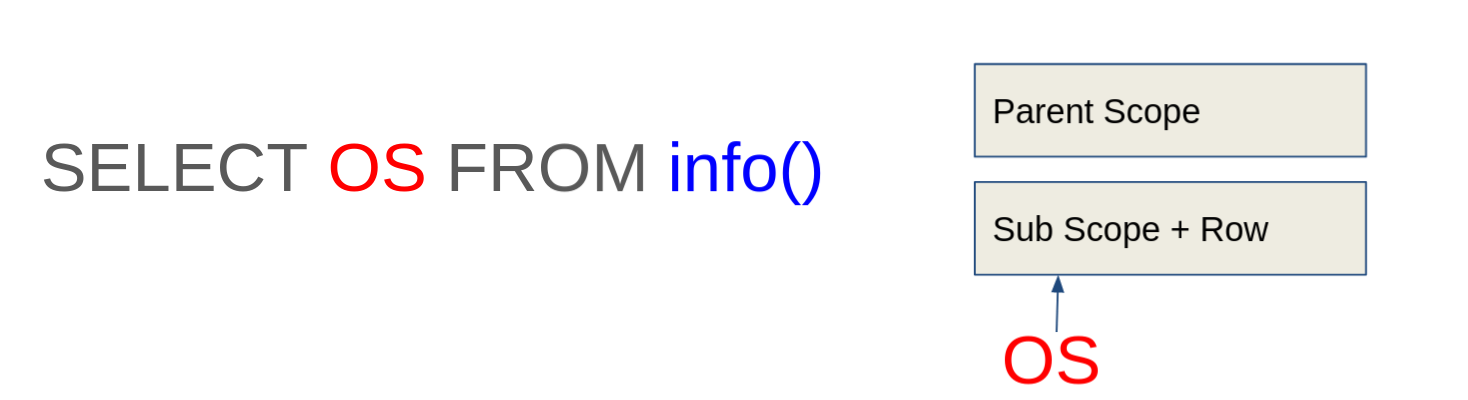
VQL evaluates the info() plugin, which emits a single row. Then VQL
creates a child scope, with the row at the bottom level. When VQL tries
to resolve the symbol OS from the column expression, it examines the
scope stack in reverse, checking if the symbol OS exists in the
lower layer. If not, VQL checks the next layer, and so on.
Masking variables in the scope
Columns produced by a plugin are added to the child scope and
therefore mask the same symbol name from parent scopes. This can
sometimes unintentionally hide variables of the same name which are
defined at a parent scope. If you find this happens to your query you
can rename earlier symbols using the AS keyword to avoid this
problem. For example:
SELECT Pid, Name, {
   SELECT Name FROM pslist(pid=Ppid)
} AS ParentName
FROM pslist()
In this query, the symbol Name in the outer query will be resolved
from the rows emitted by pslist() but the second Name will be
resolved from the row emitted by pslist(pid=Ppid) - or in other
words, the parent’s name.
String constants
Strings in VQL are denoted by " or ', and can include
backslash-escaped special characters, for example, "\n" means a new
line.
Allowing backslash escapes is useful but it also means that literal
backslashes also need to be escaped. This is sometimes inconvenient,
especially when dealing with Windows paths (that often contain a lot
of backslashes) or regexes where \ is used for
shorthand character classes and for escaping special characters.
Therefore, Velociraptor also offers a raw string syntax which is
denoted by ''' (three single quotes). Within this type of string no
escaping is possible and all characters are treated literally,
including new lines.
Because the raw string syntax preserves newline it can also be used for specifying multi-line strings. For example:
SELECT *
FROM parse_csv(accessor="data", filename='''
X,Y,Z
1,2,3
2,4,6
''')
If you come from a Python or C# background, note that multi-line strings do not use triple double-quotes. Only triple single-quotes facilitate multi-line strings in VQL.
Identifiers with spaces
In VQL an Identifier is the name of a column, member of a dict or a
keyword name. Sometimes identifiers contain special characters such as
space or . which make it difficult to specify them without having
VQL get confused by these extra characters.
In this case it is possible to enclose the identifier name with back
ticks (`).
In the following example, the query specifies keywords with spaces to
the dict() plugin in order to create a dict with keys containing spaces.
The query then continues to extract the value from this key by enclosing the name of the key using backticks.
LET X = SELECT dict(`A key with spaces`="String value") AS Dict
FROM scope()

SELECT Dict, Dict.`A key with spaces` FROM X
Subqueries
VQL Subqueries can be specified as a column expression or as an
arguments. Subqueries are delimited by { and }. Subqueries are
also lazily evaluated, and will only be evaluated when necessary.
The following example demonstrates subqueries inside plugin args. The
if() plugin will evaluate the then or the else query depending
on the condition value (in this example when X has the value 1).
SELECT * FROM if(condition=X=1,
then={
  SELECT * FROM ...
},
else={
  SELECT * FROM ...
})
Subqueries as columns
You can use a subquery as a column which will cause it to be evaluated
for each row (in this way it is similar to the foreach() plugin).
Since subqueries are always an array of dictionaries, the output if often difficult to read when the subquery returns many rows or columns. As a special case, VQL will simplify subqueries:
- If the subquery returns one row and has several columns, VQL will put a single dictionary of data in the column.
- If the subquery returns one row and a single column, the value is expanded into the cell.
These heuristics are helpful when constructing subqueries to enrich columns. If you wish to preserve the array of dicts you can use a VQL function instead.
Here is an example to demonstrate:
LET Foo =  SELECT "Hello" AS Greeting FROM scope()

SELECT { SELECT "Hello" AS Greeting FROM scope() } AS X,
       { SELECT "Hello" AS Greeting, "Goodbye" AS Farewell FROM scope() } AS Y,
       Foo AS Z
FROM scope()
In the above query - X is a subquery with a single row and a single
column, therefore VQL will simplify the column X to contain "Hello"
The second query contains two columns so VQL will simplify it into a
dict.
Finally to get the full unsimplified content, a VQL stored query can
be used. This will result in an array of one dict, containing a single
column Greeting with value of Hello
Arrays
An array may be defined either by ( and ) or [ and ]. Since it
can be confusing to tell regular parenthesis from an array with a
single element, VQL also allows a trailing comma to indicate a single
element array. For example (1, ) means an array with one member,
whereas (1) means a single value of 1.
Dictionaries
A dictionary (or in short a dict) is an associative data structure
which associates keys with values. This is often called a hash map
in other languages.
VQL’s dict appears in many places and used heavily internally. You can
recognize that a dict is involved using the typeof() VQL function.
Unlike some other languages, Velociraptor’s dicts maintain their key
order. You can iterate over the dict’s key value pairs using the
items() plugin:
LET MyDict <= dict(Foo=1, Bar=2, Baz=3)

SELECT * FROM items(item=MyDict)
The dict has a number of very useful attributes:
MyDict.Items: Returns a list of key value pairsMyDict.Keys: Returns a list of keysMyDict.Values: Returns a list of ValuesMyDict.Len: Returns the number of keysMyDict.ToMap: Converts to an unordered map.MyDict.String: Converts to a JSON representation of the dict.
The scope() plugin
VQL is strict about the syntax of a VQL statement. Each statement must have a plugin specified, however sometimes we don’t really want to select from any plugin at all.
The default noop plugin is called scope() and simply returns the
current scope as a single row. If you even need to write a query but
do not want to actually run a plugin, use scope() as a noop
plugin. For example
-- Returns one row with Value=4
SELECT 2 + 2 AS Value
FROM scope()
The Foreach plugin
VQL is modeled on basic SQL since SQL is a familiar language for new
users to pick up. However, SQL quickly becomes more complex with very
subtle syntax that only experienced SQL users use regularly. One of
the more complex aspects of SQL is the JOIN operator which typically
comes in multiple flavors with subtle differences (INNER JOIN, OUTER
JOIN, CROSS JOIN etc).
While these make sense for SQL since they affect the way indexes are
used in the query, VQL does not have table indexes, nor does it have
any tables. Therefore the JOIN operator is meaningless for
Velociraptor. To keep VQL simple and accessible, we specifically did
not implement a JOIN operator. For a more detailed discussion of the
JOIN operator see
emulating join in VQL.
Instead of a JOIN operator, VQL has the foreach() plugin, which is
probably the most commonly used plugin in VQL queries. The foreach()
plugin takes two arguments:
-
The
rowparameter is a subquery that provides rows -
The
queryparameter is a subquery that will be evaluated on a subscope containing each row that is emitted by therowargument.
Consider the following query:
SELECT * FROM foreach(
    row={
        SELECT Exe FROM pslist(pid=getpid())
    },
    query={
        SELECT ModTime, Size, FullPath FROM stat(filename=Exe)
    })
Note how Exe is resolved from the produced row since the query is
evaluated within the nested scope.
Foreach is useful when we want to run a query on the output of another query.
Foreach on steroids
Normally foreach iterates over each row one at a time. The
foreach() plugin also takes the workers parameter. If this is larger
than 1, foreach() will use multiple threads and evaluate the query
query in each worker thread. This allows the query to evaluate values in parallel.
For example, the following query retrieves all the files in the System32 directory and calculates their hash.
SELECT FullPath, hash(path=FullPath)
FROM glob(globs="C:/Windows/system32/*")
WHERE NOT IsDir
As each row is emitted from the glob() plugin with a filename of a
file, the hash() function is evaluated and the hash is
calculated.
However this is linear, since each hash is calculated before the next hash is started - hence only one hash is calculated at once.
This example is very suitable for parallelization because globbing for all files is quite fast, but hashing the files can be slow. If we delegate the hashing to multiple threads, we can make more effective use of the CPU.
SELECT * FROM foreach(
row={
   SELECT FullPath
   FROM glob(globs="C:/Windows/system32/*")
   WHERE NOT IsDir
}, query={
   SELECT FullPath, hash(path=FullPath)
   FROM scope()
}, worker=10)
Foreach and deconstructing a dict
Deconstructing a dict means to take that dict and create a column for each field of that dict. Consider the following query:
LET Lines = '''Foo Bar
Hello World
Hi There
'''

LET all_lines = SELECT grok(grok="%{NOTSPACE:First} %{NOTSPACE:Second}", data=Line) AS Parsed
FROM parse_lines(accessor="data", filename=Lines)

SELECT * FROM foreach(row=all_lines, column="Parsed")
This query reads some lines (for example log lines) and applies a grok expression to parse each line. The grok function will produce a dict after parsing the line with fields determined by the grok expression.
The all_lines query will have one column called “Parsed” containing
a dict with two fields (First and Second). Using the column
parameter to the foreach() plugin, foreach will use the value in that
column as a row, deconstructing the dict into a table containing the
First and Second column.
LET expressions
We know that subqueries can be used in various parts of
the query, such as in a column specifier or as an argument to a
plugin. While subqueries are convenient, they can become unwieldy when
nested too deeply. VQL offers an alternative to subqueries called
Stored Queries.
A stored query is a lazy evaluator of a query that we can store in
the scope. Wherever the stored query is used it will be evaluated on
demand. Consider the example below, where for each process, we
evaluate the stat() plugin on the executable to check the
modification time of the executable file.
LET myprocess = SELECT Exe FROM pslist()

LET mystat = SELECT ModTime, Size, FullPath
        FROM stat(filename=Exe)

SELECT * FROM foreach(row=myprocess, query=mystat)
Note
A Stored Query is simply a query that is stored into a variable. It is not actually evaluated at the point of definition. At the point where the query is referred, that is where evaluation occurs. The scope at which the query is evaluated is derived from the point of reference.
For example in the query above, mystat simply stores the query
itself. Velociraptor will then re-evaluate the mystat query for each
row given by myprocess as part of the foreach() plugin operation.
LET expressions are lazy
We have previously seen VQL goes out of its way to do as little work as possible.
Consider the following query
LET myhashes = SELECT FullPath, hash(path=FullPath)
FROM glob(globs="C:/Windows/system32/*")

SELECT * FROM myhashes
LIMIT 5
The myhashes stored query hashes all files in System32 (many
thousands of files). However, this query is used in a second query
with a LIMIT clause.
When the query emits 5 rows in total, the entire query is cancelled
(since we do not need any more data) which in turn aborts the
myhashes query. Therefore, VQL is able to exit early from any query
without having to wait for the query to complete.
This is possible because VQL queries are asynchronous - we do
not calculate the entire result set of myhashes before using
myhashes in another query, we simply pass the query itself and
forward each row as needed.
Materialized LET expressions
A stored query does not in itself evaluate the query. Instead the query will be evaluated whenever it is referenced.
Sometimes this is not what we want to do. For example consider a query which takes a few seconds to run, but its output is not expected to change quickly. In that case, we actually want to cache the results of the query in memory and simply access it as an array.
Expanding a query into an array in memory is termed Materializing the query.
For example, consider the following query that lists all sockets on
the machine, and attempts to resolve the process ID to a process name
using the pslist() plugin.
LET process_lookup = SELECT Pid AS ProcessPid, Name FROM pslist()

SELECT Laddr, Status, Pid, {
   SELECT Name FROM process_lookup
   WHERE Pid = ProcessPid
} AS ProcessName
FROM netstat()
This query will be very slow because the process_lookup stored query
will be re-evaluated for each row returned from netstat (that is, for each
socket).
The process listing will not likely change during the few seconds it takes the query to run. It would be more efficient to have the process listing cached in memory for the entire length of the query.
We recommend that you Materialize the query:
LET process_lookup <= SELECT Pid AS ProcessPid, Name FROM pslist()

SELECT Laddr, Status, Pid, {
   SELECT Name FROM process_lookup
   WHERE Pid = ProcessPid
} AS ProcessName
FROM netstat()
The difference between this query and the previous one is that
the LET clause uses <= instead of =. The <= is the materialize
operator. It tells VQL to expand the query in place into an array
which is then assigned to the variable process_lookup.
Subsequent accesses to process_lookup simply access an in-memory
array of pid and name for all processes and do not need to run
pslist() again.
Local functions
LET expressions may store queries into a variable,
and have the queries evaluated in a subscope at the point of use.
A LET expression can also declare explicit passing of
variables.
Consider the following example which is identical to the example above:
LET myprocess = SELECT Exe FROM pslist()

LET mystat(Exe) = SELECT ModTime, Size, FullPath
        FROM stat(filename=Exe)

SELECT * FROM foreach(row=myprocess, query={
  SELECT * FROM mystat(Exe=Exe)
})
This time mystat is declares as a VQL Local Plugin that
takes arguments. Therefore we now pass it an parameter explicitly and
it behaves as a plugin.
Similarly we can define a VQL Local Function.
LET MyFunc(X) = X + 5

-- Return 11
SELECT MyFunc(X=6) FROM scope()
Differences between a VQL plugin and VQL function
Remember the difference between a VQL plugin and a VQL function is that a plugin returns multiple rows and therefore needs to appear between the FROM and WHERE clauses. A function simply takes several values and transforms them into a single value.
Local functions may define a default value for a parameter. If the caller does not specify the parameter, the default value is used.
LET MyFunc(X=5) = X + 5

-- Return 11
SELECT MyFunc(X=6), MyFunc() FROM scope()
VQL Operators
In VQL an operator represents an operation to be taken on operands. Unlike SQL, VQL keeps the number of operators down, preferring to use VQL functions over introducing new operators.
The following operators are available. Most operators apply to two
operands, one on the left and one on the right (so in the expression
1 + 2 we say that 1 is the Left Hand Side (LHS) operand, 2 is
the Right Hand Side (RHS) operand, and + is the operator.
| Operator | Meaning |
|---|---|
+ - * / |
These are the usual arithmetic operators. |
=~ |
This is the regex operator, which reads like “matches”. For example X =~ "Windows" will return TRUE if X matches the regex Windows. |
!= = < <= > >= |
These are usual equality and ordering comparison operators. |
in |
The membership operator. Returns TRUE if the LHS is present in the RHS. Note that in is an exact case sensitive match. |
. |
The . operator is called the Associative Operator.It dereferences a field from the LHS named by the RHS. For example X.Y extracts the field Y from the dict X |
|| && |
Logical operators that perform logical AND and OR operations on boolean expressions. |
Protocols
When VQL encounters an operator it needs to decide how to actually evaluate the operator. This depends on what types the LHS and RHS operands actually are. The way in which operators interact with the types of operands is called a “protocol”.
Certain comparison operators would normally make no sense for disparate data types. For example, comparing a string with an int is normally nonsensical. However VQL implements some special handling for comparisons that would otherwise not make sense. In general, if one of the operands can be coerced so that it can be meaningfully compared with the other operand then VQL does so. VQL generally does the expected/intuitive thing but it is valuable to understand which protocol will be chosen in specific cases.
Example: Regex operator
For example consider the following query
LET MyArray = ("X", "XY", "Y")
LET MyValue = "X"
LET MyInteger = 5

SELECT MyArray =~ "X",
       MyValue =~ "X",
       MyInteger =~ "5"
FROM scope()
In the first case the regex operator is applied to an array so the expression is TRUE if any member of the array matches the regular expression.
The second case applies the regex to a string, so it is TRUE because the string matches. In most languages this is normally the only valid regex comparison, i.e. string vs. string.
Finally in the last case, the regex is applied to an integer. Normally it would make no sense to apply a regular expression to an integer, but VQL is smart enough to automatically coerce the int to a string for the purpose of the comparison. The result is therefore also TRUE.
Example: Associative operator applied on a stored query
The Associative operator is denoted by . and accesses a field from
an object or dict. One of the interesting protocols of the .
operator is when it is applied to a query or a list.
In the following example, I define a stored query that calls the
Generic.Utils.FetchBinary artifact (This artifact fetches the named
binary):
LET binary = SELECT FullPath
  FROM Artifact.Generic.Utils.FetchBinary(ToolName="ToolName")
Although a query defined via the LET keyword does not actually run
the query immediately (it is a lazy operator), we can think of the
variable binary as containing an array of dictionaries
(e.g. [{"FullPath": "C:\Windows\Temp\binary.exe"}]).
If we now apply the associative operator . to the variable binary,
the operator will convert the array into another array, where each
member is extracted for example binary.FullPath is
["C:\Windows\Temp\binary.exe"]. To access the name of the binary we
can then index the first element from the array.
SELECT * FROM execve(argv=[binary.FullPath[0], "-flag"])Expanding queries using the associative operator
While using the . operator is useful to apply to a stored query,
care must be taken that the query is not too large. In VQL, stored
queries are lazy and do not actually execute until needed because they
can generate thousands of rows! The . operator expands the query
into an array and may exhaust memory while doing so.
The following query may be disastrous:
LET MFT = SELECT * FROM Artifact.Windows.NTFS.MFT()

SELECT MFT.FullPath FROM scope()
The Windows.NTFS.MFT artifact typically generates millions of rows,
and MFT.FullPath will expand them all into memory!
Comparison and Evaluation Logic
Before any comparison or operation, the system checks if a value or referenced object (e.g. Stored Query) is “lazy”, for example:
LET Past24hours = timestamp(epoch=now() - 86400)

SELECT *
FROM source()
WHERE Mtime > Past24hours
If it is lazily-defined, then it’s resolved to an actual value first. In other words, the comparison triggers evaluation because it’s needed for the comparison.
Null compared to anything is false.
Truthiness
Truthiness is a programming concept where non-boolean values are
implicitly converted to true or false when evaluated in a boolean
context, such as in
if statements or
logical operators.
This is a key concept for implementing flow control logic in VQL.
Truthiness is distinct from strict boolean equality. Sometimes people like to use the words “truthy” or “falsy” rather than “true” or “false” to emphasize the difference, but we still use the latter for simplicity.
In general, empty objects (storedQuery objects, strings, dicts,
arrays, etc.) or NULL are considered false in VQL. This means that
a query that returns zero rows is considered false. Artifact
preconditions, for example, rely on
this principle to determine whether or not the artifact’s sources
should run.
The truthiness of VQL data types generally corresponds to their analogous data types in other languages such as Python. The Go language, in which Velociraptor is written, does not itself have the concept of truthiness. So in VQL, truthiness is defined by the protocols mentioned previously.
In particular:
-
nil/Nullis false. -
int: Negative ints and 0 are false. Positive ints are true. -
float: Negative ints and 0 are false. Positive ints are true. -
string: The empty string ("") is false. Non-empty strings are true. -
arrayanddict: Empty arrays and dicts are false. Non-empty ones are true. -
VQL
StoredQueryobject: That is, the result of a VQL query, is false if it returns zero rows and true if it returns any rows. -
timestamp(date/time value): A timestamp representing a real point in time after January 1, 1970 (the Unix epoch) is true. An unset or zero timestamp is false.
Truthiness is also central to understanding VQL’s logical operators, which can be used to control execution flow or provide conditional fallback values for data fields.
Equality comparisons
The VQL equality operators are = (equals) and != (not equals).
VQL compares values in a way that usually does what you’d expect, even when the two values are different types. Here is how it works:
-
No value (Null): something with no value is only equal to another thing with no value. Comparing anything to nothing is always false.
-
Text (strings): two pieces of text are equal only if they are exactly the same, including upper/lower case. Text is never equal to a number or other type.
SELECT "hello" = "hello" AS Result -- TRUE FROM scope() SELECT "hello" = "world" AS Result -- FALSE FROM scope() -
Integers: all integers are treated the same regardless of size. So
1always equals1, whether it came from a small or large number.SELECT 100 = 100 AS Result FROM scope() -- TRUE SELECT 100 = 101 AS Result FROM scope() -- FALSE -
True/false (booleans): a true/false value is usually only equal to another true/false value. However, VQL also accepts common text representations:
"Y","y","true", and"True"are treated the same asTRUE. Any other text is treated asFALSE. Notice that in VQL the true/false values are not case sensitive, unlike many other languages. -
Decimal numbers: decimal numbers are compared as decimals. A integer and a decimal can still be equal if they represent the same value.
-
Dates and times (timestamps): timestamps are compared precisely down to the nanosecond. You can compare a timestamp against a number, and VQL will interpret that number as seconds since January 1, 1970 (Unix time).
SELECT now() = 1710000000 AS Result FROM scope() -
Mixed number types: if one value is a integer and the other is a decimal, VQL converts both to decimals before comparing.
-
Arrays (lists): two arrays are equal only if they have the same number of items and each matching position contains an equal value.
-
Dictionaries: two dictionaries are equal if they have the same keys and each key holds an equal value.
Ordering comparisons
The VQL ordering operators are < (less than), <= (less than or
equal), > (greater than), and >= (greater than or equal).
-
No value: any ordering comparison with a missing value (
Null) returns FALSE. -
Text vs Text: text is compared alphabetically. For example
"apple" < "banana"is true because “apple” comes before “banana” in the alphabet.SELECT "apple" < "banana" AS Result FROM scope() -- TRUE -
Integers: all integers are converted to a common form and compared.
SELECT 5 > 3 AS Result FROM scope() -- TRUE SELECT 5 > 10 AS Result FROM scope() -- FALSE -
Integer vs Decimal: the integer is treated as a decimal for comparison. So
3 < 3.5is true. -
Decimal vs Decimal: compared directly as decimals.
-
Dates and times (timestamps): timestamps are compared by their point in time. You can compare:
- a timestamp against another timestamp
- a timestamp against a number (interpreted as seconds since 1970)
- a timestamp against a decimal (seconds with fractional nanoseconds)
SELECT now() > timestamp(epoch=0) AS Result FROM scope() -- TRUE -
Text vs Timestamp: if you compare text against a timestamp, VQL tries to interpret that text as a number of seconds since 1970.
-
Fallback for mixed types: if VQL cannot figure out the types directly, it tries converting both sides to numbers. This handles cases like comparing a number against text that looks like a number.
The numeric comparison rules in short:
| Left side | Right side | How VQL compares |
|---|---|---|
| Integer | Integer | Convert both, then compare |
| Integer | Decimal | Treat integer as decimal, then compare |
| Decimal | Integer | Treat integer as decimal, then compare |
| Decimal | Decimal | Compare directly |
-
Dictionaries: when comparing two dictionaries with
<or>, VQL compares by the number of keys (the dictionary’s length). A dictionary with fewer keys is considered smaller.SELECT dict(a=1) < dict(a=1, b=2) AS Result FROM scope() -- TRUE (1 key < 2 keys) -
Arrays (lists): when comparing two arrays, VQL compares by their first element. An empty list is smaller than any non-empty list.
SELECT (1, 2, 3) < (4, 5, 6) AS Result FROM scope() -- TRUE (1 < 4)
Membership comparisons
The in operator checks whether a value belongs to a group. Think of
it as asking “is this thing in that collection?”
-
No value (Null): returns false. You cannot find something in nothing!
-
Dictionary: if the right side is a dictionary, the left side must be text. VQL checks whether the dictionary has a key with that name.
SELECT "Name" in dict(Name="Alice", Age=30) AS Result FROM scope() -- TRUE SELECT "Phone" in dict(Name="Alice", Age=30) AS Result FROM scope() -- FALSE -
Text: if the right side is a piece of text, VQL checks whether the left side text appears anywhere inside it (a substring check).
SELECT "he" in "hello" AS Result FROM scope() -- TRUE ("he" is inside "hello") SELECT "xyz" in "hello" AS Result FROM scope() -- FALSE -
List: if the right side is a list, VQL checks each item in the list. If any item equals the left side, the result is true.
SELECT "admin" in ("admin", "user", "guest") AS Result FROM scope() -- TRUE SELECT "root" in ("admin", "user", "guest") AS Result FROM scope() -- FALSE -
All other collections: VQL falls back to checking each element one by one using the same equality rules described above.
Regex comparisons
Velociraptor has several functions and plugins that provide regex-based matching.
In VQL syntax itself, regex matching is provided by the =~ operator.
In contrast to the functions/plugins mentioned above, this is used
purely for logical comparisons with the result always being a boolean
(TRUE/FALSE) value.
Internally we use Go’s regexp package, so the expression syntax (RE2) and capabilities are generally the same as in Go, with a few VQL-specific exceptions that are described below. This regex engine allows faster and safer matching than more complex implementations such as PCRE. However, this means that some PCRE regex constructs that you may be familiar with are not supported, in particular:
- Lookarounds: positive lookahead (
(?=re)), negative lookahead ((?!re)), positive lookbehind ((?<=re)), and negative lookbehind ((?<!re)) are not supported. - Backreferences (e.g.
([a-z])\1) are not supported.
Regex comparisons are most commonly used in VQL WHERE clauses, but
can be used anywhere that value comparisons are supported.
For example, in a WHERE clause:
SELECT _value AS count FROM range(end=40) WHERE count =~ "3$"which will return rows containing 3, 13, 23, and 33.
Or a regex comparison can be used in a field value, such as:
SELECT (timestamp(epoch=now()).Weekday.String =~ "Friday") AS IsItFriday
FROM scope()
which will return true if today is Friday and false if it’s not.
Negative regex matching
VQL does not have a regex “not like” (!~) comparator. Instead, to
achieve negative matching you can either:
-
implement the inverse matching directly in your regex, although this may be tricky given that we don’t support lookaheads, as mentioned previously, but it may be viable for trivial inverse matches. or
-
use the
NOTkeyword. This is the preferred way and provides the best readability for the comparison. For example:SELECT _value AS count FROM range(end=5) WHERE NOT count =~ "3$"
Regex modifiers
Expressions are treated as case-insensitive by default. If you
require case-sensitive matching, you can prefix the (?-i) modifier
to your expression. You can apply the (?i) and (?-i) modifiers to
enable/disable case sensitivity in different parts of your regex. This
case-insensitive default also applies to standard character classes
such as [A-Z].
By default we don’t match across lines. If you need to match across
multi-line input, you can prefix the single-line “s” modifier (?s)
to your regex, for example:
LET message <= '''one
two
three
'''

SELECT (message =~ '''(?s)wo.th''') FROM scope()
Similarly, for multi-line values you can apply the “m” ((?m))
modifier to match the ^ and $ anchors within the text.
LET message <= '''one
two three
four
'''

SELECT (message =~ '''(?m)^tw.+ee$''') FROM scope()
Modifiers can be combined, for example (?sm-i), and you can apply
any set of modifiers to any subexpression of the regex using “scoped
modifiers” where the subexpression is enclosed in the parenthesis
along with the modifier. For example, (?-i:F)riday will match
Friday or FRIDAY but not friday, although you could
alternatively use character classes which are inherently
case-sensitive, for example [F]riday.
The (?g) modifier, also known as the “global” flag, is not supported
and is further meaningless in comparisons since they either match or
don’t match.
Regex special cases
In VQL the regex “match all” operator (.) matches anything if it’s
used on its own. In other words it always returns true regardless of
what it’s being compared to, including non-string data types.
However, when used as part of an expression along with other characters it retains it’s normal regex meaning.
So in this example, y will evaluate to FALSE because there is no
character ahead of the string test.
LET x <= "testing"
SELECT (x =~ ".test") AS y FROM scope()
While in this case, y will evaluate as TRUE regardless of what
string value, or even which data type, x is set to.
LET x <= "testing"
SELECT (x =~ ".") AS y FROM scope()
The main use case for this special behavior is to allow artifact
parameters to accept empty strings and have these interpreted as a
“match all” in the VQL rather than requiring .* as the parameter
input.
Regex on other data types
VQL’s =~ operator also works on data types other than plain text:
-
Numbers and timestamps: VQL automatically converts them to text before matching. For example,
5 =~ "5"returns TRUE because5is formatted as"5"and then compared. -
Dictionaries: a dictionary is converted to its JSON representation and the regex is matched against that JSON string.
SELECT dict(Name="Alice", Age=30) =~ "Alice" AS Result FROM scope()   -- TRUE
SELECT dict(Name="Alice", Age=30) =~ "999" AS Result FROM scope()     -- FALSE
Raw strings vs. character escaping
VQL allows you to specify raw (literal) strings
using the ''' (triple single quotes) syntax. For regex expressions
this is the preferred way of specifying them since the expression is
passed uninterpreted to the regex parser.
It’s OK to use standard string syntax (with single or double quotes)
for simple expressions, but if your expression itself requires regex
escaping (\) then you’d also have to escape that escape character,
which leads to inelegant expressions, for example C:\\\\Windows,
which is also prone to typo mistakes. It’s best to develop the habit
of always using raw strings for regex unless it’s a very simple
expression.
Logical operators
You might already be familiar with || and && from scripting
environments like Bash. In VQL they work similarly and are most often
used to provide conditional fallback values.
These operators can be chained, so they are not limited to comparing only two values.
To understand how the operands are evaluated as true/false for various data types, please see the section about Truthiness.
|| (Logical OR)
This operator returns the first true value encountered, or the last value if all are false. This behavior is know as “short-circuiting” where it evaluates from left to right and stops as soon as it encounters the first true value, returning that value immediately. This is a common pattern used to provide fallback values for Null or empty fields, or invalid values.
Examples
SELECT
    (timestamp(epoch=now()).Weekday.String = "Friday" || "Not Friday") AS IsItFriday
FROM scope()
will return either “Friday” or “Not Friday” depending on which day of the week today is.
SELECT ( 0 || 1 || FALSE) FROM scope()will return 1 since positive ints are considered true, and this is the first true value encountered when evaluating from left to right.
&& (Logical AND)
This operator returns the last value if all are true. So it either returns false or it returns the last operand - it never returns any operands other than the last one.
As with the OR operator, this also implements “short-circuiting”: it evaluates from left to right and stops as soon as it encounters the first false value, returning that value immediately without evaluating the rest.
Examples
SELECT
    (timestamp(epoch=now()).Weekday.String = "Friday" && "It is Friday!") AS IsItFriday
FROM scope()
will return “It is Friday!” if today is Friday, otherwise it will return false.
SELECT ( 1 && 0 && TRUE) FROM scope()will return false when it encounters the second operand 0 since the number zero is considered false, and this is the first false value encountered when evaluating from left to right.
Notice that the AND operator only returns the last value if all the preceding operands are true. Otherwise it returns false. This is different from OR which will return the value of the first operand that’s true in the chain regardless of it’s position in the chain.
VQL control structures
Let’s summarize some of the more frequent VQL control structures.
We already met with the foreach() plugin before. The row parameter
can also receive any iterable type (like an array or a dict).
Looping over rows
VQL does not have a JOIN operator - we use the
foreach plugin to iterate over the results of one query and apply a
second query on it.
SELECT * FROM foreach(
    row={ <sub query goes here> },
    query={ <sub query goes here >})
Looping over arrays
Sometimes arrays are present in column data. We can iterate over these using the foreach plugin.
SELECT * FROM foreach(
    row=<An iterable type>,
    query={ <sub query goes here >})
If row is an array, the value will be assigned to _value as a special placeholder.
Conditional: if plugin and function
The if() plugin and function allows branching in VQL.
SELECT * FROM if(
    condition=<sub query or value>,
    then={ <sub query goes here >},
    else={ <sub query goes here >})
If the condition is a query it is true if it returns any rows. Next, we’ll
evaluate the then subquery or the else subquery. Note that as usual,
VQL is lazy and will not evaluate the unused query or expression.
Conditional: switch plugin
The switch() plugin and function allows multiple branching in VQL.
SELECT * FROM switch(
    a={ <sub query >},
    b={ <sub query >},
    c={ <sub query >})
Evaluate all subqueries in order and when any of them returns any rows we stop evaluation the rest of the queries.
As usual VQL is lazy - this means that branches that are not taken are essentially free!
Conditional: chain plugin
The chain() plugin allows multiple queries to be combined.
SELECT * FROM chain(
    a={ <sub query >},
    b={ <sub query >},
    c={ <sub query >})
Evaluate all subqueries in order and append all the rows together.
Group by clause
A common need in VQL is to use the GROUP BY clause to stack all rows
which have the same value, but what exactly does the GROUP BY clause
do?
As the name suggests, GROUP BY splits all the rows into groups
called bins where each bin has the same value of as the target
expression.
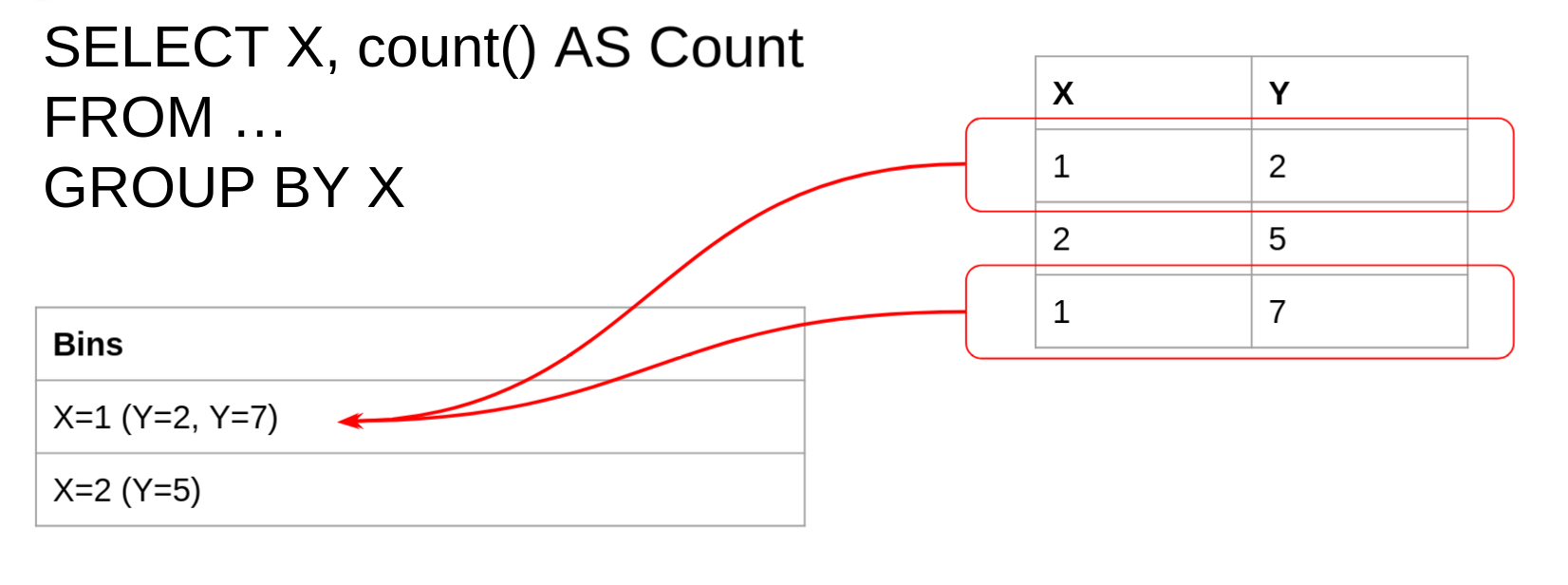
Consider the query in the example above, the GROUP BY clause
specifies that rows will be grouped where each bin has the same value
of the X column. Using the same table, we can see the first group
having X=1 contains 2 rows, while the second group having X=2
contains only a single row.
The GROUP BY query will therefore return two rows (one for each
bin). Each row will contain a single value for the X value and one
of the Y values.
Selecting columns with GROUP BY
As the above diagram illustrates, it only makes sense in general to select the same column as is being grouped. This is because other columns may contain any number of values, but only a single one of these values will be returned.
In the above example, selecting the Y column is not deterministic
because the first bin contains several values for Y.
Be careful not to rely on the order of rows in each bin.
Aggregate functions
Aggregate VQL functions are designed to work with the GROUP BY
clause to operate on all the rows in each bin separately.
Aggregate functions keep state between evaluations. For example
consider the count() function. Each time count() is evaluated, it
increments a number in its own state.
Aggregate function State is kept in an Aggregate Context - a
separate context for each GROUP BY bin. Therefore, the following
query will produce a count of all the rows in each bin (because each
bin has a separate state).
SELECT X, count() AS Count
FROM …
GROUP BY X
Aggregate functions are used to calculate values that consider multiple rows.
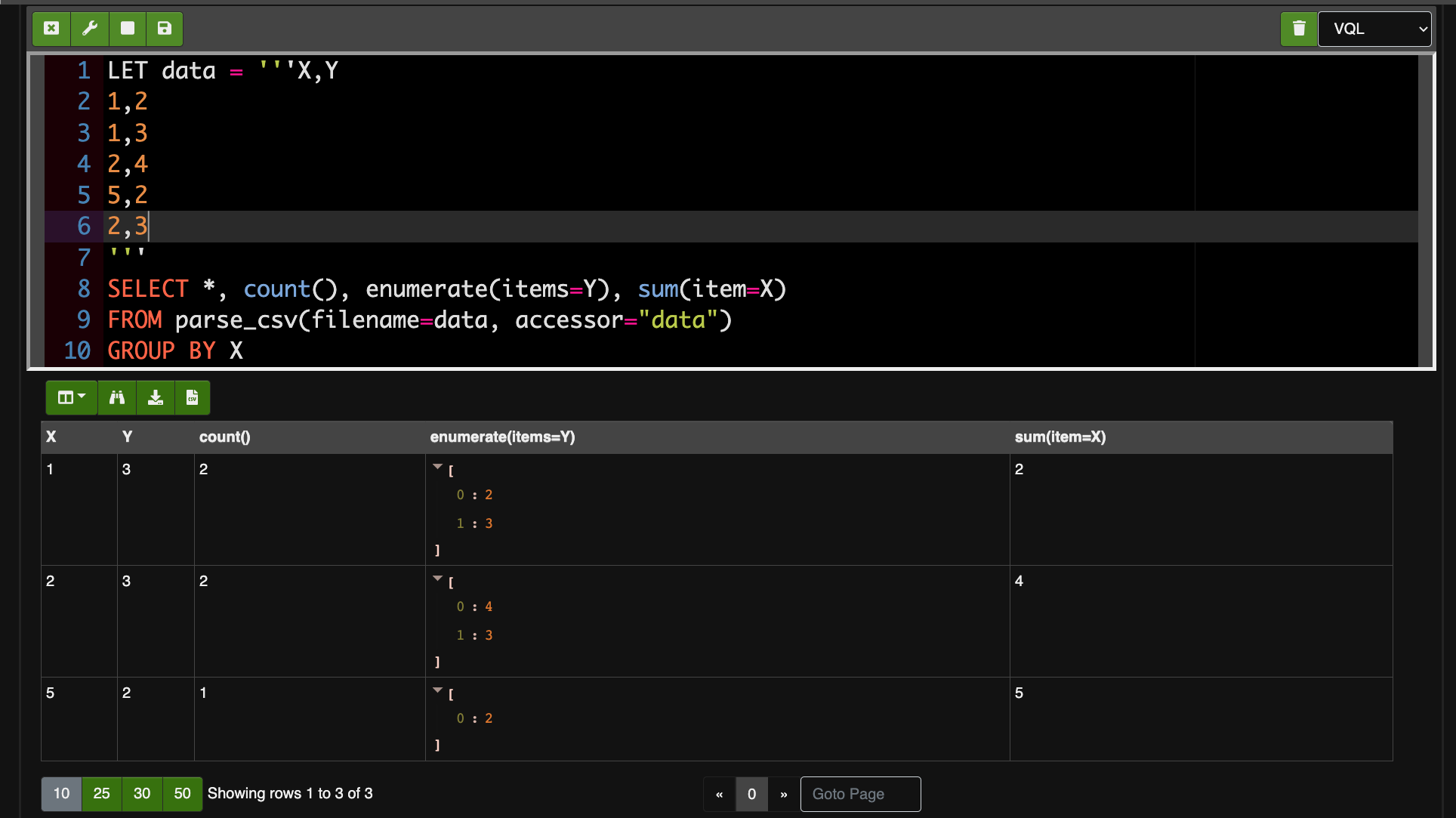
Some aggregate functions:
count()counts the total number of rows in each bin.sum()adds up a value for an expression in each bin.enumerate()collect all the values in each bin into an in-memory array.rate()calculates a rate (first order derivative) between each invocation and its previous one.
These can be seen in the query below.
VQL Lambda functions
In various places it is possible to specify a VQL lambda function. These functions a simple VQL expressions which can be used as filters, or simple callbacks in some plugins. The format is simple:
x=>x.Field + 2Represents a simple function with a single parameter x. When the
lambda function is evaluated, the caller will pass the value as x
and receive the result of the function.
Usually lambda functions are specified as strings, and will be
interpreted at run time. For example the eval() function allows a
lambda to be directly evaluated (with x being the current scope in
that case).
SELECT eval(func="x=>1+1") AS Two FROM scope()The scope that is visited at the place where the lambda is evaluated will be passed to the lambda function - this allows the lambda to access previously defined helper functions.
LET AddTwo(x) = x + 2

SELECT eval(func="x=>AddTwo(x=1)") AS Three FROM scope()
VQL Error handling
VQL queries may encounter errors during their execution. For example, we might try to open a file, but fail due to insufficient permissions.
It is especially not desirable to have VQL stop execution completely and abort when an error occurs. Usually we want the query to continue and produce as much data as possible. However, we do want to know that some things potentially went wrong.
Therefore VQL functions typically return NULL in the case of an
error, and log the error in the Query Logs. These logs are visible
in a number of places:
- When collecting an artifact from a client, the query logs are
visible in the
Logstab. - In a notebook cell the query logs are visible by clicking the
Logsbutton at the bottom of the cell. - With the API the query logs are returned in a separate response field.
When writing a VQL query, another aspect to think about is: what do we define as an error? For example if we write a VQL query to collect a bunch of files, but one of these files is unreadable - do we consider the query has failed? Should we just stop?
It really depends on a case by case basis.
Generally when collecting an artifact, a number of error conditions
might occur and some query logs will be produced. But the collection
is not automatically marked as an Error unless one of the following
conditions is met:
- Any logs are emitted at the
ERRORlevel (using thelog()function withlevel='ERROR'). - Any log messages match the error patterns defined in
Frontend.collection_error_regex. By
default this includes
Symbol not foundwhich usually indicates a mistake or typo with the VQL query itself. - Errors produced by the client itself (e.g. the query canceled or timed out)
When a collection indicates an error all it means is that something unexpected happened and a user needs to take a closer look. The collection may still contain useful data - it is a judgment call.
Therefore when writing your own VQL think if an error is actually something we need to alert the user about (i.e. there is no further value in the collection) or can we just log the error and move on.
Conversely as a Velociraptor user, when a collection is completed without an error it does not necessarily mean that everything worked perfectly - there may be some messages in the query logs that alert to some errors encountered. You should always take a quick look at the error logs to see if there is anything of concern.
Temporary or permanent errors
Note that an error may be temporary (e.g. the artifact collection timed out), or permanent (e.g. an error within the VQL itself, file not found etc).
It is not a good idea to automatically retry a collection unless you are sure the error is temporary - if the error is more permanent the same thing will happen again. It is always worth checking the query logs to make sure there is any point in retrying the collection.