Autoexec mode
Autoexec mode lets you run preset run commands automatically . It does this by including a default command line, and optionally custom artifact definitions, directly into the Velociraptor binary. When the binary is run without any CLI commands, the embedded commandline executes automatically.
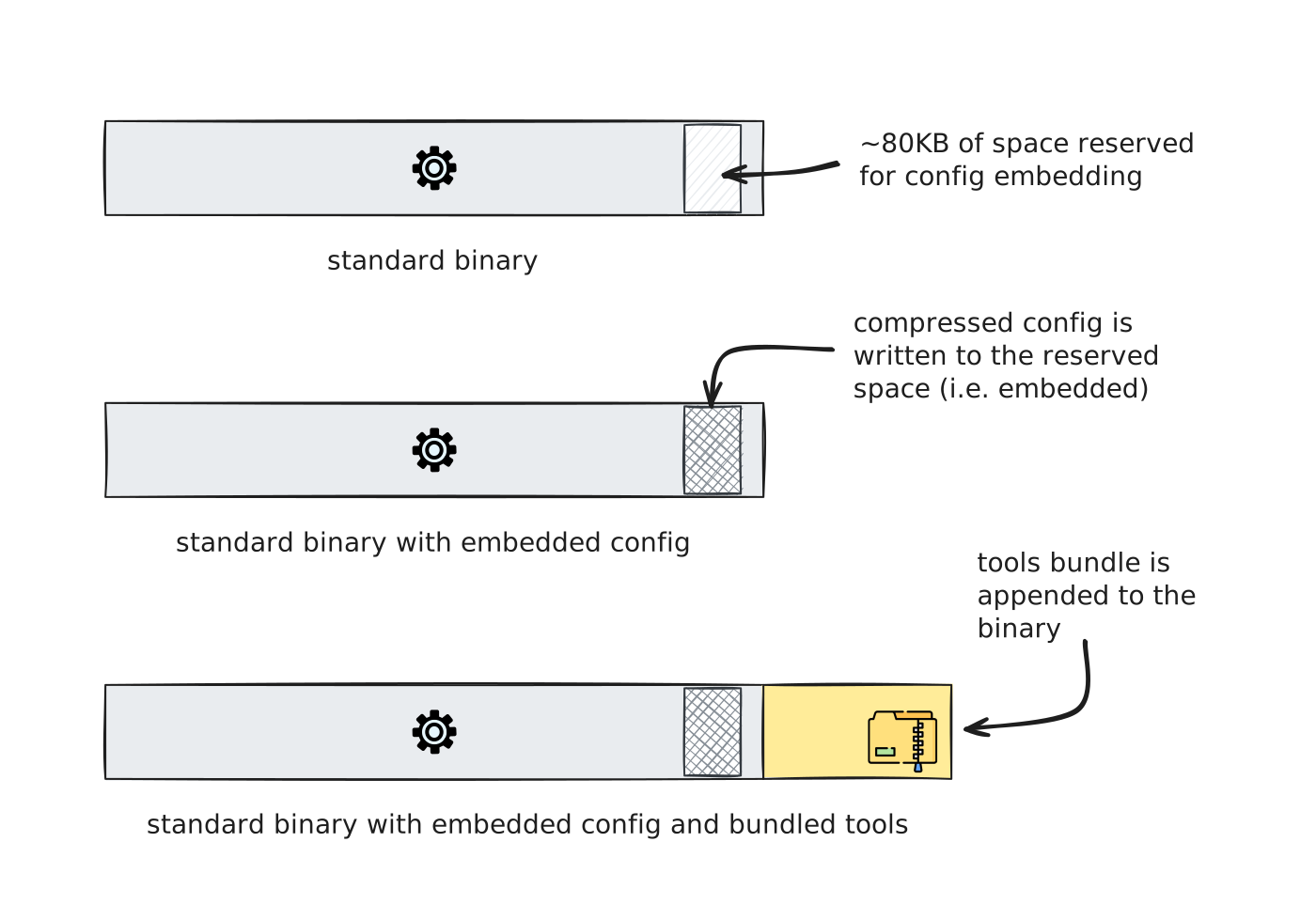
This is actually the mechanism used for offline collectors which are special-purpose binaries that collect artifacts and store the results locally without needing a server connection. But autoexec mode is also flexible enough for any other scenario where you want a Velociraptor binary to run some preconfigured commandline when double-clicked or launched from a script.
The binary always checks for an embedded config when it is launched.
If it has such a config and if the config contains an autoexec
section, then it uses it. This behavior is not triggered if any CLI
commands are provided. That is:
- With CLI commands: the commands are executed normally. The
autoexecsection is ignored. - Without CLI commands: if an
autoexec.argvsection exists, it is executed as if those arguments had been typed on the command line.
This means the embedded config with an autoexec.argv is treated as a
default commandline. Any explicit CLI command will take precedence
and override it.
Embedding a config with config repack
The config repack
command embeds a configuration file inside the Velociraptor binary:
velociraptor config repack [<flags>] <config_file> <output>See the section about config embedding to understand the mechanism in more detail.
Example
velociraptor config repack my_config.yaml my_collector.exeTo embed into a specific binary (instead of the current one), use
the --exe flag:
velociraptor config repack --exe /path/to/velociraptor \
    my_config.yaml my_collector.exe
You can also bundle tools into the
repacked binary using the --binaries flag:
velociraptor config repack --binaries MyTool \
    my_config.yaml my_collector.exe
The repacked binary is a fully functional Velociraptor binary. When run with CLI commands it behaves like any other Velociraptor binary. Autoexec mode only activates when the binary is launched without commands.
The autoexec config section
The autoexec section of the config has two parts:
autoexec:
  argv:
  - artifacts
  - collect
  - MyCollector
  - -v
  - --require_admin

  artifact_definitions:
  - name: MyCollector
    description: A custom collector artifact
    sources:
    - query: |
        SELECT * FROM info()
argv
The argv list specifies the default CLI arguments. These are the
same arguments you would type on the command line, where the first
element is the command, followed by any subcommands and flags.
For example, to start a client automatically:
autoexec:
  argv:
  - client
  - -v
  - --require_admin
To run an artifact collection:
autoexec:
  argv:
  - artifacts
  - collect
  - Collector
  - -v
  - --require_admin
artifact_definitions
The artifact_definitions list lets you optionally embed custom
artifact definitions directly in the config. These artifacts are
available whenever the binary runs, not just in autoexec mode.
Embedded artifacts take precedence over built-in artifacts compiled into the binary.
For more about artifact precedence, see Built-in vs. Compiled-in vs. Custom Artifacts.
Environment variable expansion
Values in argv are expanded at runtime using environment variable
substitution. Both Unix-style $VAR and Windows-style %VAR%
notations are supported:
autoexec:
  argv:
  - artifacts
  - collect
  - Collector
  - --output
  - $OUTPUT_DIR/results.zip
On Windows, %VAR% works the same way:
autoexec:
  argv:
  - artifacts
  - collect
  - Collector
  - --output
  - "%USERPROFILE%\\results.zip"
To include a literal $ character, escape it by doubling:
autoexec:
  argv:
  - echo
  - $$
The “post args” (--) pseudo-flag
The -- pseudo-flag solves a specific problem: running the binary
without any CLI arguments triggers autoexec mode, but adding any
CLI command causes autoexec to be skipped. The -- pseudo-flag lets
you append extra flags to the autoexec command without supplying a
command, so autoexec mode still activates.
For example, consider an offline collector binary that contains this
autoexec.argv section:
autoexec:
  argv:
  - artifacts
  - collect
  - Collector
  - -v
  - --require_admin
Without any arguments, the binary runs artifacts collect Collector -v --require_admin. To add --nobanner and --prompt to that
command line, use -- followed by the extra flags:
velociraptor_collector.exe -- --nobanner --promptBecause no CLI command appears before --, autoexec mode activates.
The post args are appended to the autoexec.argv command line,
making it equivalent to:
autoexec:
  argv:
  - artifacts
  - collect
  - Collector
  - -v
  - --require_admin
  - --nobanner
  - --prompt
Which produces the effective command line:
velociraptor_collector.exe artifacts collect Collector \
    -v --require_admin --nobanner --prompt
Any global or command-specific CLI flags can be used as post args.
Flag override limitation
If a flag is specified in autoexec.argv then it cannot be negated
or overridden via post args. You can only add flags that have not
already been used in the embedded command.
Example: Using custom artifacts with autoexec
You can combine embedded artifact definitions with autoexec to create self-contained binaries that run custom artifacts without any external dependencies:
autoexec:
  argv:
  - artifacts
  - collect
  - MyCustom.Artifact
  - -v

  artifact_definitions:
  - name: MyCustom.Artifact
    description: Collects specific forensic data
    sources:
    - query: |
        SELECT * FROM info()
This is especially useful for creating targeted collection binaries for specific investigations. The artifact definition is baked into the binary, so no need to distribute artifact files separately.
Example use cases
Offline collectors
The most common use of autoexec mode is
offline collectors:
binaries that collect artifacts without a server connection. The
collector builder
in the GUI creates these automatically, but you can also build them
on the command line with the
collector command.
Online (non-persistent) collectors
You can repack a client config with autoexec to create a binary that starts in client mode, connects to the server, and collects data, all without installation. This is useful when you need the interactivity of a live client but can’t install software on the target. See How to create an “online collector” binary for a detailed walkthrough.
Custom automation tools
Any CLI command can be embedded. For example, you could create a binary that automatically dumps server config, lists artifacts, or runs a specific VQL query, useful for scripted workflows or one-click operations.
Example: Create an API query binary
Normally the built-in API client is
run with a separate API config,
however it’s possible to include the API config in the embedded config
and then use the autoexec section to preconfigure the binary to run
in API client mode and run a specific API query against the server.
API config security
API configs contain cryptographic keys to authenticate against the server and should therefore be carefully guarded. A binary containing an embedded API config should be treated the with the same security considerations as a standalone API config file, since the embedded config can trivially be extracted from the binary.
As with any API client, ensure that the associated user account adheres to the principle of least privilege.
First create an API client config with the
config api_client command,
which mints a client certificate and writes the connection details and
key material to a YAML file. Then add an autoexec section to that
config:
autoexec:
  argv:
  - query

api_config:
  ca_certificate: |
    -----BEGIN CERTIFICATE-----
    ...
    -----END CERTIFICATE-----
  client_cert: |
    -----BEGIN CERTIFICATE-----
    ...
    -----END CERTIFICATE-----
  client_private_key: |
    -----BEGIN RSA PRIVATE KEY-----
    ...
    -----END RSA PRIVATE KEY-----
  api_connection_string: localhost:8001
  name: reader
Then we embed the config into a new binary:
velociraptor config repack my_api_config.yaml velociraptor_query.exeWe can then run the repacked binary and use the -- [pseudo-flag] to
pass it the actual query and any additional flags:
./velociraptor_query.exe -- "SELECT client_id, hostname, last_ip, last_seen_at FROM clients()" --format csvWrap one or more bundled tools
You can bundle an external tool into the binary and have autoexec run it with preset arguments. This is useful for distributing a single binary that wraps one or more utilities, and optionally their support files. This single binary can then be given to local support staff to run on machines without them needing to type a potentially complicated command line or set up supporting files (for example configuration files or other prerequisite files). This is similar to a self-extracting zip exe, with a predefined commandline baked into the binary.
Example: Wrap a 3rd-party tool
In this example, we’ll wrap the bumblebee package inventory assessment tool with a custom commandline. Note that this example is a bit contrived in order to demonstrate the basic concepts - we’re not recommending this particular utility, nor that it should be run this way, nor implying that its results will be particularly useful. You can easily substitute your own tool (or multiple tools) and command line in the same manner.
First embed the tool with config repack --binaries. The tool must be
registered in the server’s tool inventory:
velociraptor config repack --binaries Bumblebee \
    my_config.yaml bumblebee_runner.exe
The bundled tool is stored in the binary’s embedded archive under
uploads/, alongside an uploads/inventory.csv that maps tool names
to their bundled filenames. A custom artifact reads this inventory via
the me accessor,
copies the tool out to an executable temporary file, and runs it with
execve:
autoexec:
  argv:
  - artifacts
  - collect
  - Custom.Bumblebee.Scan

  artifact_definitions:
  - name: Custom.Bumblebee.Scan
    description: Run the bundled bumblebee scanner against this host
    sources:
    - query: |
        LET tool <= SELECT Filename FROM parse_csv(
            filename="/uploads/inventory.csv", accessor="me")
        WHERE ToolName = "Bumblebee"

        LET bin <= copy(filename=tool[0].Filename, accessor="me",
            dest=tempfile(permissions="x", remove_last=TRUE))

        SELECT Stdout FROM execve(argv=[
            bin, "scan", "--profile", "baseline",
            "--output=file", "--output-file=/tmp/bumblebee.ndjson"])
The me accessor reads files directly
from the binary’s embedded archive; it cannot execute them. The copy
step copies the tool to a real file on disk (with execute permissions
set), and execve runs it from there. Here bumblebee writes its scan
results straight to a file using its own --output=file flag, so no
extra VQL is needed to capture the output. One of the benefits of
wrapping a tool in an autoexec binary is that you could use VQL to
filter and reformat the tool’s output, and use VQL functions to write
the results to a format or output destination that the tool itself
doesn’t support.
The Generic Collector uses autoexec mode under the hood
Normally, autoexec mode requires repacking the config into the
binary. The
Generic Collector
is a variation where the config is stored in a separate file and
referenced at launch using the --embedded_config flag. This approach
is required on macOS (where code signing prevents binary modification)
and is also useful when the embedded config exceeds the embedding size
limit (80 KB). The generic collector config file and the embedded
config share the same format, and it is worth noting that it uses
autoexec mode.
However, Velociraptor does not currently provide a way to create a
generic collector that runs anything other than the offline
Collector artifact. The generic collector builder always generates
an autoexec section that runs artifacts collect Collector. So
while autoexec mode works with a generic collector config, it is only
useful for collecting artifacts; you cannot use it to run other CLI
commands (such as the API query or bundled tool examples above). This
means autoexec mode is not an option in situations where you would
otherwise need --embedded_config to avoid embedding a config into a
binary.