The "collector" command
Builds an offline collector.
[ collector ]
collector [<flags>] [<spec_file>]
    Build an offline collector

    --datastore=DATASTORE  Path to a datastore directory (defaults to temp)
    --format=json          Output format to use (text,json,csv,jsonl).
    --[no-]force           Ignore schema errors and use it anyway

Args:
  [<spec_file>]  A Spec file to use.
Typically offline collectors are built using a user-friendly wizard-style workflow in the GUI.
The collector command allows you to do the same thing on the command line.
This is mainly intended to support automated build environments.
The GUI is the recommended way to create offline collectors, particularly for new users.
Creating a collector
The process of creating an offline collector on the command line consists of 2 steps:
-
Create a YAML spec file which details all the options to be used when creating the collector.
-
Run the
collectorcommand and provide it with the spec file.
The computer that you create collectors on will potentially need to have internet access so that it can download tools and additional Velociraptor binaries (under certain circumstances it may need to - see the section on server integration below).
Obtaining a sample spec file
If you run the collector command without any arguments it will print an
example spec file in the terminal. You can redirect the output to a file and
then use that as a starting point, customize it, and then build a new offline
collector binary.
velociraptor collector > sample_spec.yamlObtaining a spec file from the GUI
From version 0.75.5 the Server.Utils.CreateCollector artifact will create the
corresponding spec file and store it in the collection’s Uploads section, in
addition to the repacked collector binary.
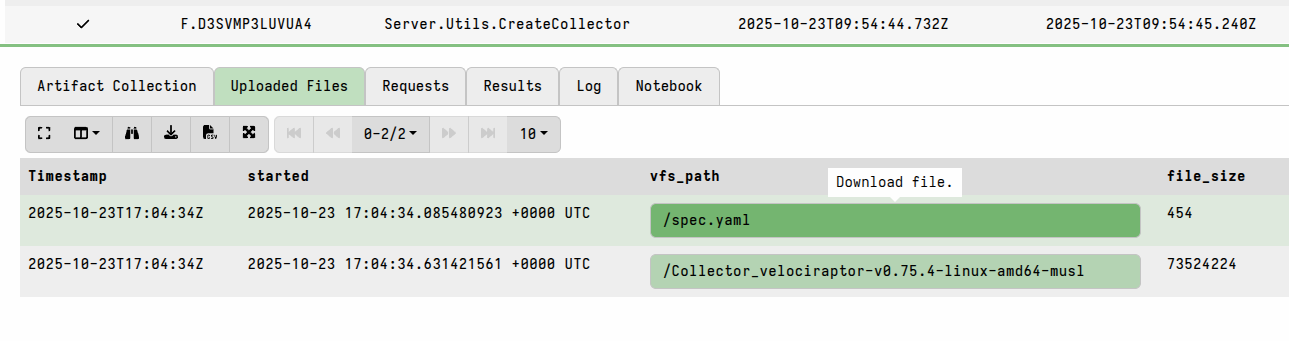
This allows you to create an initial collector using the GUI and then rebuild the same collector - perhaps with a few tweaks - using the CLI. The CLI build process can be useful when you intend to periodically rebuild/update a set of standardized collectors, possibly in a separate build environment. You might also want to set this up as a repeatable process for when new Velociraptor versions are released.
Spec file formatting
The spec file provides parameters to the Server.Utils.CreateCollector artifact
which creates the collector. This means that all fields and their associated
values defined in the spec file have to be valid parameters for this artifact.
While the spec file is YAML, all values in it are specified as strings. This means that items such as artifact parameters which expect compound data types need to be specified as serialized JSON and not as the equivalent YAML data types.
For example, the following spec is invalid and will not be parsed correctly:
# The list of artifacts and their args.
Artifacts:
 Windows.Triage.Targets:
    VSS_MAX_AGE_DAYS: 3
    HighLevelTargets:
      - _KapeTriage
      - _BasicCollection
      - _Live
      - _SANS_Triage
 Windows.Sysinternals.Autoruns:
    All: Y
The correctly formatted version of the above would be:
# The list of artifacts and their args.
Artifacts:
 Windows.Triage.Targets:
    VSS_MAX_AGE_DAYS: '3'
    HighLevelTargets: '["_KapeTriage","_BasicCollection","_Live","_SANS_Triage"]'
 Windows.Sysinternals.Autoruns:
    All: 'Y'
Note that in the above example we must force YAML to treat the number 3 as a
string, which we do by enclosing it in quotes. The same is necessary for the Y
since we need it to be a string rather than a YAML boolean field.
The formatting tends to be more readable if you use a combination of single and
double quotes, as in this example, but you can escape inner quotes with a \
character if you prefer that alternative.
- To specify an empty field value where a JSON object is expected, you should
use the notation for an empty JSON object: e.g.
Foo: {}(without quotes). - For a field that expects a simple string the empty string value, e.g.
Foo: "", should be used. - You should never leave values blank (e.g.
Foo:) since this is interpreted asNullwhich is never a valid value for artifact parameters.
Integrating collector builds with a Velociraptor server
Certain offline collector options imply integration with an existing server:
- if the collector needs to include tools from the server’s tools inventory (necessary when your selected artifacts require these tools and when those tools can’t be downloaded directly from the internet on the computer that you are creating the collector on).
- you want the collector to create X.509-secured collection containers (which is a recommended option).
- you want the collector to include custom artifacts that are in the server’s artifact repository.
If you don’t need to integrate your offline collectors with a Velociraptor server in any of the ways described above then all you need is the Velociraptor binary, and you can skip the rest of this section.
When running the collector command there are a few command line flags that can
be used to link it to an existing server datastore for the reasons stated above.
The choice of which flags to use depends on which of the above options you need,
and whether you are working on the Velociraptor server itself or in a separate
build environment:
-
You can use the
--datastoreflag with thecollectorcommand to provide it with access to a server datastore. This gives it access to the tools inventory and artifact repository contained in that datastore. -
Offline collectors can create X.509-secured collection containers using the server’s certificate, which can then be transparently imported to your Velociraptor server. To enable that you’ll need to provide the
collectorcommand with access to your server’s config (the server into which the archives will be imported). The server config contains the server certificate which can be used to encrypt the collection containers. To point thecollectorcommand to the server config you can use the--config(or-c) flag. -
You can use the
--definitionsflag with thecollectorcommand to point it to a folder containing custom artifact definitions. In a separate build environment you may have copied theartifact_definitionsdirectory from your server. Note that using this flag is not needed if you want to use custom artifacts that are in your server’s datastore, and you have used either of the previously described options (--datastoreor--config) which should allow the command to locate the datastore and the custom artifacts contained in it.
The options requiring access to a Velociraptor config or datastore don’t mean
that you are required to build the offline collectors on your production server.
When using the --config or --datastore flags you can work with a copy of the
config and a temporary datastore, or you can replicate (i.e. create a copy of)
your server’s config or datastore in a separate build environment.
Also note that the --config or --datastore flags only connect it to files -
the status of the Velociraptor server associated with those files is irrelevant
because the command is not connecting to the server process. The collector
command actually spins up a separate temporary server, which is
technically similar to an
Instant Velociraptor
instance, just for the purpose of creating collectors. In the process
it creates a temporary datastore on disk with it’s own
server.config.yaml. Unless you specify the --datastore flag, this
temporary datastore will be created in your operating system’s temp
directory. Unless you specify the --config flag a new
server.config.yaml will be created in that temporary datastore.
Example workflow
-
Create a temporary datastore location and obtain an initial spec file template:
$ mkdir /tmp/datastore/ $ ./velociraptor collector > /tmp/datastore/spec.yaml velociraptor-v0.75.4-linux-amd64: error: collector: No Spec file provided-
The first command prepares a temporary datastore location that we will use in subsequent steps.
-
The second command outputs an example spec and writes it to a file in the newly created directory. Because we have not provided the required
[<spec_file>]parameter, Velociraptor prints a template to the Stdout which we redirect to a file.
-
-
Next, edit the spec file (which is heavily self-documented via YAML comments). You will see that most options are similar to the ones presented in the GUI’s collector builder wizard, although in the spec file the YAML keys are
snake_caserather thanCamelCase. -
To build the collector, run the
collectorcommand with your edited spec file:$ ./velociraptor collector --datastore /tmp/datastore/ /tmp/datastore/spec.yaml ... Running query LET _ <= SELECT name FROM artifact_definitions() []Running query LET Spec <= parse_yaml(filename=SPECFILE) [INFO] 2025-11-05T12:12:21Z Compiled all artifacts. []Running query LET _K = SELECT _key FROM items(item=Spec.Artifacts) []Running query SELECT * FROM Artifact.Server.Utils.CreateCollector(OS=Spec.OS, artifacts=serialize(item=_K._key), parameters=serialize(item=Spec.Artifacts), target=Spec.Target, target_args=Spec.TargetArgs, encryption_scheme=Spec.EncryptionScheme, encryption_args=Spec.EncryptionArgs, opt_verbose=Spec.OptVerbose, opt_banner=Spec.OptBanner, opt_prompt=Spec.OptPrompt, opt_admin=Spec.OptAdmin, opt_tempdir=Spec.OptTempdir, opt_level=Spec.OptLevel, opt_concurrency=Spec.OptConcurrency, opt_filename_template=Spec.OptFilenameTemplate, opt_collector_filename=Spec.OptCollectorTemplate, opt_format=Spec.OptFormat, opt_output_directory=Spec.OptOutputDirectory, opt_cpu_limit=Spec.OptCpuLimit, opt_progress_timeout=Spec.OptProgressTimeout, opt_timeout=Spec.OptTimeout, opt_version=Spec.OptVersion, opt_delete_at_exit=Spec.OptDeleteAtExit) [INFO] 2025-11-05T12:12:21Z Downloading tool VelociraptorWindows FROM https://github.com/Velocidex/velociraptor/releases/download/v0.74/velociraptor-v0.74.5-windows-amd64.exe client_repack: Will Repack the Velociraptor binary with 6488 bytes of config Uploaded /tmp/datastore/Collector_velociraptor-v0.74.5-windows-amd64.exe (67637688 bytes) [ { "Repacked": { "Path": "/tmp/datastore/Collector_velociraptor-v0.74.5-windows-amd64.exe", "Size": 67637688, "sha256": "8d1bbeafe44a3f7368152c919ead670adad2698fb19a603ee65c835ccaacc54f", "md5": "8652b8bef0f95c52825c28d03ad7b540", "Components": [ "Collector_velociraptor-v0.74.5-windows-amd64.exe" ] }, "_Source": "Server.Utils.CreateCollector" } ]DEBUG:Query Stats: {"RowsScanned":432,"PluginsCalled":3,"FunctionsCalled":3,"ProtocolSearch":0,"ScopeCopy":867} [INFO] 2025-11-05T12:12:40Z Exiting notification service for Org <root> (root)!
As you can see in the above output, the collector command is really just a
wrapper for the Server.Utils.CreateCollector artifact. Therefore it’s
functionality could be replicated using the same VQL
query against the API,
but that would be far less convenient.
Reproducing configurations from previously-created collectors
From version 0.75.5 the Server.Utils.CreateCollector artifact will create the
corresponding spec file and store it in the collection’s Uploaded Files tab,
in addition to the repacked collector binary.
You can preview the spec in the GUI or download it and possibly edit it before
using it with the CLI collector command.
Note
In versions prior to 0.75.5 a spec file was not generated when running a
Server.Utils.CreateCollector. However if you upgrade to v0.75.5 or above you
can select an old collection and use the “Copy Collection” button to re-run the
same collector builder process. The new collection will then contain the updated
build of the collector plus the corresponding spec file.
If you haven’t upgraded yet then the process is very manual:
-
For a previously run
Server.Utils.CreateCollectorflow you can inspect the Requests tab to see what settings were used and then manually transcribe them if needed. Generally it is easier to use the Copy Collection button in the GUI to rebuild an offline collector, possibly tweaking some settings in the process. However you might want to switch from using the GUI collector builder to using the CLIcollectorcommand and would therefore need to transcribe the settings into a spec file. -
For a previously created collector you can inspect the embedded config using the
config showCLI command and then manually transcribe the settings into a new spec file. While this is not the most pleasant way to do things, sometimes it is the only option. For example, you might only have access to a collector that someone else created and you need to rebuild it on the latest version or modify some of it’s settings.
Keep your collector spec files safe!
A lot of work can go into designing, testing and tuning offline collector specs.
If you do this in the GUI then the Server.Utils.CreateCollector collections
store the details that were used. Re-running any of those collections will build
a new collector based on the original spec.
But over time it may become difficult to figure out which collection in the GUI created which offline collector. Or you might rebuild your server and accidentally lose those collections. Or you might be setting up a new server and want to replicate a collector build that was done on another server. Or you might want to rebuild your offline collectors periodically, particularly after server updates/upgrades or after making changes to your custom artifacts.
For all of the above reasons, it a good idea to store copies of your offline collector spec files somewhere safe for future use. As with your server config, these files may contain sensitive information (e.g. passwords) so ensure that you also apply appropriate security controls to the stored copies.