Limiting resource usage
Velociraptor often runs on performance sensitive endpoints, like servers and laptops, as well as low resource machines like cloud virtual machines. It is critical to ensure that Velociraptor does not generate undue load on the endpoint, leading to performance degradation.
Resource limits can be placed on queries and collections. These limits
are usually set in the artifact collection or hunt creation workflows
in the GUI. However it is possible to predefine these limits in the
artifact definitions themselves using the resources key. If resource
limits are specified in the artifact then the user still has the
opportunity to change these as usual in the GUI workflows.
Resource limits are essential for controlling the load on endpoints and preventing collections from negatively impacting users or network infrastructure. They protect the endpoint.
Not a security boundary
Resource limits are enforced by the Velociraptor client on itself and are not validated server-side. A compromised or malicious client can ignore these limits entirely. Treat resource limits as a cooperative safeguard against accidental runaway collections, not as a security boundary against untrusted clients.
They act as a “fail safe” mechanism to prevent accidents, such as inadvertently collecting massive quantities of data or using excessive resources.
Setting resource limits can ensure that runaway queries or collections that take too long are cancelled before they cause too many problems.
Resource control is specific to an artifact and what it does. For example, CPU limiting is useful for artifacts doing heavy processing like Yara scans but not necessarily for others.
Limits are set using the resources key in the artifact definition.
resources:
timeoutops_per_secondcpu_limitiops_limitmax_rowsmax_upload_bytesmax_batch_waitmax_batch_rowsmax_batch_rows_buffer
If you define resources in your artifact, you only need to specify
the subkeys relevant to the resources you want to limit. Default
values will apply to any subkeys not specified, and as mentioned
above, users still have the opportunity to override these limits in
the GUI before collecting the artifact.
Example:
resources:
  timeout: 1800
  cpu_limit: 50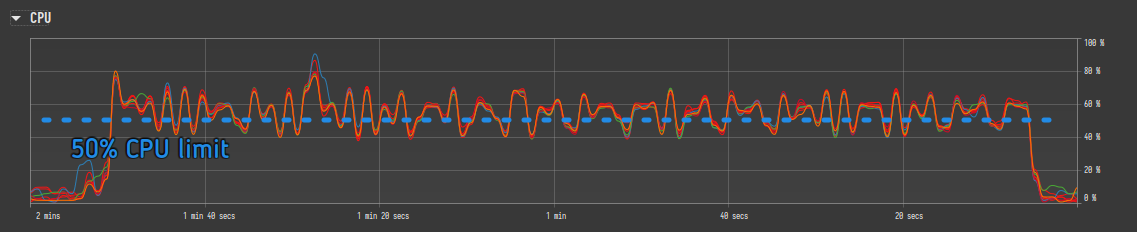
How Limits Are Aggregated Across Artifacts
When a collection includes multiple artifacts, the effective resource
limits are calculated by taking the maximum value across all
artifacts’ resources blocks. For example, if artifact A specifies
max_rows: 10 and artifact B specifies max_rows: 20, the
collection will have max_rows: 20. This aggregation applies to all
numeric resource limits.
Values specified in the collection request (via the GUI or API) override the artifact-level defaults entirely. The precedence order from lowest to highest is:
- Built-in defaults in the Velociraptor configuration
- Artifact
resourceskey (in the artifact YAML definition) - Artifact spec overrides (per-artifact overrides in the collection request)
- Collection-level request values (set in the GUI or API)
Time Limits
There are two timeouts. The first is for the overall collection and for offline collections there is no timeout by default. There is also a progress timeout which aims to catch cases where a query is not making progress in a reasonable time.
Timeout / Max Execution Time: This sets a maximum duration for an
artifact collection. The default timeout is 600 seconds. If the
timeout is reached, the collection is timed out and cancelled.
-
timeout(Query Timeout): A general timeout parameter can be set for a query. This timeout applies to the entire query and cancels the collection when exceeded. Timed-out flows might need to be re-run with increased timeouts Setting a timeout is considered a way to make a query safe enough. Queries are typically limited to 10 minutes (600 seconds). -
progress_timeout(Max Idle Time in Seconds): This parameter, set in the resources section, terminates a query if no progress (rows emitted) is detected within the specified time. By default, it is not set (which means there is no limit). In the context of offline collectors, this kills the specific artifact that is not making progress, allowing the collection to move on. This parameter can also be provided to thequery()plugin for more fine-grained control. This limit cannot currently be specified in an artifact’sresourcessection. -
Notebook Query Timeout: The timeout for notebook queries is 10 minutes, by default. Normally this should be more than sufficient for any reasonable notebook query, but in rare cases if you need to set this to a longer interval you can do so via a config setting (which requires a server restart).
Resource Limits
Resource limits can be applied to any artifacts/collections, although the effectiveness of these limits depends on what the artifact actually does. In particular CPU and IO limits are not enforceable when running external applications via execve().
-
CPU Limit: This limits how much CPU the Velociraptor agent can use on average.
-
Setting a CPU limit pauses the query when the average CPU usage exceeds the limit, and it resumes when the average drops below the threshold.
-
CPU limiting works in all queries, but the underlying plugin needs to support pausing.
-
CPU limiting can cause queries to take longer or even not complete if the limit is set too low, since a limited query will stop until the CPU load for the entire process drops below the threshold, other queries which are not limited may preempt it.
-
Setting a global CPU limit is generally not recommended; Only artifacts which are known to impose a high CPU load should have throttling enabled.
-
-
IOPS Limit: The iops_limit parameter limits the I/O per second. The mechanism works by throttling the client based on an IO budget, not necessarily tied to real CPU load or bandwidth, and is most useful for large Yara scans. It can also be set on the
query()plugin. -
Ops Per Second: The
ops_per_secondparameter limits the rate at which VQL operations are executed. This is useful for throttling artifacts that iterate over large numbers of files or registry keys, preventing them from overwhelming the endpoint. This limit is set at the collection level in the GUI rather than in the artifact definition.
CPU and IOPS limits do not apply to external tools invoked by an artifact since Velociraptor has no control over the resources they consume.
Data Limits
-
Max Rows: This limit restricts the total number of rows returned by a collection. This limit is set per collection and works by cancelling the entire collection once the limit is reached. Server artifacts currently don’t enforce a row limit.
Do not confuse
max_rowswithmax_batch_rows(see Batching Controls below).max_rowsis a hard limit on the total number of rows the collection may emit — the collection is cancelled when exceeded.max_batch_rowscontrols how many rows are included in each individual response chunk during transmission; it does not cancel the collection. -
Max Upload Bytes: This limits the total amount of data transferred back from the client as an “Upload” (i.e. bulk files). This limit is set per collection and cancels the entire collection when reached. This is a crucial limit to prevent accidentally collecting massive amounts of data.
Batching Controls
The max_batch_wait, max_batch_rows, and max_batch_rows_buffer
parameters control how the Velociraptor client chunks results into
response packets during collection. They do not limit the total
data collected — they determine the granularity of data transmission
from the client back to the server.
These settings are most relevant for event-based or long-running queries where you want to control how frequently results arrive at the server and how large each payload is.
-
Max Batch Rows (
max_batch_rows): The maximum number of rows to buffer before sending a response packet. When the buffer reaches this many rows, the payload is flushed and transmitted. The default is 1000 rows. -
Max Batch Wait (
max_batch_wait): The maximum time in seconds to wait before sending a partial payload. If the row count or buffer size thresholds have not been reached within this time, the accumulated rows are sent anyway. This ensures the server sees progress even for slow queries. The default is 100 seconds. -
Max Batch Rows Buffer (
max_batch_rows_buffer): The maximum size in bytes for a response payload before it is sent. This is a fairer measure than row count because rows can vary significantly in size. The default is 5 MB (5 * 1024 * 1024 bytes).
The first condition to be met — row count, buffer size, or wait timeout — triggers a payload flush. For example, if a query produces very large rows, the buffer size limit may be reached before the row count limit, causing an early transmission.
Example:
resources:
  max_batch_rows: 5000
  max_batch_wait: 30
  max_batch_rows_buffer: 10485760
This configuration would send a response packet when either 5,000 rows, 10 MB of data, or 30 seconds of wall time is reached, whichever comes first.
Limiting Memory Use
It is not possible to limit memory usage via artifact resource settings. However, Velociraptor provides memory management at both the client and server levels through configuration settings.
Client-Side Memory Management
The client runs a nanny
process that periodically checks the client’s memory footprint. The
Client.max_memory_hard_limit
setting specifies a hard ceiling (in bytes) for the client process.
If the client’s heap usage exceeds this limit, the nanny triggers a
controlled hard exit. If Velociraptor is installed as a Windows
service, the service recovery option can restart the client
automatically.
Server-Side Memory Management (Notebooks)
On the server, memory pressure is managed through notebook cell calculation controls:
-
defaults.notebook_memory_low_water_mark: A threshold (in bytes) that must be met before a new notebook cell calculation can start. If the server process memory exceeds this mark, the cell calculation is delayed until memory drops below it. This prevents new calculations from starting under high memory pressure. -
defaults.notebook_memory_high_water_mark: An upper threshold (in bytes) that triggers cancellation of in-flight notebook cell calculations. When the server process memory exceeds this mark, active cell calculations are cancelled to bring memory usage back down.
The low water mark acts as a soft admission control (delay new work) while the high water mark acts as a hard cancellation (kill in-flight work). These settings are independent of artifact collection and apply only to notebook cell execution on the server.