Preserving Forensic Evidence
Scenario
As a system administrator you have a high level of confidence a certain endpoint is compromised. You wish to preserve critical evidence while arranging for a more experienced DFIR professional to examine the evidence.
Main takeaways
- This technique is a “shotgun” approach - it typically collects a lot of data.
- Not very targeted.
- Does not scale to many endpoints - use when very confident an endpoint is compromised.
- DFIR skill required - LOW.
Steps to take
Some common artifacts that are used in a preservation collection:
Windows.KapeFiles.Targets- collects files such as$MFT, log files etc.Windows.Memory.Acquisition- collects a physical memory image.
If Velociraptor is already installed on the endpoint
For collecting from a single endpoint
- Search for the client you want to acquire from the main search screen.
- Select
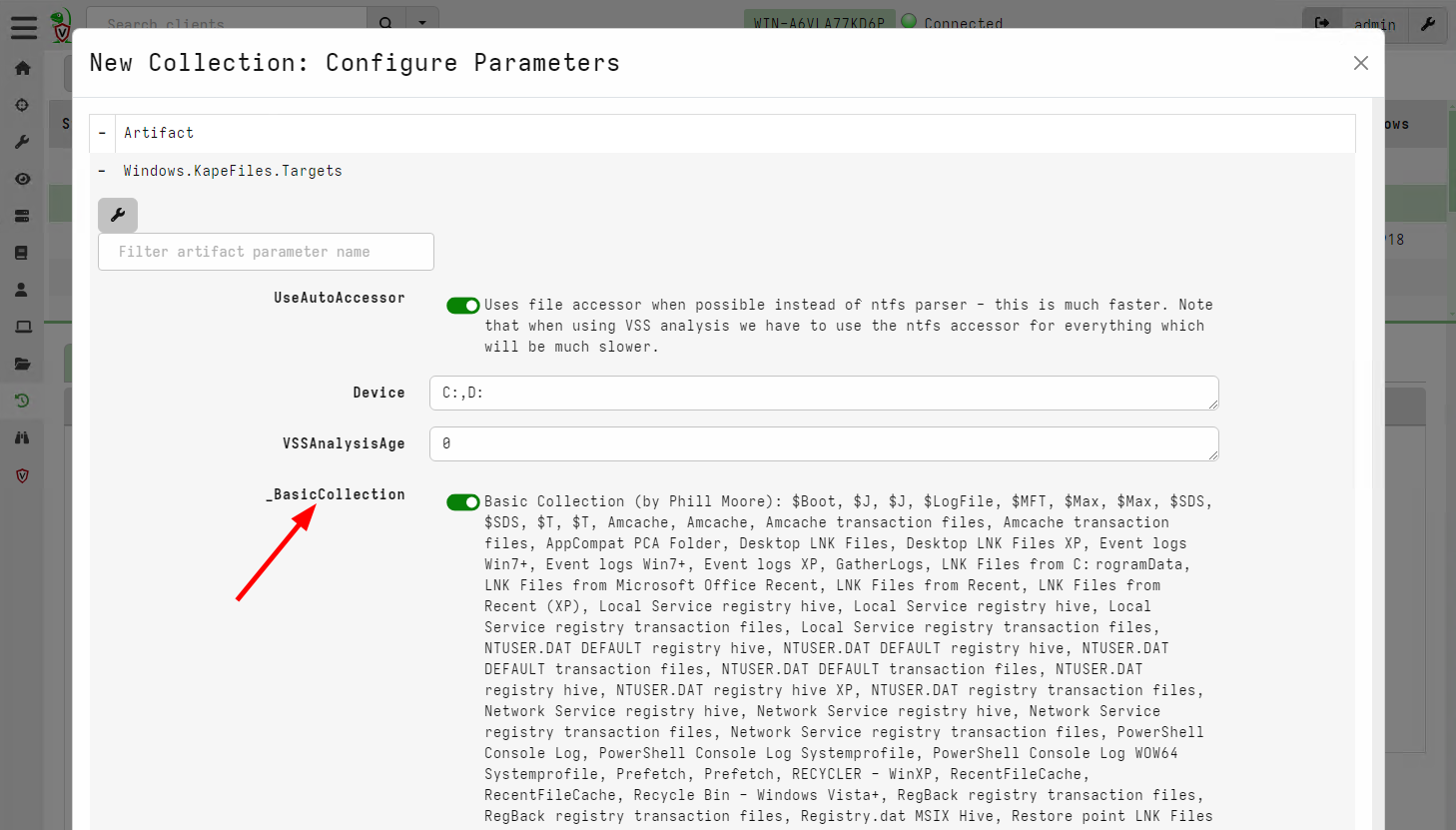
Collected Artifactsfrom the sidebar, then selectNew Collectionfrom the toolbar. - For Windows systems, select
Windows.KapeFiles.Targets. - Select the
BasicCollectionorKape TriageorSANS Triagetargets. These targets select the most common raw files used by DFIR analysts. - This artifact can collect a large amount of data, we recommend to place resource limits to ensure that collection is not too excessive.
If you will have a number of endpoints to collect you can use a hunt to combine the data together:
- In the
Hunt Managerscreen, create a new hunt. Restrict the hunt to a labelacquisition. - Proceed to collect the same artifacts as above
- As the investigation proceeds, when you find a client that warrants
a preservation collection, simply add a label
acquisitionto the client. TheWindows.KapeFiles.Targetswill be automatically scheduled on this client. - You can view all acquired clients in the hunt overview page, and create a large zip export of all preserved files.
Ensure the hunt is restricted by labels!
Make sure this hunt is restricted by labels! If it is not, it will be scheduled on all clients and may result in a lot of data being transferred to the server - this can result in the server’s bandwidth being saturated, disk becoming full or server becoming unresponsive.
If this happens you can stop the hunt in the GUI which will cancel all in-flight collections and eventually recover the server’s bandwidth.
If Velociraptor is not installed on the endpoint
If Velociraptor is not already installed on the endpoint, you can use
an offline collector. The Velociraptor Offline Collector is a
preconfigured version of Velociraptor which can run on the endpoint
and write all raw files into a ZIP archive.
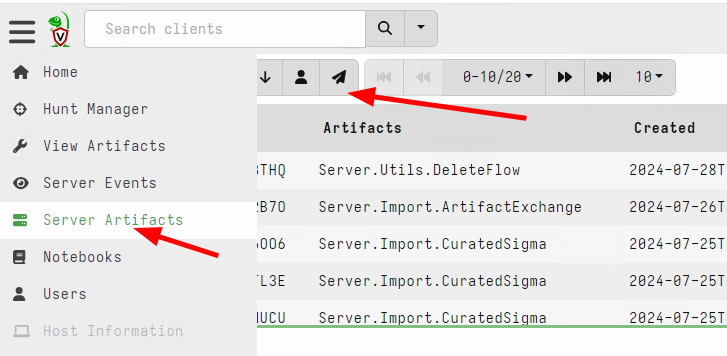
You can use a number of methods to push the offline to collection to the endpoint:
- Use an existing EDR or endpoint security product to run the binary and retrieve the collected ZIP file.
- Use Group Policy to schedule a task that runs the collector from a remote share.
- Use
WinRMorPsExecto run the collector remotely (by careful of pass the hash type attacks though).
We recommend using the X509 encryption scheme to store the raw data to an encrypted container. This helps to protect it in transit.
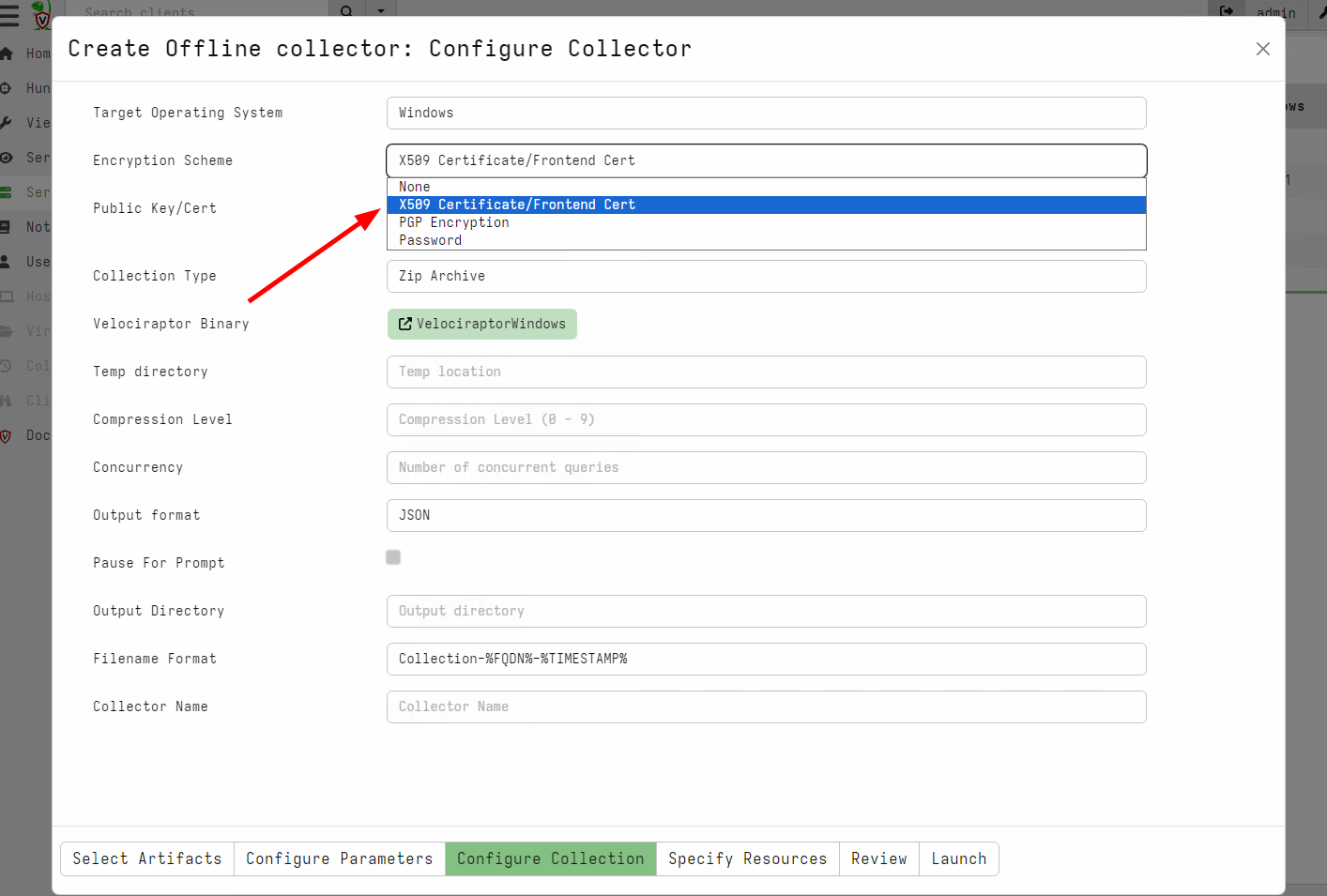
You can also configure the offline collector to automatically upload
the collection to a cloud storage, such as S3, Google Cloud Storage or a Windows file share.
When to use this technique?
This technique should be used sparingly, usually targeting few systems, as it can transfer a large amount of data.
Typically this technique is used when the endpoint is likely to be destroyed (e.g. re-imaged) or become inaccessible in the near future. The method is most suitable for preservation of raw data.
When not to use this technique?
This workflow is not appropriate for triage. A triage workflow is
about discovering unknown compromised endpoints and therefore by
definition must be applied to a large number of endpoints. The
Preserving Forensic Evidence workflow can not be applied to a large
number of endpoints.
The traditional digital forensics workflow consists of the following steps:
Acquisitionstep collects a large amount of raw data to a central server.Analysisstep applies parsers and various dedicated tools in a central “forensics workstation” on all the raw data collected.Interpretationstep involves examining the output from the various parsers to answer case specific questions.
Many newcomers to Velociraptor have been trained with this workflow and try to apply it to Velociraptor.
However this centralist approach to digital forensics does not scale in practice. When trying to apply this approach to a large network of endpoints, users are often overwhelmed with data (it is almost a right of passage for new Velociraptor users to completely fill their server’s disk because they tried to collect all the log files from all the endpoints)
Velociraptor’s philosophy is different:
- Velociraptor considers the endpoint to be the ultimate source of truth.
- Therefore we rarely need to fetch the raw data from the endpoint! Since Velociraptor can parse the raw data directly on the endpoint we prefer asking case relevant questions from the entire network directly.
To explain this point, let’s consider an example where we want to know if an executable file was recently downloaded onto the endpoint. We will attempt to parse the USN Journal to answer this question.
The very traditional Digital Forensics process (i.e. back in the 90s) would require acquiring a bit for bit disk image of the suspected endpoint with a write blocker attached! Probably no-one does this any more!
A more modern approach is to use a digital acquisition tool to copy
just the C:\$Extend\$UsnJrnl:$J file in it’s entirety for
Acquisition, then apply a separate tool to parse the journal and
search for any files written to the disk with a .exe extension.
While this approach is better than acquiring the entire disk image (Average disks are of the range of 1-2Tb these days), it still requires collecting several hundred MB of data from each endpoint. If you have 10,000 endpoints this quickly becomes intractable.
Velociraptor’s approach is different: Since the endpoint is considered
the source of truth, we just directly run our analysis on the
endpoint. Collecting the Windows.Forensics.Usn artifact with a
FileNameRegex filter of .exe$ will query each machine to parse
their own local copy of the USN journal to find all executables
directly.
We can collect this artifact using a hunt from the entire network at once. Since each endpoint will be doing the analysis in parallel, results will return in minutes regardless of how many endpoint there are!
This is why we consider simple acquisition followed by central analysis workflows to be inferior to directly collecting the right artifacts.
You should use the Preserving Forensic Evidence workflow only on
systems that are known to have been compromised and you want to
preserve the raw files for some reason.
Other considerations
When collecting raw files from the endpoint we need to make a trade-off:
- Collecting fewer files may miss some files that are needed later during analysis.
- Collecting more files will result in larger collection.
Ultimately it is not possible to know in advance what type of evidence
may be relevant. For example, we might collect the $MFT in our
initial acquisition but subsequent analysis can show that certain
files are critical (e.g. files in the user’s Downloads directory).
In a Preserving Forensic Evidence workflow we can not go back to the
source of truth and check the files in the Downloads directory!
Therefore it is always better to have Velociraptor already installed on the endpoint so we can pivot during the analysis phase and get additional information as required.