Remote Orgs
This article is about an experimental feature present in version 0.77.4. This feature is still experimental although the Velociraptor team is seeking feedback and testing.
Velociraptor Org architecture
Velociraptor breaks clients into groups called “Orgs”. Each org is considered a separate collections of clients.
Logically, each org is stored at a different directory within the data store, keeping the org data separated. However all orgs are running within the same binary.
This is useful to logically separate orgs in a multi-tenancy deployment. The common use case of orgs are:
-
For consultants that onboard new customers, each org can contain a separate deployment. Making all orgs available under the same Velociraptor GUI for the same team simplifies operations.
-
Clients within the same deployment can be broken into different access level. For example, most sensitive clients can only be controlled by some users.
Org design shortcomings
While having multiple orgs is useful it does not address a couple of important problems:
-
Since all orgs are running on the same physical server, resources are shared amongst all the orgs. The more orgs, the more resources are needed (i.e. more memory, CPU etc).
-
From a security perspective, since all data resides on the same filestore, there is some concern for user data separation. Although Velociraptor makes every effort to control access through mandatory access controls, it is theoretically possible to access another org’s data. In particular this is possible if users are allowed to run arbitrary notebook queries. See https://docs.velociraptor.app/docs/deployment/security/#managing-org-access
-
Since there is still a single physical server, all clients must connect to the same server. This does not offer any geo-diversity - clients close to the server have high bandwidth but clients located far from the server can be slow.
Other mechanism offered by Velociraptor do not address these issue. For example, a master/minion deployment does not address the security concern because both the master and minion need unfettered access to a shared datastore.
Minions need to communicate with the master node frequently so they can not be located in a different availability zone or a different region.
Org redirection
The new org redirection feature aims to solve these issues by:
- Allowing completely separate deployments of Velociraptor in different regions.
- Mapping an org in the GUI as a remote org. This brings all remote deployments under the same pane of glass. However, each remote org is completely separate and independent.
How to create a remote org?
Suppose I have two separate Velociraptor deployments:
- One deployment is located at
remote.example.com- this independent deployment has a set of clients connecting to it, and a completely separate datastore and VM instance (or container). - The main GUI is located at
local.example.com- This is the main GUI for all Velociraptor users. We assume that it has a working functioning authentication (e.g. OIDC auth). - My username (
mike) is allowed to access the root org on the remote server.
The first step is to create a service account to carry the API keys allowing remote connections to the remote server.
Configuring the remote server
On the remote server we create a new user from the GUI called “remote”.
I will give the user the following permissions:
- The user must be a reader in the target org (that should be remotely accessible)
- Org Admin (Used to connect to other orgs).
- Any Query (Used to connect over the API).
- Impersonation (Used to make API calls on other user’s behalf).
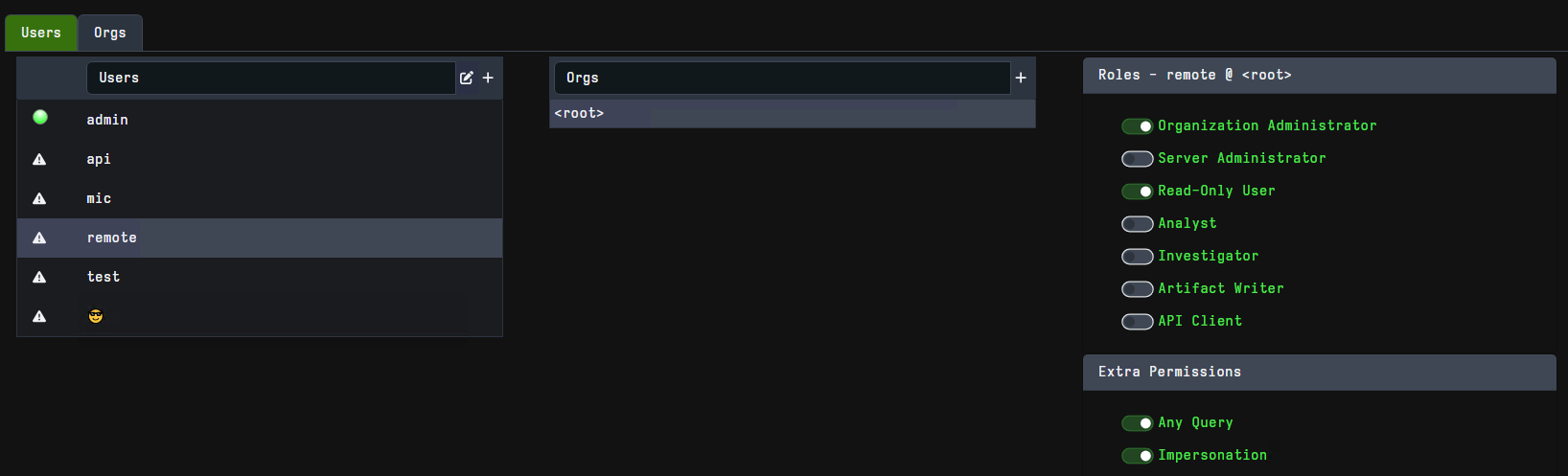
On the commandline I get a set of API keys for this remote user:
velociraptor --config /etc/velociraptor/server.config.yaml config api_client --name remote remote.api.yamlThis will create a new API key for the remote user. I will copy this
api key to the local server (with the GUI) for our example on
/etc/velociraptor/remote.api.yaml.
Configuring the local server
On the local server’s configuration file, I will add a special “Redirected Org”:
GUI:
  redirected_orgs:
    - org_id: O001
      org_name: "Remote"
      api_config_file: /etc/velociraptor/remote.api.yaml
      redirected_org_id: "root"
The new setting under the GUI section instructs Velociraptor to create
a new “redirected” org with an org ID of O001 and a name
“Remote”. The API key will be loaded from the location shown, and the
remote org that will be targeted is the root org.
I will now restart the local server then just switch to the remote org in the org selector.
I should be able to see the remote server in the GUI as though it is a local org. However, the GUI is populated directly from the remote server using the API.
How does it work?
When Velociraptor encounters a redirected org, the gRPC API calls are redirected to the remote server. The local username is forwarded to the remote server.
Note
We assume that both servers trust the IdP to properly authenticate the users. On the local server, the IdP claims that the user is who they say they are, and the RPC call simply forwards this to the remote server. On the remote server, Velociraptor allows the caller to impersonate the calling user and so just trusts it.
This is why we need to allow the API key to have impersonation permissions on the remote server. Once the user is impersonated the remote server treats the call as if the user logged into it directly - and so the user must have appropriate permissions on the remote system as well.
Benefits of the new architecture
Each remote deployment is completely independent running on a separate server with its own disk and CPU resources. Users may be given full access (including EXECVE level access) to the remote server all while restricting access to the same org data.
At the same time, the GUI presents remote orgs natively. Users can switch between orgs at will, hunts can be launched across all orgs etc.