Alerts and e-mail notifications in Velociraptor
Velociraptor does a lot in the background. Client and server event queries run continuously. Hunts and scheduled flows complete on their own time. Detection artifacts watch for IoCs. Most of this happens without anyone looking. And when someone does, they may find that the event query they relied on for uploading data to S3 has failed for over a week. Or that flows in the last hunt have started failing. Or that the collection scheduled for the CEO’s laptop — which was offline at the time — has finally completed, with results that should have been inspected immediately.
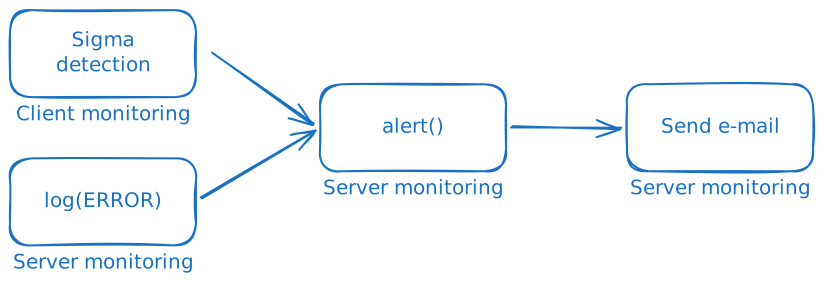
This post introduces a small family of exchange artifacts that notify you when any of this happens:
Server.Monitor.FlowCompletion: sends an e-mail when a client flow completes (or fails)Server.Monitor.Alerts: forwards alerts created byalert()calls anywhere in the deploymentServer.Monitor.Errors.AlertandServer.Monitor.Client.Errors.Alert: turn entries in the monitoring log into alerts so failures stop being silent
A series of knowledge base articles will go into detail on how to use these artifacts.
Overview
There are many ways to send a notification (Slack, Teams, PagerDuty etc.), but this post sticks to e-mail because:
- it requires little setup and works almost everywhere
- it can carry a lot of information per message
Two of the artifacts introduced here send e-mail directly:
The remaining artifacts, and most of the examples, produce alerts. If
you want alerting but not e-mail notifications, the error monitoring
and the use of alert() for detection are still relevant. You
only need to use or write/adjust a monitoring artifact to produce
notifications, for example Slack or Teams, for alerts produced. See
Using in-app user messages for how to use Velociraptor’s
new built-in notification system.
Sending e-mails
Every e-mail produced by the artifacts in this post passes through two pieces of shared infrastructure:
- An SMTP secret holds the connection details (server, port, credentials, sender address). It is created once in Manage Server Secrets and referenced by name everywhere else.
Generic.Utils.SendEmailbuilds a properly-encoded MIME message: it Base64-wraps the body, supportsmultipart/alternativefor HTML with plain-text fallback, and handles file attachments. It then calls the underlyingmail()function for you.
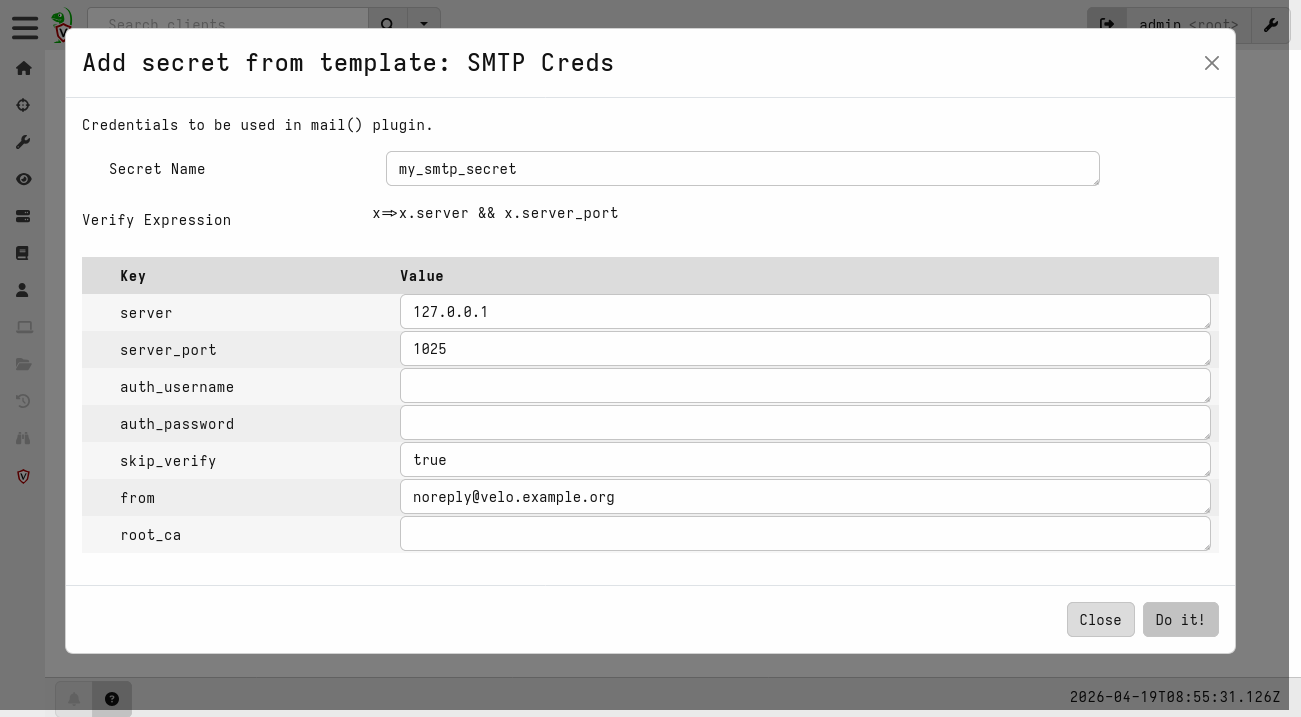
If you have not configured SMTP yet, start with How to send e-mails from Velociraptor. It also covers testing locally with Mailpit, which lets you send as many e-mails as you want without getting blocked by any real SMTP server, and explains the global e-mail throttling worth knowing about before going to production.
Flow-completion notifications
Server.Monitor.FlowCompletion watches
System.Flow.Completion
and sends an e-mail when a client flow finishes. The default e-mail
includes client details, flow metadata (creator, timestamps, duration,
requested artifacts, arguments), and a result summary.
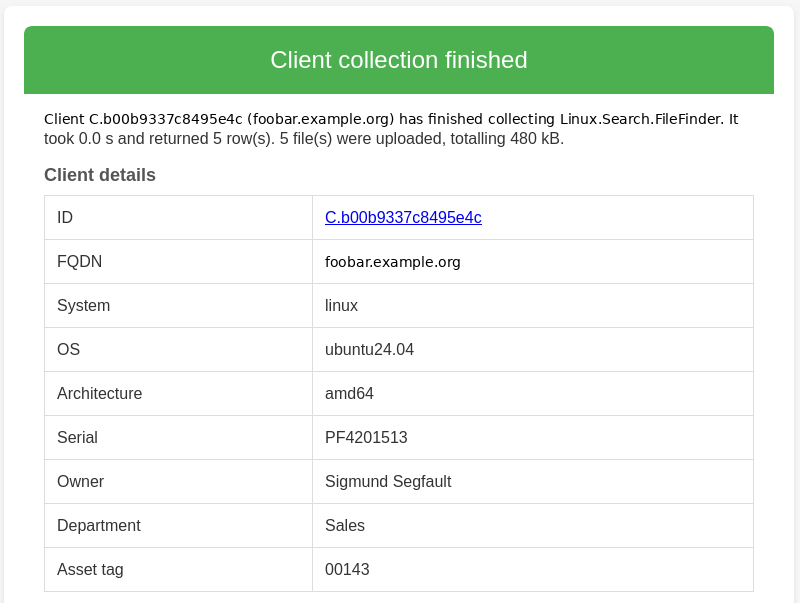
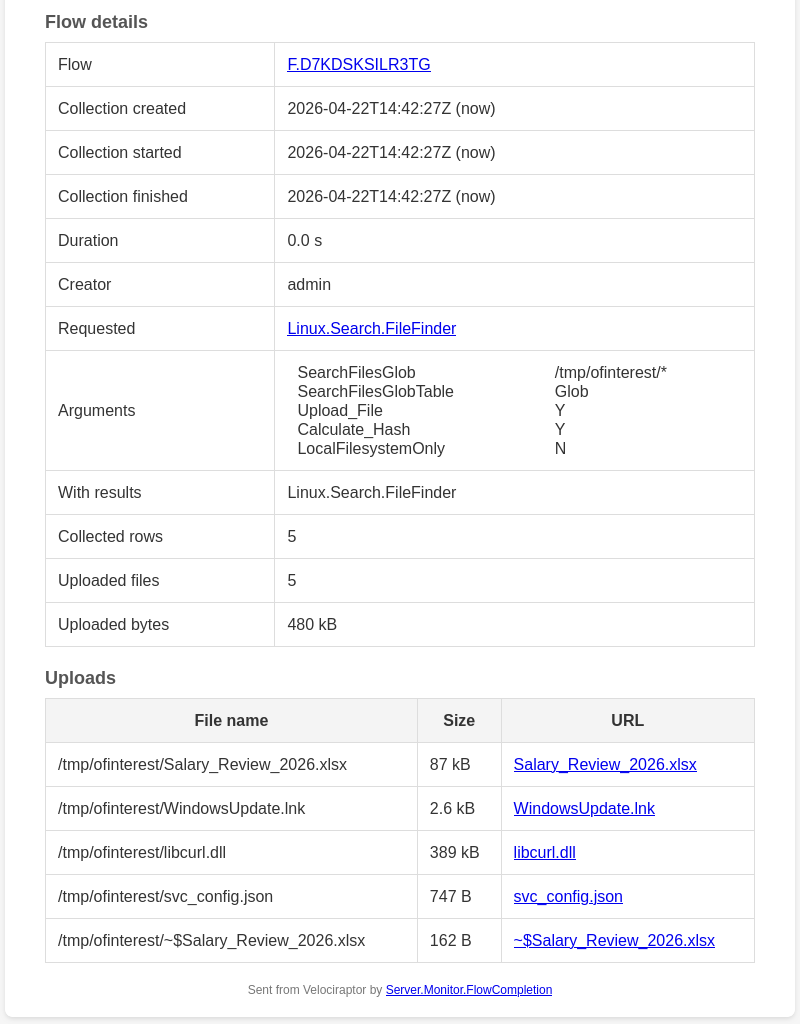
The artifact comes with a great number of parameters, most being filters that let you configure in detail when and for what to be notified. You should read through the description and use cases and pick suitable arguments. Some of the parameters are:
ArtifactsToAlertOn/ArtifactsToIgnore: regex match on the collected artifactsClientLabelsToAlertOn/ClientLabelsToIgnore: match on client labelsArtifactPermToAlertOn: only notify when the collected artifacts require a specific permission, e.g.EXECVEDelayThreshold: only notify when the flow took at least N seconds (filters out clients that were already online)ErrorHandling: multi-choice flag that lets failures bypass individual filters (IncludeHunts,IgnoreArtifactFilters,IgnoreDelay)NotifyIfResultsLabels/NotifyIfUploadsLabels: special override: If a client carries this label, or a hunt is tagged with this value, any flow that produces results (or uploads) notifies regardless of other filters
Recipients can come from a fixed list (Recipients), be derived
from the user who scheduled the flow (NotifyExecutor, optionally
mapping bare usernames to full addresses), or be pulled from a
client metadata field (NotifyMetadataEMail). All three can be used
at once.
A few examples
- Notify the analyst who ran a collection: Set
NotifyExecutorto true. If usernames are e-mail addresses, that is all you need; otherwise addNotifyExecutorDomainsto map them. Since getting a notification for a flow that finishes immediately is not very useful, setDelayThresholdto a few seconds or minutes. The idea is to get notified when a collection finishes some time in the future, so that its results are not forgotten. - Audit shell access: Set
ArtifactPermToAlertOntoEXECVEandDelayThresholdto0. Every completed flow that involved a shell artifact (or any artifact that allows for arbitrary code execution through artifact arguments) notifies an auditor. - Notify the device owner: Store the owner’s address in a
client metadata field and point
NotifyMetadataEMailat that field. Useful in environments with strict privacy rules. - Catch failures in a hunt: Leave
NotifyHuntsoff, but addIncludeHuntstoErrorHandling. Be sure to test-run your hunts before enabling this.
Including results in the e-mail
Apart from just notifying you that a collection has completed,
Server.Monitor.FlowCompletion
can also include (parts) of the results in the e-mail.
IncludeResultTableFrom renders selected sources as inline HTML
tables. IncludeResultAttachmentFrom exports them as JSONL or CSV
attachments. Both accept a CSV argument of Source, Columns, MaxRows
(and CellLimit) to help you restrict the amount of data to include.
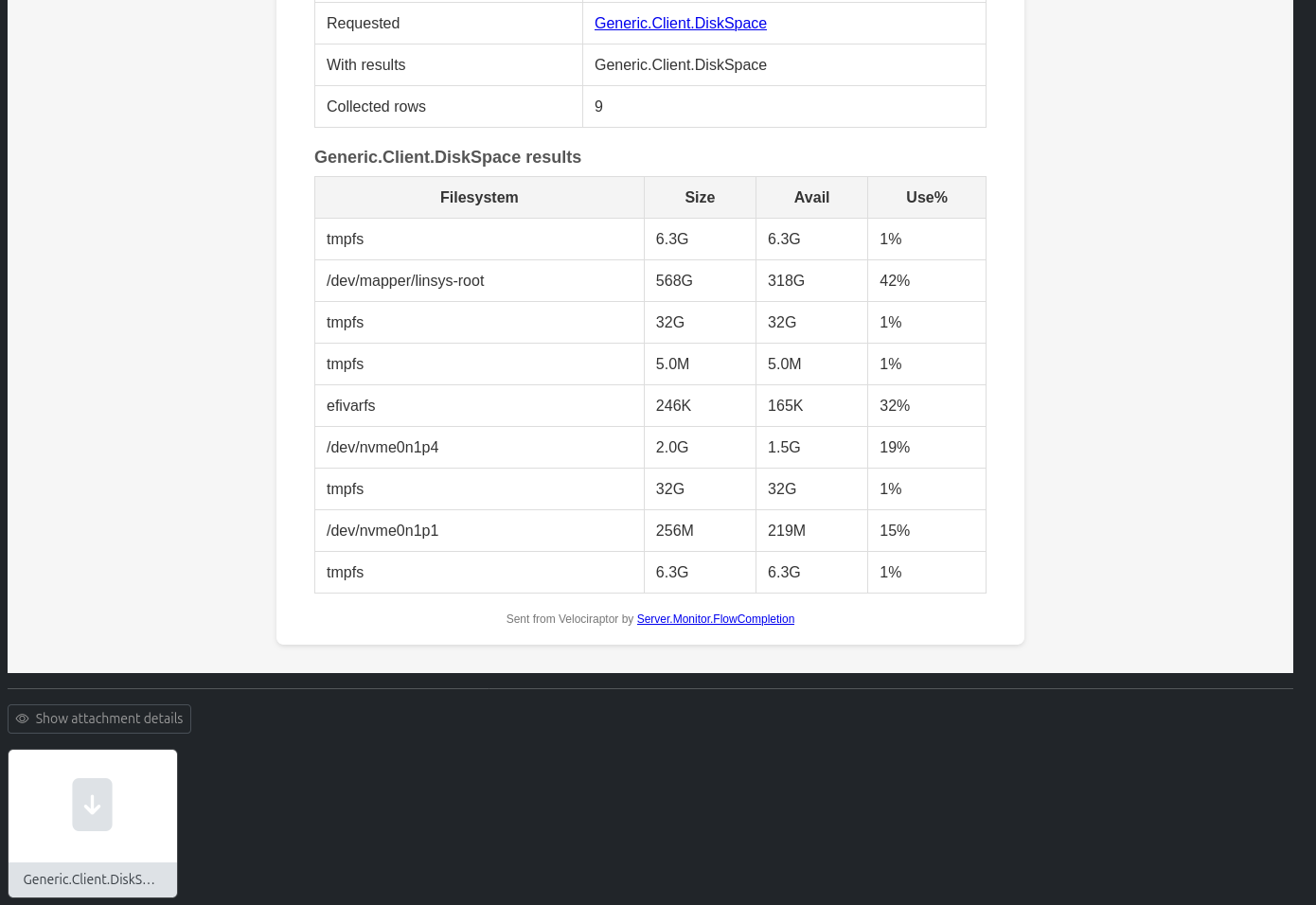
See How to set up e-mail notifications for flow completions for more information.
Detection alerts
Flow-completion notifications fire on every flow that passes the
filters, regardless of what the flow actually found. Alerts are
different: the artifact author chooses when to surface something worth
attention, such as when a honey file is accessed, when a YARA rule
matches, or when an IoC is detected in the system log. The
alert() function is how that signal
is sent. Alerts are created very much like log entries, but as opposed
to logs, alerts are sent to the queue
Server.Internal.Alerts,
which server event artifacts can subscribe to.
SELECT alert(
    name="Honey file accessed",
    dedup=300,
    Path=FileName,
    `Process name`=ProcessName,
    `Process info`=ProcInfo,
    PID=Pid
)
FROM ...
The name argument is required. Every other argument is free-form
context, available as an individual column in the internal
Server.Internal.Alerts
artifact. Identical names are deduplicated for two hours by default;
pass dedup=-1 to disable the suppression while testing.
Although alert() can be used in VQL anywhere, it makes the most
sense to use it in event artifacts. Collections and hunts finish or
expire, after which you would normally inspect the results. Event
queries never stop, making alerts a good way to notify when
something noteworthy happens.
Server.Monitor.Alerts is the consumer. It watches the
Server.Internal.Alerts queue, formats each alert as an HTML or
plain-text e-mail, and sends it through the same
Generic.Utils.SendEmail utility as Server.Monitor.FlowCompletion.
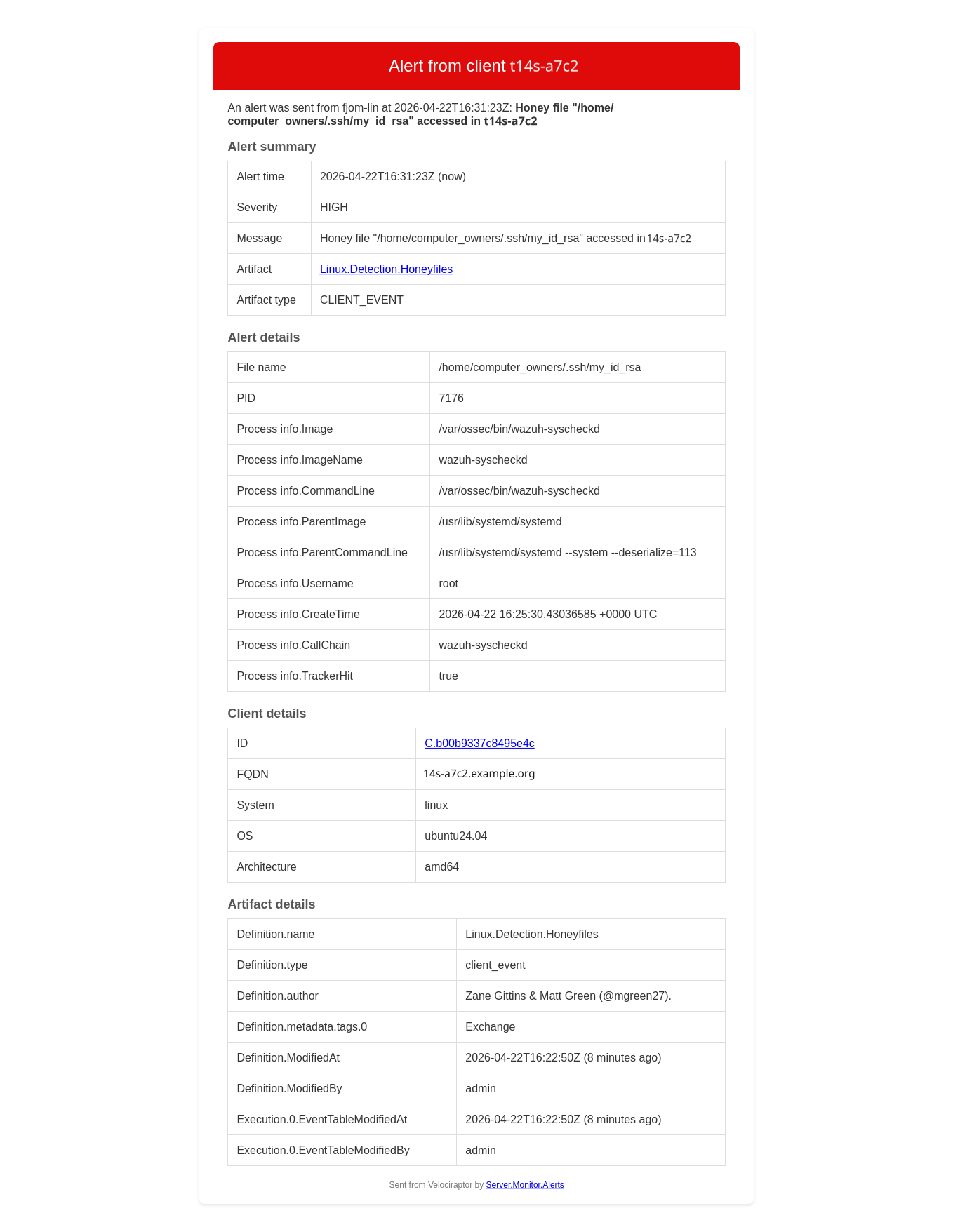
As seen in the screenshot above, the resulting e-mail contains a
lot of details. Every free-form argument passed to alert() is
included as alert context and flattened by default. This makes
nested JSON data a lot more readable. The client and flow
information may be optionally disabled.
Where to call alert()
There are two places to call alert() for
detections in client monitoring: directly in the client event artifact,
or in a server event artifact watching the client event artifact.
The simplest place is inside the artifact that detects the condition. If you do not want to modify the existing artifact, or want full control over when the alert fires and with what context, create a small server event artifact:
Server monitoring for client honey file access
name: Server.Monitor.HoneyfileAccess
type: SERVER_EVENT
sources:
  - query: |
      SELECT alert(
          name=format(
            format='Honeyfile "%v" accessed on %v',
            args=(FileName,
                  client_info(client_id=ClientId).os_info.hostname)),
          ClientId=ClientId,
          Artifact="Linux.Detection.Honeyfiles",
          ArtifactType="CLIENT_EVENT",
          Severity="high",
          `File name`=FileName,
          PID=Pid,
          `Process name`=ProcessName)
      FROM watch_monitoring(artifact="Linux.Detection.Honeyfiles")
See Using alerts in Velociraptor for details.
Catching silent failures
Event queries fail. Perhaps not during testing, but after months of
successfully calling an API or parsing events from an endpoint. A
parse_json() call quietly fails, returning nothing. An upload_S3()
call exhausts its retries. execve() fails to find the executable.
None of these stops the event query from running; they all just write
something to the monitoring log. You would have to study these logs
(per client in the case of client monitoring) in order to notice the
errors.
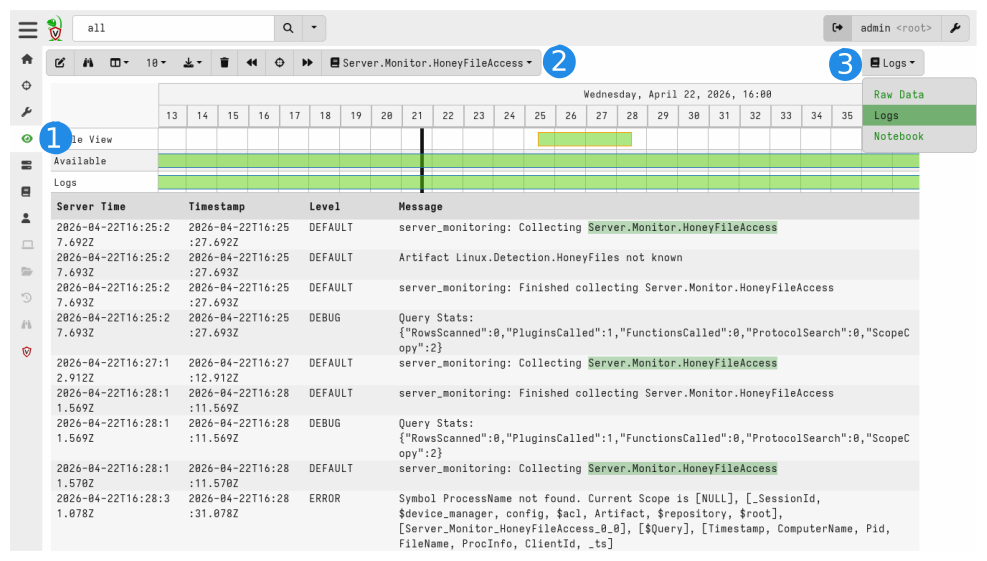
Server.Monitor.Errors.Alert (server) and
Server.Monitor.Client.Errors.Alert (clients) inspect
those logs and call alert() for entries that match their filters.
Combined with Server.Monitor.Alerts, you can get an e-mail notification every
time a monitoring artifact starts failing.
The filter model is shared by both: IncludeFilter and
ExcludeFilter are CSVs with regex columns for Artifact, Level
and Message, plus an optional Severity column and any extra
columns you add for free-form context (such as a description of the
error). Rows match top-to-bottom and the first match wins, so put
specific patterns above broad catch-alls.
Artifact,Level,Message,Severity,Explanation
.+,DEFAULT,fork/exec .+ no such file or directory,high,Executable not found
.+,DEFAULT,upload_S3: operation error .+,high,S3 upload failed with no retry
.+,ERROR,.+,medium,
A subtle point worth knowing: many errors from native VQL functions
and plugins are logged at level DEFAULT, not ERROR. A naive filter
that only matches ERROR will miss most of them. This
reference contains a CSV
list that you can use as an argument to IncludeFilter to detect many
of these errors.
Server.Monitor.Client.Errors.Alert iterates over all clients
to query their per-client monitoring logs. The work is parallelized,
but it is still more expensive than the server-side variant —
narrow IncludeFilter to the artifacts you actually care about
before turning it on in a large deployment.
See How to monitor event artifact errors for a full walkthrough.
Using in-app user messages
You can supplement e-mail notifications with in-app notifications (“user messages”) by using
Server.Monitor.Alerts.UserMessage
This simple artifact posts each matching alert as an in-app user
message in addition to (or instead of) an e-mail. Logged-in users see
the notification when they open the message panel from the bell icon
in the lower-left corner of the web app. The bell turns red when there
are unread messages, and the list can be cleared from the panel.
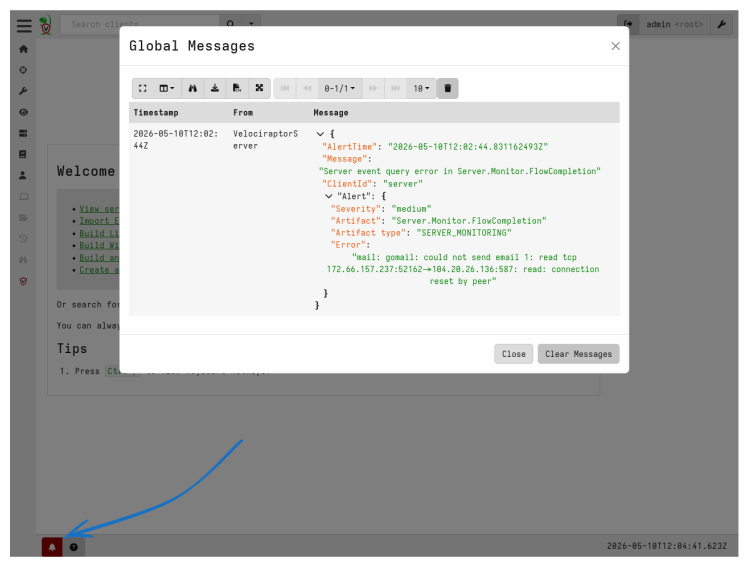
User messages have no formatting and only show a nested dict. However, since you are already in the Velociraptor web app, the additional details provided in the e-mail notifications are not needed: Simply navigate to the source of the alert and investigate.
Summary
If you want to try out all of the discussed monitoring:
- Create an SMTP secret of type SMTP Creds and grant access to
VelociraptorServer (Server Event Runner). - Add
Server.Monitor.FlowCompletionas a server event artifact. Start withNotifyExecutor=trueand a sensibleDelayThreshold, then refineArtifactsToAlertOn/ArtifactsToIgnoreand the label filters as you go. - Add
Server.Monitor.Alertsso anything that callsalert()(detection artifacts, error monitors, your own custom watchers) produces an e-mail. ConfigureSeverityTransformsandSeverityThresholdas needed. - Add
Server.Monitor.Errors.Alertto surface failures in your server event queries. - Optionally add
Server.Monitor.Client.Errors.Alert, scoped to the handful of client event artifacts you feel the need to monitor closely for errors. - Optionally add
Server.Monitor.Alerts.UserMessageto enable in-app user messages for alert notifications. - Set
SendIntervalto-1once the configuration is settled. The default 10-second window silently drops bursts. This is useful while tuning, but could be problematic in production when you expect to be alerted.
Further reading
- How to send e-mails from Velociraptor:
SMTP secrets,
mail(),Generic.Utils.SendEmail, Mailpit - How to set up e-mail notifications for flow completions:
Server.Monitor.FlowCompletionin depth - Using alerts in Velociraptor:
alert(), severity, deduplication, custom watchers - How to monitor event artifact errors:
Server.Monitor.Errors.Alertand the client variant