How to set up e-mail notifications for flow completions
Server.Monitor.FlowCompletion
sends an e-mail when a client flow completes, with support for HTML
formatting, inline result tables, and file attachments. It monitors
System.Flow.Completion and applies a configurable set of filters
before deciding whether to send a notification.
An SMTP secret is required. See How to send e-mails from Velociraptor.
Installation
If your server has internet access, run
Server.Import.Extras
to import all exchange artifacts, including
Server.Monitor.FlowCompletion. Otherwise, copy the artifact
definition manually from the
Artifact Exchange.
Add Server.Monitor.FlowCompletion as a server event artifact. Set
Secret to the name of your SMTP secret. Configure at least one
recipient in Recipients, or enable NotifyExecutor to notify
whoever scheduled the flow.
Filtering
By default, Server.Monitor.FlowCompletion notifies on every flow
except those collecting only Generic.Client.Info (or its Custom.
override). The main parameters for controlling what triggers a
notification are:
| Parameter | Type | Description |
|---|---|---|
ArtifactsToAlertOn |
regex | Only flows collecting matching artifacts notify |
ArtifactsToIgnore |
regex | Suppresses notifications for single-artifact flows |
ClientLabelsToAlertOn / ClientLabelsToIgnore |
regex | Filter by client label |
NotifyHunts |
bool | Include flows that are part of a hunt (off by default) |
DelayThreshold |
int | Only notify if the flow took longer than N seconds to complete (default 10 s) |
ArtifactsToIgnore does not take effect when multiple artifacts are collected.
The parameter ErrorHandling lets failed flows bypass filters:
| Choice | Description |
|---|---|
IncludeHunts |
Create notifications for failed flows part of hunts (may be noisy!) |
IgnoreCancelled |
Do not consider a cancelled flow a failure (enabled by default) |
IgnoreArtifactFilters |
Ignore ArtifactsToAlertOn and ArtifactsToIgnore for failed flows |
IgnoreDelay |
Ignore DelayThreshold for failed flows |
Throttling
SendInterval controls how many seconds must pass between
notifications. The default is 10 seconds. Set it to -1 to disable
throttling once you have confirmed the configuration works correctly.
See the
throttling section
in the e-mail setup guide for how dropped messages are logged.
E-mail content
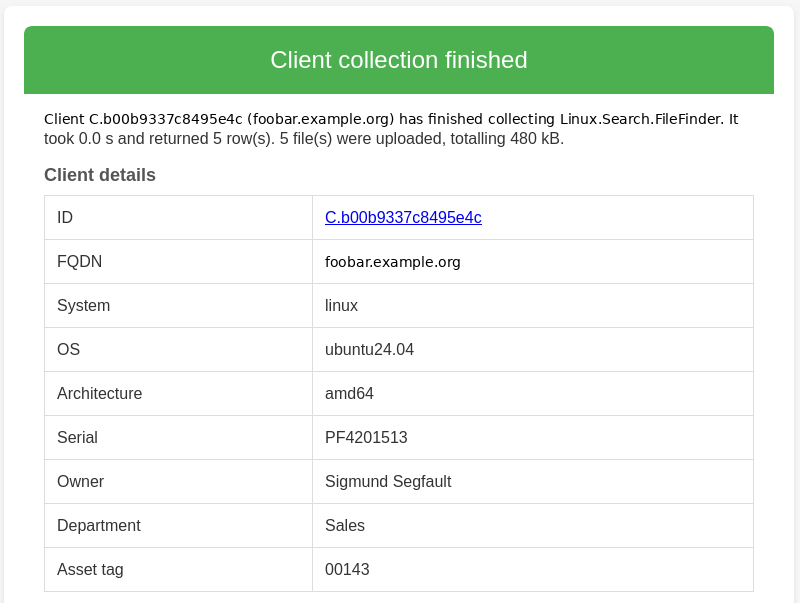
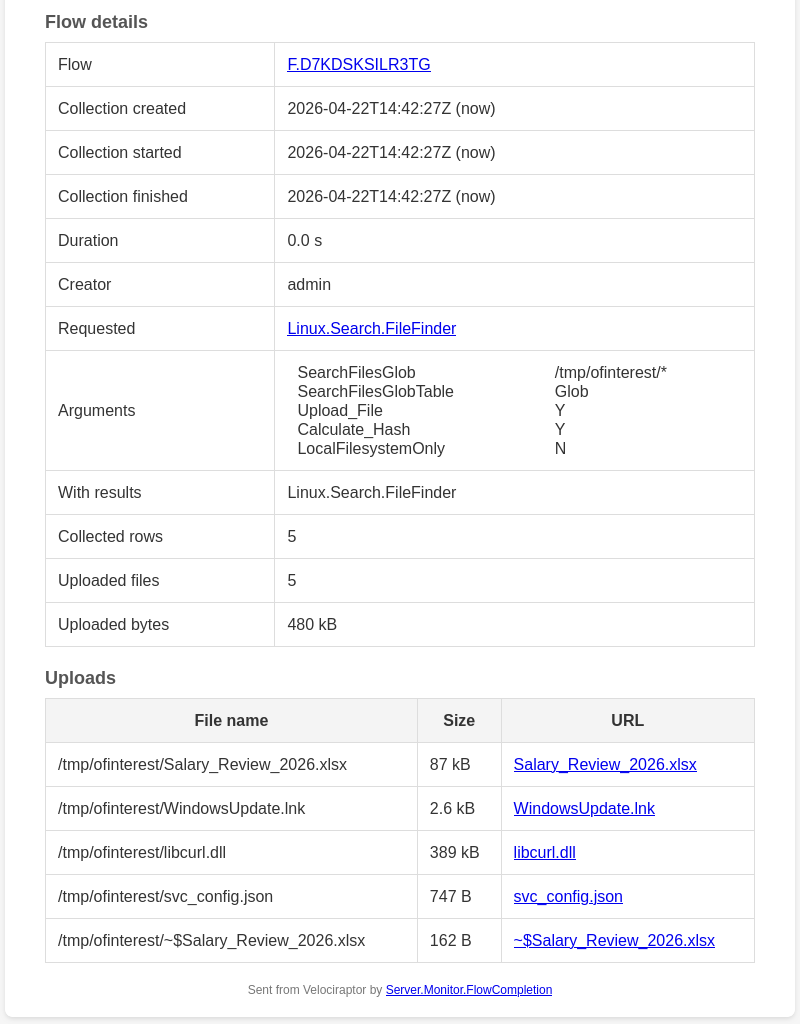
Server.Monitor.FlowCompletion sends HTML by default (HTML=true).
The message includes client details, flow details, and optionally:
- Selected client metadata (
ClientMetadata) - Inline result tables from selected artifact sources
(
IncludeResultTableFrom) - JSONL or CSV attachments (
IncludeResultAttachmentFrom) - Direct download links to uploaded files (
IncludeUploadsTableRows)
When HTML is enabled, a plain-text alternative is also provided (using “multipart/alternative”). E-mail clients that do not support HTML can still view the e-mails.
For IncludeResultTableFrom, rows, columns, and cell values are
automatically truncated when they exceed the hard limits: 100 rows, 4
columns (ResultTableMaxColumns), and 10,000 characters per cell.
Tables with many columns render poorly in e-mail clients even within
these limits. Only configure inline tables for specific artifact
sources with compact, predictable output, and use the Columns regex
to select only the fields you need.
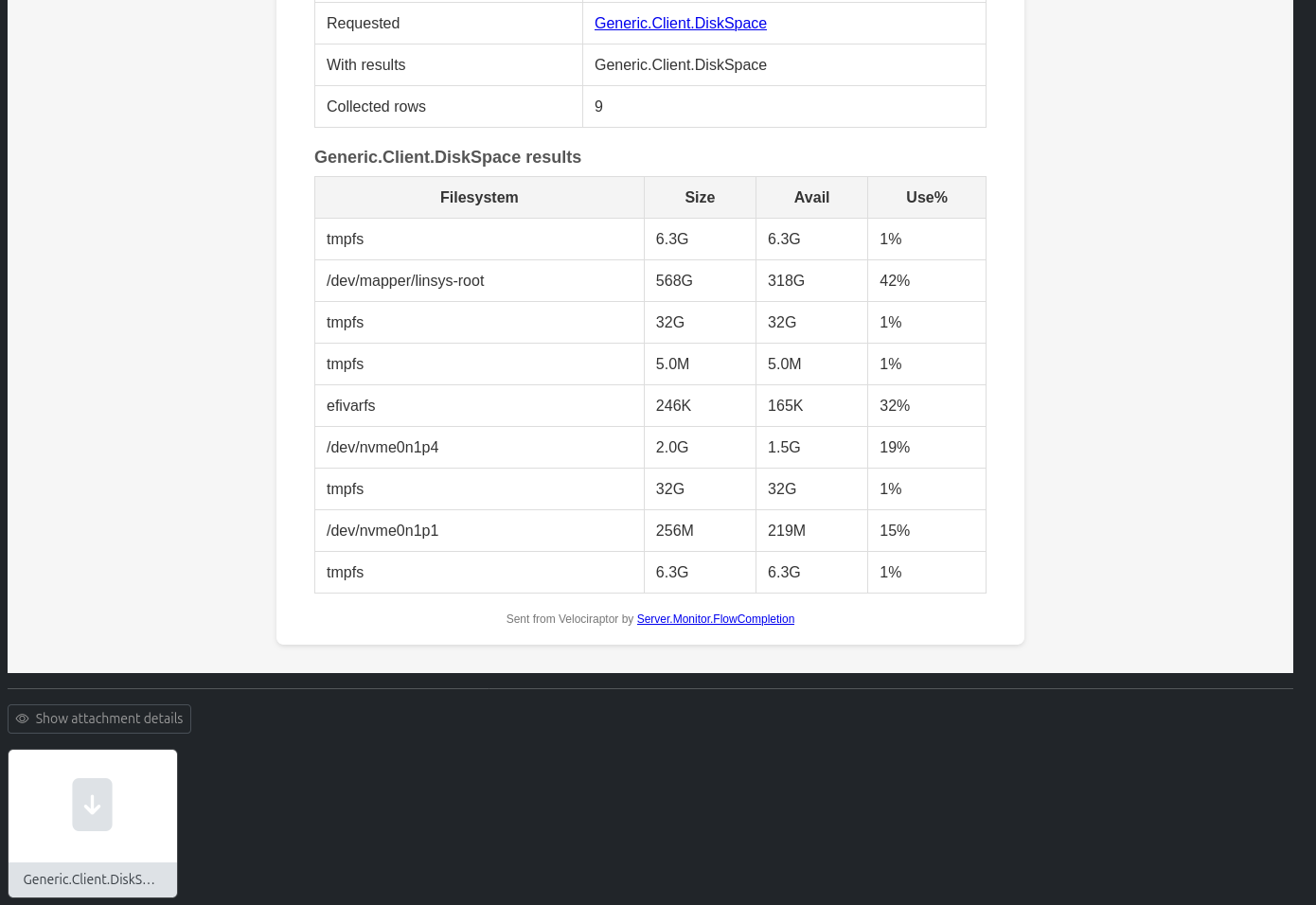
For example, to include shell command output, a compact network connection summary and results from querying disk usage:
Source |
Columns |
MaxRows |
CellLimit |
|---|---|---|---|
| bash|powershell | Stdout|Stderr | 20 | 1000 |
| Windows.Network.Netstat | RemoteAddr|ProcessName|Pid | 30 | 200 |
| DiskSpace$ | Filesystem|Size|Avail|Use% |
All regexes are case-insensitive.
IncludeResultAttachmentFrom has no row or column limits, but if the
total size of all attachments exceeds AttachmentsMaxMiB (default 100
MiB), all attachments for that e-mail are dropped. Keep the source
selection specific here as well.
Note
Including results in the e-mail, either inline or as attachments, should be used with care. Only include data limited by targeted regexes, and consider dropping attachments altogether. The e-mail already includes direct download links in the uploads HTML table.
Example use cases
Server.Monitor.FlowCompletion may be used in many ways. Some
examples follow. If you need to run several of these in parallel, you
may have to create your own artifacts that call
Server.Monitor.FlowCompletion individually with different arguments.
Notify the analyst who ran the collection
Enable NotifyExecutor. If the Velociraptor username is an e-mail
address, the result is sent directly to whoever scheduled the flow,
with no fixed Recipients list needed. If usernames are not e-mail
addresses, use NotifyExecutorDomains to map them: a row
.+,example.org appends @example.org to any username.
Notify when an offline client finally checks in
You have scheduled a collection on an offline client. Set
DelayThreshold to something larger than the expected completion time
(e.g. 300 for five minutes) so you are only notified when the
client had to wait. Use NotifyExecutor to send the result to the
analyst who scheduled it, and/or set Recipients, and set
IncludeResultAttachmentFrom to attach the results directly to the
e-mail so the analyst does not need to open the GUI at all.
When collecting artifacts from individual clients (i.e. not through hunts), it may be easy to forget about the collection — especially if the client was not online when the flow was scheduled. Getting an e-mail notification when the flow fails or completes is very useful.
Get notified when hunt flows fail
You are running a large hunt and want to know about failing clients
without being flooded by success notifications. Leave NotifyHunts
off (so successful hunt flows are silent), but add IncludeHunts to
ErrorHandling. Failed flows in the hunt will still notify,
regardless of the NotifyHunts setting.
Combine with IgnoreArtifactFilters in ErrorHandling if you also
want failure notifications regardless of ArtifactsToIgnore.
This may create a lot of notifications if the hunt is buggy. Test the artifact collection on a smaller part of the fleet before enabling.
Audit shell and EXECVE artifact use
Artifacts with EXECVE permissions allow the collector to run
arbitrary commands on endpoints. Such artifacts are dangerous, and you
may want to monitor when they are used.
Set ArtifactPermToAlertOn to EXECVE and DelayThreshold to 0
to get a notification for every completed flow that includes an
artifact requiring shell access.
To include the command output directly in the e-mail body, configure
IncludeResultTableFrom:
Source |
Columns |
MaxRows |
CellLimit |
|---|---|---|---|
| bash|powershell | Stdout|Stderr | 20 | 1000 |
| generic.client.vql$ | .+ | 3000 |
Alert on results from priority clients
Apply the label notify_results to clients that warrant immediate
attention regardless of other filters: a server under active
investigation, a VIP’s workstation, a honeypot. Whenever a flow on
such a client produces any results, NotifyIfResultsLabels (default
^notify_results$) causes a notification to be sent, bypassing
ArtifactsToIgnore, DelayThreshold, and label filters.
The same mechanism works for uploads: use NotifyIfUploadsLabels
with a label such as notify_uploads on clients where any file
collection should always trigger a notification.
New client enrolled
Set NewClientArtifacts to a regex matching the artifacts you
collect on enrollment (e.g. Generic.Client.Info). When a client that
is newer than NewClientThreshold seconds completes such a flow, a
notification is sent regardless of other filters. Useful for getting
an e-mail whenever a new endpoint appears on the server.
Notify the device owner
If client metadata includes the device owner’s e-mail address, set
NotifyMetadataEMail to that field name. The owner is notified
whenever a collection on their device finishes. This can run
alongside Recipients and NotifyExecutor, so the analyst, a
central mailbox, and the device owner all receive the notification
independently.
Some jurisdictions require notifying the device owner when certain data is collected from their endpoint, and this parameter provides a simple automated way to meet that obligation.